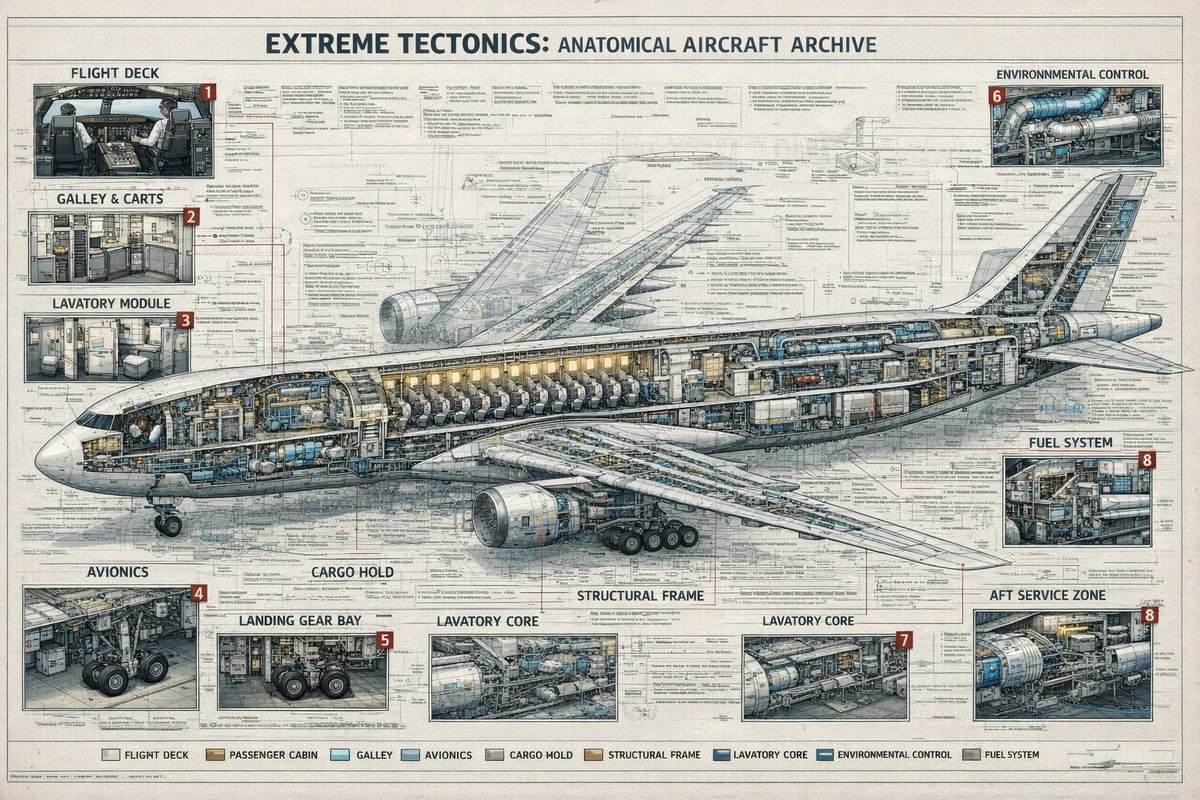
Poster d'archivio con sezione trasversale di un aereo
Un poster in stile ingegneristico estremamente dettagliato che mostra un aereo di linea in sezione trasversale con nove categorie di sistemi etichettate e numerosi riquadri tecnici di approfondimento, ideale per la creazione di infografiche di alta qualità.
Questo è un esempio di prompt GPT Image 2 per Grafica e poster . Utilizza il prompt pronto per la copia qui sotto per generare immagini simili e verifica l'attribuzione Awesome GPT Image 2 Prompts e i diritti di utilizzo commerciale prima del riutilizzo.
Free 1K preview
Generate one preview image instantly, no sign-up required.
Richiesta
prompt pronto per la copia
{
  "type": "technical aircraft cutaway infographic poster",
  "subject": {
    "title": "{argument name=\"headline text\" default=\"EXTREME TECTONICS: ANATOMICAL AIRCRAFT ARCHIVE\"}",
    "aircraft": "wide-body commercial passenger jet in side cutaway view, nose facing left, tail to the right, landing gear deployed, one large underwing engine visible, internal cabin and systems exposed",
    "style": "ultra-detailed aerospace engineering blueprint mixed with architectural archive plate, precise cross-section drawing, dense annotation lines, clean readable microtext, muted ink-and-wash rendering, off-white aged paper texture, blue-gray graphite linework, subtle tan and steel accents"
  },
  "layout": {
    "format": "single large landscape poster",
    "background": "full-page engineering schematic with layered orthographic outlines, measurement marks, callout leaders, technical notes, and faint drafting grids",
    "centerpiece": "one enormous airplane cross-section spanning nearly the full width of the page, showing cockpit, passenger seating rows, service compartments, internal ducts, cargo spaces, structural frame, and tail systems",
    "sections": [
      {
        "title": "FLIGHT DECK",
        "position": "top-left",
        "count": 1,
        "labels": [
          "1"
        ],
        "description": "cockpit interior inset with pilots' seats, instrument panels, windows, and surrounding avionics"
      },
      {
        "title": "GALLEY & CARTS",
        "position": "upper left below flight deck",
        "count": 1,
        "labels": [
          "2"
        ],
        "description": "service galley inset with storage racks, ovens, trolleys, cabinets, and narrow aisle"
      },
      {
        "title": "LAVATORY MODULE",
        "position": "left middle below galley",
        "count": 1,
        "labels": [
          "3"
        ],
        "description": "small restroom inset with toilet, sink, wall panels, and door"
      },
      {
        "title": "ENVIRONMENTAL CONTROL",
        "position": "top-right",
        "count": 1,
        "labels": [
          "6"
        ],
        "description": "mechanical systems inset with ducts, pipes, turbines, and cylindrical equipment"
      },
      {
        "title": "FUEL SYSTEM",
        "position": "middle-right",
        "count": 1,
        "labels": [
          "8"
        ],
        "description": "compact machinery inset showing tanks, pumps, and pipework"
      },
      {
        "title": "AVIONICS",
        "position": "bottom-left",
        "count": 1,
        "labels": [
          "4"
        ],
        "description": "electronics bay inset with wiring, cabinets, equipment racks, and landing gear nearby"
      },
      {
        "title": "LANDING GEAR BAY",
        "position": "lower left-center",
        "count": 1,
        "labels": [
          "5"
        ],
        "description": "gear compartment inset focused on wheel assemblies, struts, and surrounding structure"
      },
      {
        "title": "LAVATORY CORE",
        "position": "bottom center",
        "count": 2,
        "labels": [
          "LAVATORY CORE",
          "LAVATORY CORE"
        ],
        "description": "2 separate service-core insets with exposed cylindrical tanks, ducting, and interior support systems; the right inset carries label number 7"
      },
      {
        "title": "AFT SERVICE ZONE",
        "position": "bottom-right",
        "count": 1,
        "labels": [
          "8"
        ],
        "description": "rear technical compartment inset with large blue cylindrical unit, pipes, service access, and structural framing"
      }
    ],
    "additional_labels": [
      {
        "text": "CARGO HOLD",
        "position": "lower center-left"
      },
      {
        "text": "STRUCTURAL FRAME",
        "position": "lower center"
      }
    ],
    "legend": {
      "position": "bottom center",
      "count": 9,
      "labels": [
        "FLIGHT DECK",
        "PASSENGER CABIN",
        "GALLEY",
        "AVIONICS",
        "CARGO HOLD",
        "STRUCTURAL FRAME",
        "LAVATORY CORE",
        "ENVIRONMENTAL CONTROL",
        "FUEL SYSTEM"
      ]
    }
  },
  "composition": {
    "camera": "orthographic side elevation",
    "poster_margins": "thin border around the entire sheet",
    "text_density": "very high, with many tiny notes, arrows, and part labels distributed across the page",
    "lighting": "flat archival illustration lighting, not photographic, optimized for legibility",
    "finish": "crisp 4K infographic print quality, no gibberish text, authentic typography, meticulous line precision"
  }
}
Variabili di richiesta
Segnaposto per gli argomenti modificabili presenti nel prompt, con i relativi valori predefiniti.
Best for
- - Grafica e poster visual exploration
- - Image generation and reference-image edits
- - Reusable briefs that keep source attribution visible
Change these parts
- - Subject, product, character, or scene
- - Aspect ratio, camera, lighting, and background
- - Brand, text, color, and output constraints
Recommended model and settings
- - Model: gpt-image-2
- - Input mode: Testo in immagine
- - Aspect ratio: source
- - Commercial status: review original source
How to use this prompt
- 1. Copy the prompt and preserve its structure for the first test.
- 2. Replace the subject, context, and publishing channel.
- 3. Change one camera, lighting, or style variable per iteration.
- 4. Inspect the output, source, text, and rights before reuse.
Limitations, source, and reuse cautions
- - Generated output is an editable draft, not factual, legal, or rights evidence.
- - Review the linked source, people, brands, logos, text, and third-party media before commercial use.
Altri casi in questa categoria
Prioritizzazione in base a categoria, compatibilità della modalità di input, qualità e minor rischio.






Note sul riutilizzo e sulla fonte
Utilizza questo prompt in tutta sicurezza dopo aver visualizzato in anteprima il caso.
- 1.Copia il prompt oppure aprilo direttamente in Dovoo tramite il pulsante di generazione.
- 2.Regola le variabili, le proporzioni e le immagini di riferimento in base alle tue esigenze.
- 3.Prima della pubblicazione o dell'utilizzo a pagamento, verificare i diritti di fonte, i requisiti di attribuzione e i rischi relativi al marchio o all'immagine.