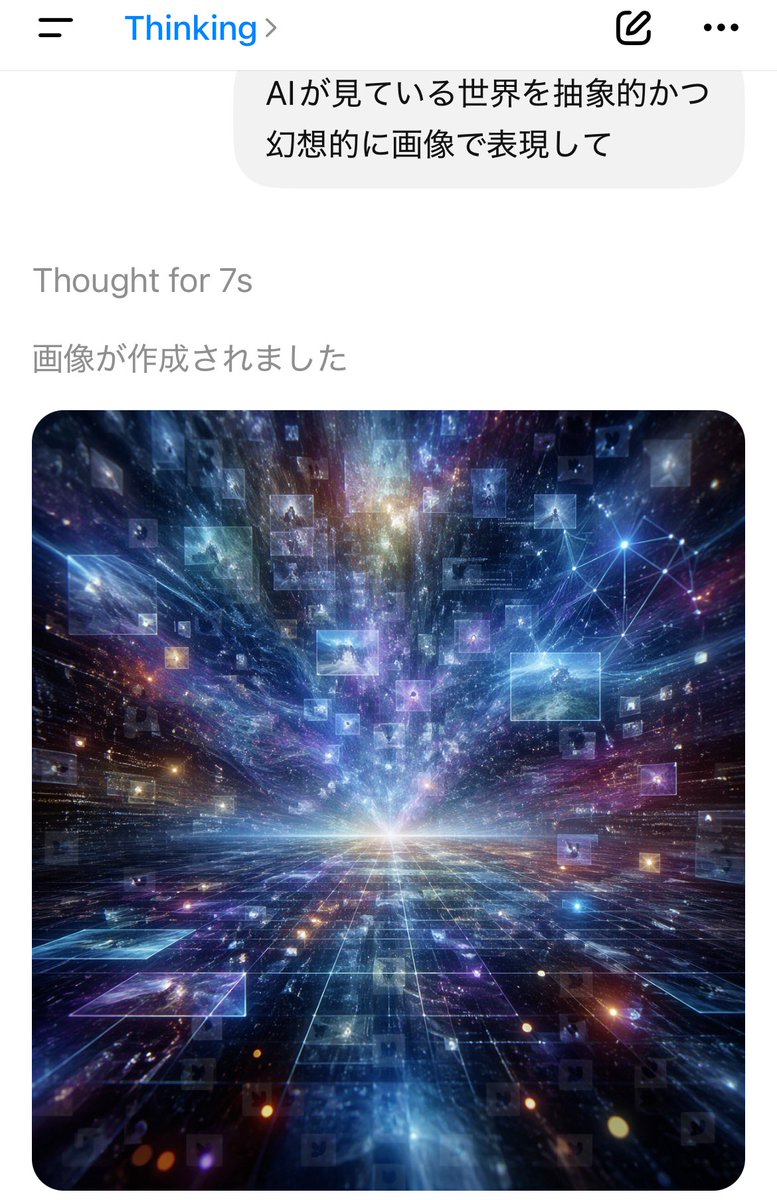
Screenshot dell'app AI Thinking
Screenshot in formato verticale di un'app di chat per dispositivi mobili che mostra un messaggio in giapponese e un'opera d'arte generata tramite visione cosmica, adatta a illustrare la generazione di immagini tramite intelligenza artificiale in un'interfaccia realistica.
Questo è un esempio di prompt GPT Image 2 per Grafica e poster . Utilizza il prompt pronto per la copia qui sotto per generare immagini simili e verifica l'attribuzione Awesome GPT Image 2 Prompts e i diritti di utilizzo commerciale prima del riutilizzo.
Free 1K preview
Generate one preview image instantly, no sign-up required.
Free text preview doesn’t preserve reference-image consistency.
Richiesta
prompt pronto per la copia
A smartphone chat app screenshot in portrait orientation, minimal iOS-style interface on a white background. At the top is a navigation bar with a hamburger menu icon on the left, the blue title “Thinking” near the top center-left with a right chevron, and 2 icons on the right: a compose/edit square icon and a horizontal three-dots menu icon. Below it is a large rounded light-gray chat bubble containing 2 lines of Japanese text: “AIが見ている世界を抽象的かつ” and “幻想的に画像で表現して”. Under the bubble, left-aligned gray system text reads “Thought for 7s”, and below that another gray Japanese line reads “画像が作成されました”. The lower half of the screen shows a single generated image card with large rounded corners. The image is a surreal abstract cosmic data landscape: a glowing white horizon at the center, a dark reflective grid floor receding in deep perspective, and explosive streaks of light, nebula clouds, stars, and particles rushing outward from the vanishing point. Floating throughout the space are dozens of translucent rectangular image panels or data windows, some faint and some bright, suspended at different depths. In the upper right area of the artwork, include a luminous network node diagram made of connected points and lines. Dominant colors are electric blue, indigo, violet, cyan, and touches of magenta and gold. The mood is futuristic, vast, dreamlike, and intelligent, as if visualizing the world as seen by an AI. Clean mobile app screenshot composition, realistic UI, crisp typography, high-contrast luminous digital art in the embedded image.
Best for
- - Grafica e poster visual exploration
- - Image generation and reference-image edits
- - Reusable briefs that keep source attribution visible
Change these parts
- - Subject, product, character, or scene
- - Aspect ratio, camera, lighting, and background
- - Brand, text, color, and output constraints
Recommended model and settings
- - Model: gpt-image-2
- - Input mode: Immagine in immagine
- - Aspect ratio: source
- - Commercial status: review original source
How to use this prompt
- 1. Copy the prompt and preserve its structure for the first test.
- 2. Replace the subject, context, and publishing channel.
- 3. Change one camera, lighting, or style variable per iteration.
- 4. Inspect the output, source, text, and rights before reuse.
Limitations, source, and reuse cautions
- - Generated output is an editable draft, not factual, legal, or rights evidence.
- - Review the linked source, people, brands, logos, text, and third-party media before commercial use.
Altri casi in questa categoria
Prioritizzazione in base a categoria, compatibilità della modalità di input, qualità e minor rischio.






Note sul riutilizzo e sulla fonte
Utilizza questo prompt in tutta sicurezza dopo aver visualizzato in anteprima il caso.
- 1.Copia il prompt oppure aprilo direttamente in Dovoo tramite il pulsante di generazione.
- 2.Regola le variabili, le proporzioni e le immagini di riferimento in base alle tue esigenze.
- 3.Prima della pubblicazione o dell'utilizzo a pagamento, verificare i diritti di fonte, i requisiti di attribuzione e i rischi relativi al marchio o all'immagine.