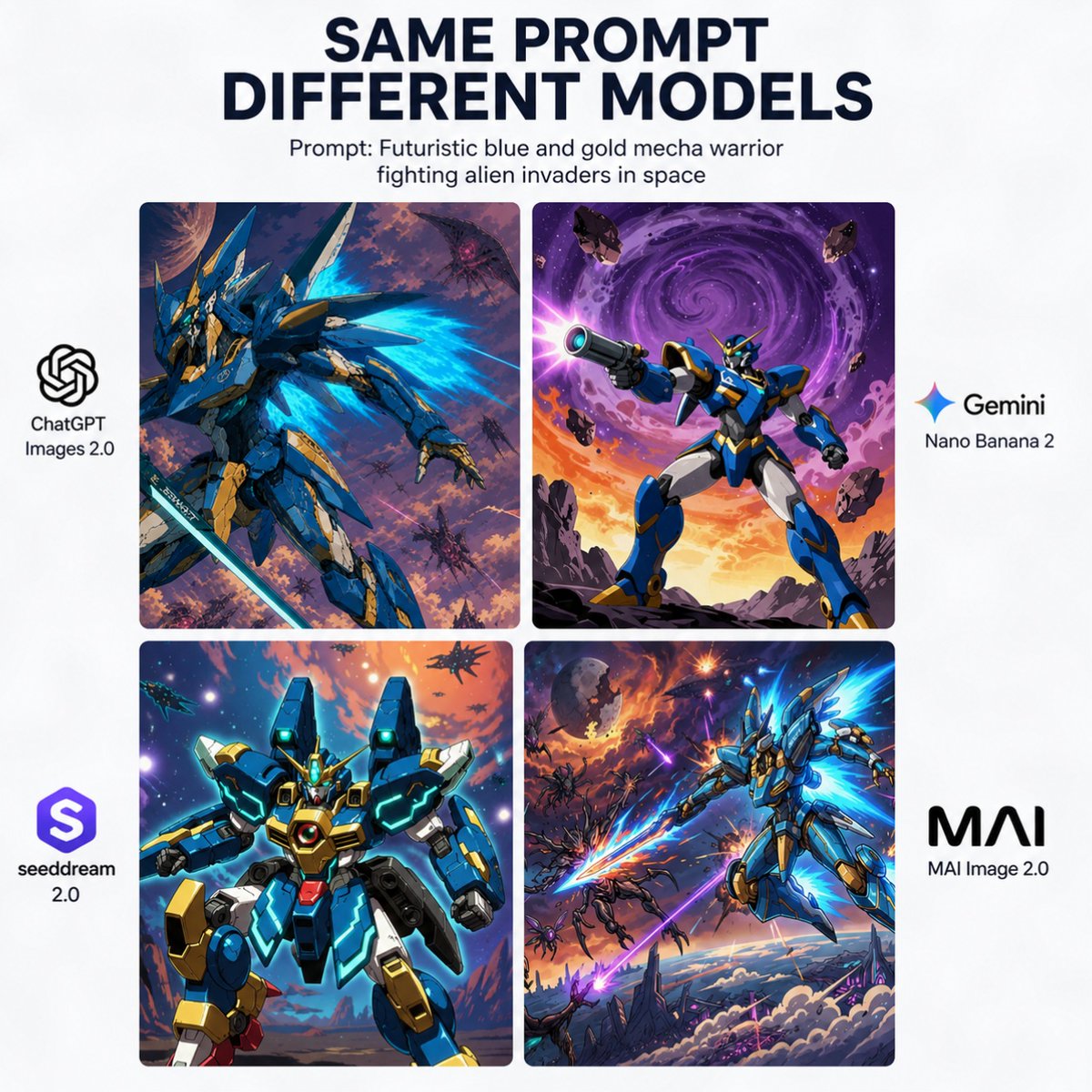
Poster di confronto tra modelli di mecha basati sull'intelligenza artificiale
Un grafico comparativo quadrato per i social media che mostra lo stesso tema di un mecha fantascientifico interpretato da quattro diversi modelli di immagine, utile per post di riferimento o di annuncio.
Questo è un esempio di prompt GPT Image 2 per Grafica e poster . Utilizza il prompt pronto per la copia qui sotto per generare immagini simili e verifica l'attribuzione Awesome GPT Image 2 Prompts e i diritti di utilizzo commerciale prima del riutilizzo.
Free 1K preview
Generate one preview image instantly, no sign-up required.
Richiesta
prompt pronto per la copia
{
  "type": "comparison poster",
  "style": "clean social-media infographic with white background and bold editorial typography",
  "canvas": {
    "aspect_ratio": "1:1",
    "background": "solid white"
  },
  "headline": {
    "title": "SAME PROMPT\nDIFFERENT MODELS",
    "subtitle": "Prompt: {argument name=\"prompt text\" default=\"Futuristic blue and gold mecha warrior fighting alien invaders in space\"}",
    "title_style": "large bold all-caps sans-serif in very dark navy, centered at top",
    "subtitle_style": "smaller black sans-serif, centered below title"
  },
  "layout": {
    "grid": {
      "position": "center",
      "rows": 2,
      "columns": 2,
      "count": 4,
      "gap": "narrow even spacing",
      "corner_radius": "slightly rounded image panels"
    },
    "side_labels": {
      "left": 2,
      "right": 2
    }
  },
  "images": [
    {
      "position": "top-left",
      "model_name": "ChatGPT Images 2.0",
      "scene": "dynamic blue and gold humanoid mecha in a three-quarter action pose, surrounded by glowing cyan energy wings or thruster flares, holding a long sword, set in a chaotic purple-orange outer-space battlefield with multiple small alien craft and debris",
      "style": "high-detail anime mecha illustration, dramatic lighting, painterly sci-fi background"
    },
    {
      "position": "top-right",
      "model_name": "Gemini Nano Banana 2",
      "scene": "blue and gold mecha standing heroically on rocky ground, aiming a large futuristic blaster toward the viewer, with a huge swirling purple galaxy vortex in the sky, orange sunset glow at the horizon, and floating asteroids around it",
      "style": "bold comic-anime sci-fi illustration, vivid contrast, poster-like composition"
    },
    {
      "position": "bottom-left",
      "model_name": "seeddream 2.0",
      "scene": "front-facing bulky blue and gold mecha with teal glowing accents and a central chest core, posed like a character card portrait against a bright cosmic sky with stars, planets, and distant ships",
      "style": "clean glossy mecha render with anime influence, symmetrical framing, saturated neon highlights"
    },
    {
      "position": "bottom-right",
      "model_name": "MAI Image 2.0",
      "scene": "sleek blue and gold mecha flying diagonally through the sky with bright cyan energy wings and a glowing energy blade, battling multiple alien enemies above clouds and jagged sci-fi terrain under an explosive purple-orange sky",
      "style": "cinematic anime action art, intense motion, high energy effects"
    }
  ],
  "branding": {
    "left_side": [
      {
        "position": "mid-left beside top-left panel",
        "label": "ChatGPT Images 2.0",
        "icon": "OpenAI knot logo in black",
        "count": 1
      },
      {
        "position": "lower-left beside bottom-left panel",
        "label": "seeddream 2.0",
        "icon": "purple rounded-square emblem with white stylized S",
        "count": 1
      }
    ],
    "right_side": [
      {
        "position": "mid-right beside top-right panel",
        "label": "Gemini Nano Banana 2",
        "icon": "multicolor four-point spark icon",
        "count": 1
      },
      {
        "position": "lower-right beside bottom-right panel",
        "label": "MAI Image 2.0",
        "icon": "bold black MAI wordmark",
        "count": 1
      }
    ]
  },
  "composition_notes": "keep all four artwork panels visually distinct but thematically consistent with the same prompt, centered in a balanced square comparison layout suitable for a viral social media post comparing image generation models"
}
Variabili di richiesta
Segnaposto per gli argomenti modificabili presenti nel prompt, con i relativi valori predefiniti.
Best for
- - Grafica e poster visual exploration
- - Image generation and reference-image edits
- - Reusable briefs that keep source attribution visible
Change these parts
- - Subject, product, character, or scene
- - Aspect ratio, camera, lighting, and background
- - Brand, text, color, and output constraints
Recommended model and settings
- - Model: gpt-image-2
- - Input mode: Testo in immagine
- - Aspect ratio: source
- - Commercial status: review original source
How to use this prompt
- 1. Copy the prompt and preserve its structure for the first test.
- 2. Replace the subject, context, and publishing channel.
- 3. Change one camera, lighting, or style variable per iteration.
- 4. Inspect the output, source, text, and rights before reuse.
Limitations, source, and reuse cautions
- - Generated output is an editable draft, not factual, legal, or rights evidence.
- - Review the linked source, people, brands, logos, text, and third-party media before commercial use.
Altri casi in questa categoria
Prioritizzazione in base a categoria, compatibilità della modalità di input, qualità e minor rischio.






Note sul riutilizzo e sulla fonte
Utilizza questo prompt in tutta sicurezza dopo aver visualizzato in anteprima il caso.
- 1.Copia il prompt oppure aprilo direttamente in Dovoo tramite il pulsante di generazione.
- 2.Regola le variabili, le proporzioni e le immagini di riferimento in base alle tue esigenze.
- 3.Prima della pubblicazione o dell'utilizzo a pagamento, verificare i diritti di fonte, i requisiti di attribuzione e i rischi relativi al marchio o all'immagine.