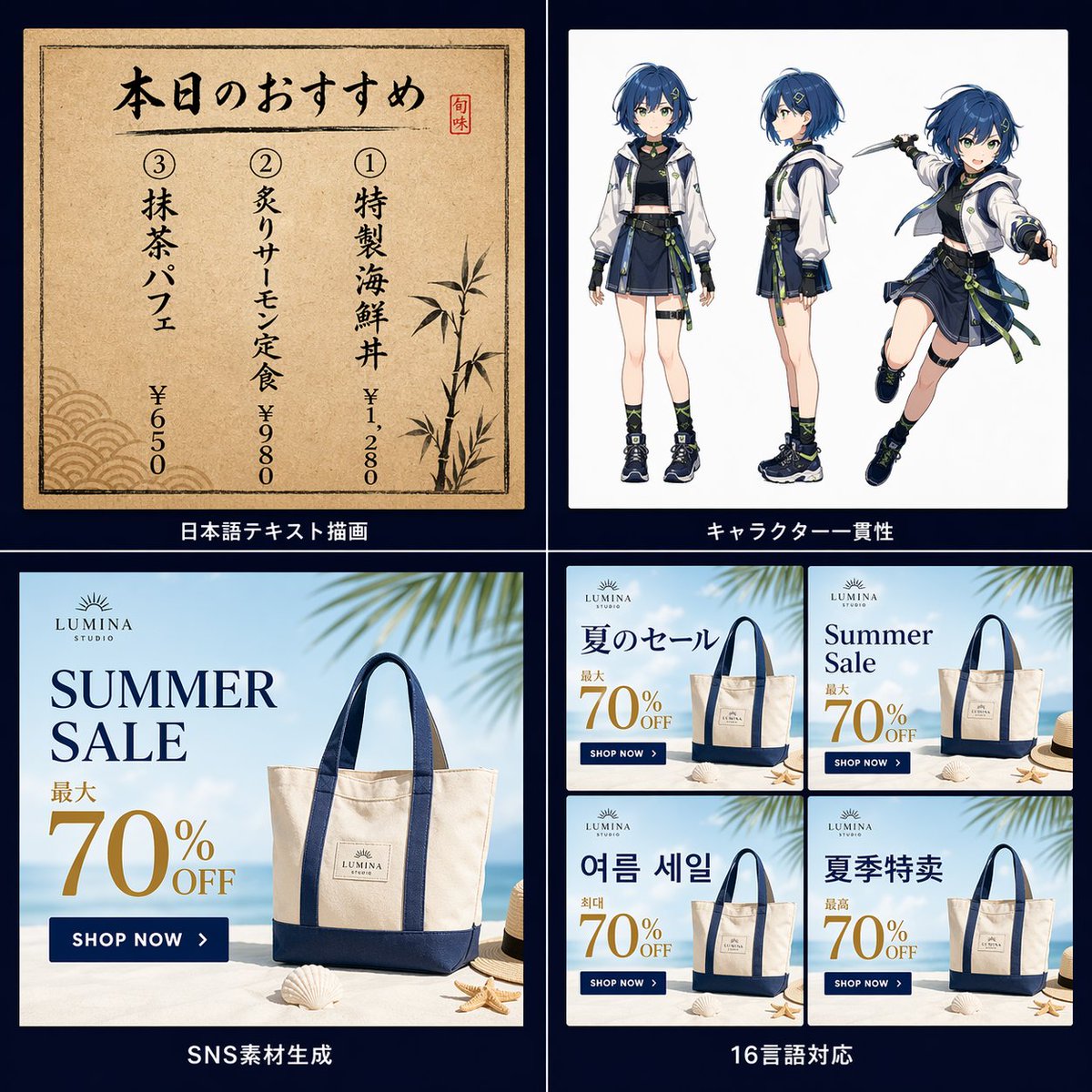
Griglia promozionale con funzionalità di elaborazione immagini basate sull'IA
Un'infografica promozionale a quattro pannelli che dimostra la resa precisa del testo giapponese, la generazione coerente di personaggi anime, la creazione di annunci per i social media già pronti e varianti di design multilingue per uso di marketing.
Questo è un esempio di prompt GPT Image 2 per Poster piatto . Utilizza il prompt pronto per la copia qui sotto per generare immagini simili e verifica l'attribuzione Awesome GPT Image 2 Prompts e i diritti di utilizzo commerciale prima del riutilizzo.
Free 1K preview
Generate one preview image instantly, no sign-up required.
Richiesta
prompt pronto per la copia
{
  "composition": "all four white or beige content panels evenly spaced on a dark navy square canvas, each section title centered below its panel in white Japanese text",
  "layout": {
    "grid": {
      "columns": 2,
      "count": 4,
      "rows": 2
    },
    "sections": [
      {
        "count": 1,
        "panel": {
          "background": "aged beige paper with subtle grain texture and dark border frame",
          "decorations": {
            "count": 3,
            "items": [
              "vertical red seal stamp on the upper right",
              "bamboo illustration on the lower right",
              "traditional wave pattern on the lower left"
            ]
          },
          "text": {
            "columns": {
              "count": 3,
              "items": [
                {
                  "name": "Special Seafood Bowl",
                  "price": "¥1,280",
                  "rank": "①"
                },
                {
                  "name": "炙りサーモン定食",
                  "price": "¥980",
                  "rank": "②"
                },
                {
                  "name": "抹茶パフェ",
                  "price": "¥650",
                  "rank": "③"
                }
              ]
            },
            "headline": "本日のおすすめ"
          },
          "type": "Japanese menu poster mockup"
        },
        "position": "top-left",
        "title": "日本語テキスト描画"
      },
      {
        "count": 3,
        "panel": {
          "background": "plain white studio backdrop",
          "poses": {
            "count": 3,
            "items": [
              "front full-body standing pose",
              "side profile standing pose",
              "dynamic action pose holding a short blade"
            ]
          },
          "subject": {
            "face": "Show every face clearly with natural, detailed facial features",
            "gender_presentation": "young female anime character",
            "hair": {
              "color": "{argument name=\"hair color\" default=\"deep blue\"}",
              "style": "short layered bob with side-swept bangs and small tied section at the back"
            },
            "outfit": {
              "count": 8,
              "items": [
                "white oversized cropped jacket with dark trim",
                "black high-neck crop top",
                "navy pleated mini skirt",
                "utility belt with straps and small pouches",
                "green ribbon and cord accents hanging from the waist",
                "black fingerless gloves",
                "dark crew socks with patterned bands",
                "chunky navy sneakers"
              ]
            }
          },
          "type": "anime character turnaround and action sheet"
        },
        "position": "top-right",
        "title": "キャラクター一貫性"
      },
      {
        "count": 1,
        "panel": {
          "branding": "{argument name=\"brand name\" default=\"LUMINA STUDIO\"}",
          "product": {
            "count": 1,
            "item": "canvas tote bag with navy handles and navy bottom panel, centered label patch with brand mark"
          },
          "scene": "bright beach product ad with pale blue sky gradient, soft palm leaf shadows from above, sand foreground, seashells and straw hat as props",
          "text": {
            "button": "SHOP NOW",
            "discount": "Up to 70% OFF",
            "headline": "SUMMER SALE"
          },
          "type": "summer sale social media banner"
        },
        "position": "bottom-left",
        "title": "SNS Material Generation"
      },
      {
        "count": 4,
        "panel": {
          "shared_design": "same tote bag beach ad layout repeated consistently across all four language versions",
          "type": "four multilingual ad variants in a 2x2 mini-grid",
          "variants": {
            "count": 4,
            "items": [
              {
                "button": "SHOP NOW",
                "discount": "Up to 70% OFF",
                "headline": "夏のセール",
                "language": "Japanese"
              },
              {
                "button": "SHOP NOW",
                "discount": "70% OFF",
                "headline": "Summer Sale",
                "language": "English"
              },
              {
                "button": "SHOP NOW",
                "discount": "최대 70% OFF",
                "headline": "여름 세일",
                "language": "Korean"
              },
              {
                "button": "SHOP NOW",
                "discount": "Up to 70% OFF",
                "headline": "Summer Sale",
                "language": "Chinese"
              }
            ]
          }
        },
        "position": "bottom-right",
        "title": "Supports 16 Languages"
      }
    ]
  },
  "quality": "sharp typography, polished ad design, highly legible multilingual text, consistent branding, modern commercial presentation",
  "style": "clean promotional infographic, premium tech marketing visual, dark navy background with thin white panel dividers, square 2x2 grid layout",
  "theme": "showcase advanced image generation capabilities for text rendering, character consistency, social media creative generation, and multilingual support",
  "type": "AI capability comparison poster collage"
}
Variabili di richiesta
Segnaposto per gli argomenti modificabili presenti nel prompt, con i relativi valori predefiniti.
Best for
- - Poster piatto visual exploration
- - Image generation and reference-image edits
- - Reusable briefs that keep source attribution visible
Change these parts
- - Subject, product, character, or scene
- - Aspect ratio, camera, lighting, and background
- - Brand, text, color, and output constraints
Recommended model and settings
- - Model: gpt-image-2
- - Input mode: Testo in immagine
- - Aspect ratio: source
- - Commercial status: review original source
How to use this prompt
- 1. Copy the prompt and preserve its structure for the first test.
- 2. Replace the subject, context, and publishing channel.
- 3. Change one camera, lighting, or style variable per iteration.
- 4. Inspect the output, source, text, and rights before reuse.
Limitations, source, and reuse cautions
- - Generated output is an editable draft, not factual, legal, or rights evidence.
- - Review the linked source, people, brands, logos, text, and third-party media before commercial use.
Altri casi in questa categoria
Prioritizzazione in base a categoria, compatibilità della modalità di input, qualità e minor rischio.






Note sul riutilizzo e sulla fonte
Utilizza questo prompt in tutta sicurezza dopo aver visualizzato in anteprima il caso.
- 1.Copia il prompt oppure aprilo direttamente in Dovoo tramite il pulsante di generazione.
- 2.Regola le variabili, le proporzioni e le immagini di riferimento in base alle tue esigenze.
- 3.Prima della pubblicazione o dell'utilizzo a pagamento, verificare i diritti di fonte, i requisiti di attribuzione e i rischi relativi al marchio o all'immagine.