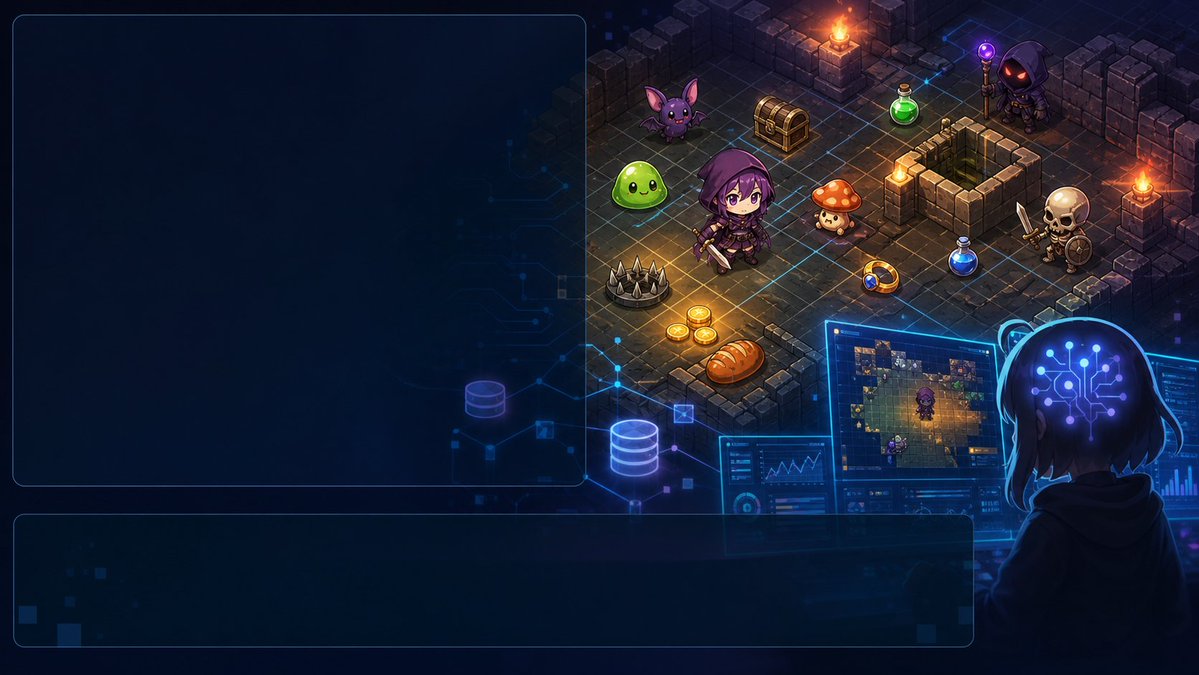
Intestazione dell'interfaccia utente di AI Fantasy Dungeon
Genera un'illustrazione cyber-fantasy in formato widescreen con pannelli dell'interfaccia utente vuoti e una scena isometrica di un dungeon RPG, utile per post sui social, presentazioni o intestazioni di articoli.
Questo è un esempio di prompt GPT Image 2 per Anime e videogiochi . Utilizza il prompt pronto per la copia qui sotto per generare immagini simili e verifica l'attribuzione Awesome GPT Image 2 Prompts e i diritti di utilizzo commerciale prima del riutilizzo.
Free 1K preview
Generate one preview image instantly, no sign-up required.
Richiesta
prompt pronto per la copia
{
  "type": "wide cyber fantasy game-development illustration with empty UI text panels",
  "aspect_ratio": "16:9",
  "style": "high-detail anime pixel-art hybrid, isometric dungeon game art, glossy digital painting, neon blue cyber interface overlays, dark navy palette with warm torchlight, crisp readable shapes, no visible text",
  "main_concept": "A developer is using AI tools to generate a fantasy RPG dungeon scene, with a large blank planning panel and a blank caption panel left empty for later text insertion.",
  "layout": {
    "canvas": "1280x720 widescreen composition",
    "left_panel": {
      "position": "left upper half",
      "shape": "large rounded rectangle",
      "count": 1,
      "appearance": "dark translucent navy panel with thin glowing blue border, completely empty, no text, occupying roughly the left 45 percent of the image"
    },
    "bottom_panel": {
      "position": "lower left to center",
      "shape": "wide rounded rectangle",
      "count": 1,
      "appearance": "dark translucent navy panel with thin glowing blue border, completely empty, no text, spanning most of the bottom width"
    },
    "right_scene": {
      "position": "upper right and center-right",
      "description": "isometric stone dungeon room shown like a tactical RPG map, connected to futuristic blue circuit lines and holographic UI elements"
    },
    "foreground_viewer": {
      "position": "bottom right",
      "description": "back view of a hooded person at computer monitors, head surrounded by glowing blue headphone-like arcs and a bright circuit-brain symbol, watching the dungeon map on screens"
    }
  },
  "dungeon": {
    "environment": "square gray stone tile floor with broken walls, pillars, raised blocks, blue grid path lines, scattered light sources",
    "lighting": "four warm orange torch flames on stone posts and walls, mixed with electric blue hologram glow",
    "hero": {
      "count": 1,
      "description": "small chibi adventurer in a purple hood and dark armor, holding a short sword, standing near the center of the dungeon"
    },
    "enemies": {
      "count": 5,
      "items": [
        "one bright green slime on the left",
        "one purple bat with large ears near the upper left",
        "one small orange mushroom creature near center-right",
        "one hooded dark mage with glowing red eyes and purple staff at the upper right",
        "one skeleton warrior with sword and round shield on the right"
      ]
    },
    "treasure_and_items": {
      "count": 7,
      "items": [
        "one closed golden treasure chest near the upper center",
        "one green potion bottle near the upper right",
        "one blue potion bottle near the right center",
        "one round ring or magical amulet near the lower right of the hero",
        "one cluster of three gold coins near the lower left of the hero",
        "one loaf of bread near the bottom center",
        "one gray spike trap near the lower left"
      ]
    },
    "monitors_and_hud": {
      "count": 3,
      "items": [
        "one main monitor showing a miniature version of the dungeon map",
        "one lower-left analytics screen with charts and interface widgets",
        "one right-side screen with vertical blue bar graphs"
      ]
    }
  },
  "background": {
    "description": "deep dark navy digital workspace with faint circuit board traces, glowing database cylinder icons, small floating squares, and subtle gradients"
  },
  "customizable_elements": {
    "project_theme": "{argument name=\"project theme\" default=\"AI-assisted fantasy RPG dungeon generation\"}",
    "main character": "{argument name=\"main character\" default=\"purple-hooded chibi adventurer\"}",
    "interface panels": "{argument name=\"interface panels\" default=\"two empty translucent rounded rectangles for later text\"}",
    "color palette": "{argument name=\"color palette\" default=\"dark navy, neon blue, purple, and warm orange torchlight\"}",
    "overall mood": "{argument name=\"overall mood\" default=\"mysterious, technical, playful, and game-like\"}"
  },
  "rendering_instructions": "Generate a clean polished illustration suitable as a social media header or presentation slide. Keep the two large UI panels blank with no lettering. Maintain strong contrast between the empty text areas on the left/bottom and the detailed isometric fantasy dungeon on the right. Do not add logos, watermarks, captions, or random text."
}
Variabili di richiesta
Segnaposto per gli argomenti modificabili presenti nel prompt, con i relativi valori predefiniti.
Best for
- - Anime e videogiochi visual exploration
- - Image generation and reference-image edits
- - Reusable briefs that keep source attribution visible
Change these parts
- - Subject, product, character, or scene
- - Aspect ratio, camera, lighting, and background
- - Brand, text, color, and output constraints
Recommended model and settings
- - Model: gpt-image-2
- - Input mode: Testo in immagine
- - Aspect ratio: source
- - Commercial status: review original source
How to use this prompt
- 1. Copy the prompt and preserve its structure for the first test.
- 2. Replace the subject, context, and publishing channel.
- 3. Change one camera, lighting, or style variable per iteration.
- 4. Inspect the output, source, text, and rights before reuse.
Limitations, source, and reuse cautions
- - Generated output is an editable draft, not factual, legal, or rights evidence.
- - Review the linked source, people, brands, logos, text, and third-party media before commercial use.
Altri casi in questa categoria
Prioritizzazione in base a categoria, compatibilità della modalità di input, qualità e minor rischio.






Note sul riutilizzo e sulla fonte
Utilizza questo prompt in tutta sicurezza dopo aver visualizzato in anteprima il caso.
- 1.Copia il prompt oppure aprilo direttamente in Dovoo tramite il pulsante di generazione.
- 2.Regola le variabili, le proporzioni e le immagini di riferimento in base alle tue esigenze.
- 3.Prima della pubblicazione o dell'utilizzo a pagamento, verificare i diritti di fonte, i requisiti di attribuzione e i rischi relativi al marchio o all'immagine.