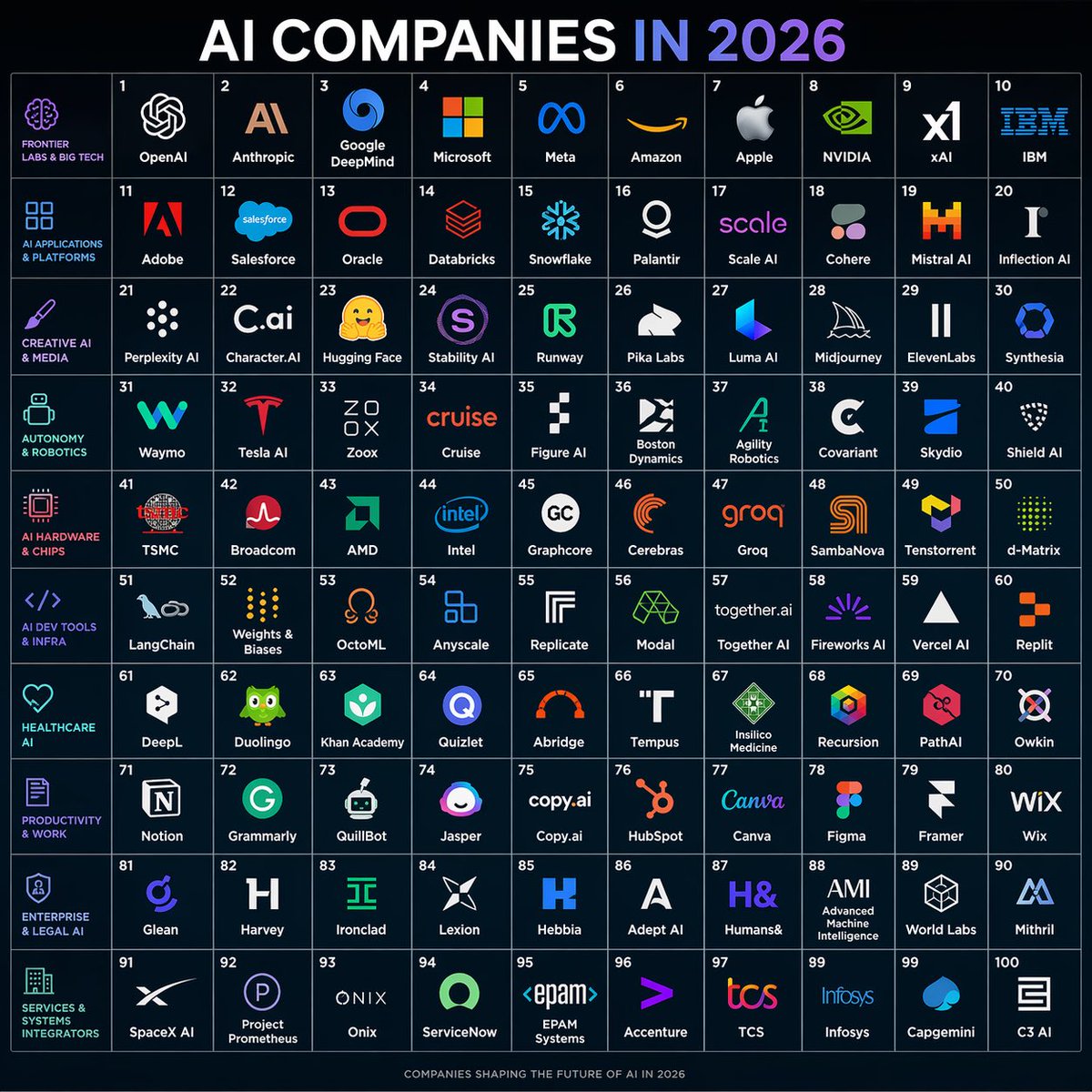
Poster con la griglia delle aziende di intelligenza artificiale nel 2026
Un poster infografico scuro e raffinato che mostra 100 aziende di intelligenza artificiale disposte in una griglia numerata 10x10, ideale per i social media, le mappe delle tendenze e le panoramiche degli ecosistemi.
Questo è un esempio di prompt GPT Image 2 per Grafica e poster . Utilizza il prompt pronto per la copia qui sotto per generare immagini simili e verifica l'attribuzione Awesome GPT Image 2 Prompts e i diritti di utilizzo commerciale prima del riutilizzo.
Free 1K preview
Generate one preview image instantly, no sign-up required.
Richiesta
prompt pronto per la copia
{
  "type": "futuristic infographic poster",
  "subject": "a square 10x10 grid map of 100 AI companies for the year 2026",
  "style": "clean dark-tech editorial infographic, flat vector logos on a deep navy background, thin glowing grid lines, crisp high-contrast typography, modern startup ecosystem poster",
  "aspect_ratio": "1:1",
  "background": {
    "color": "very dark navy blue",
    "texture": "subtle gradient with faint glow"
  },
  "title_block": {
    "headline": "{argument name=\"headline text\" default=\"AI COMPANIES IN 2026\"}",
    "position": "top center",
    "style": "very large bold sans-serif uppercase, white text with the word '2026' in a blue-to-purple gradient"
  },
  "layout": {
    "type": "grid poster",
    "grid": {
      "columns": 10,
      "rows": 10,
      "cell_count": 100,
      "numbering": "cells numbered 1 through 100 in small white numerals at the top-left of each cell",
      "cell_style": "uniform square cells with thin pale blue borders and centered company logos plus company names"
    },
    "left_sidebar": {
      "count": 10,
      "position": "far left vertical column of category labels aligned to each row",
      "style": "small uppercase cyan and magenta text with matching simple line icons",
      "labels": [
        "FRONTIER LABS & BIG TECH",
        "AI APPLICATIONS & PLATFORMS",
        "CREATIVE AI & MEDIA",
        "AUTONOMY & ROBOTICS",
        "AI HARDWARE & CHIPS",
        "AI DEV TOOLS & INFRA",
        "HEALTHCARE AI",
        "PRODUCTIVITY & WORK",
        "ENTERPRISE & LEGAL AI",
        "SERVICES & SYSTEMS INTEGRATORS"
      ]
    },
    "sections": [
      {
        "title": "FRONTIER LABS & BIG TECH",
        "position": "row 1",
        "count": 10,
        "labels": [
          "OpenAI",
          "Anthropic",
          "Google DeepMind",
          "Microsoft",
          "Meta",
          "Amazon",
          "Apple",
          "NVIDIA",
          "xAI",
          "IBM"
        ]
      },
      {
        "title": "AI APPLICATIONS & PLATFORMS",
        "position": "row 2",
        "count": 10,
        "labels": [
          "Adobe",
          "Salesforce",
          "Oracle",
          "Databricks",
          "Snowflake",
          "Palantir",
          "Scale AI",
          "Cohere",
          "Mistral AI",
          "Inflection AI"
        ]
      },
      {
        "title": "CREATIVE AI & MEDIA",
        "position": "row 3",
        "count": 10,
        "labels": [
          "Perplexity AI",
          "Character.AI",
          "Hugging Face",
          "Stability AI",
          "Runway",
          "Pika Labs",
          "Luma AI",
          "Midjourney",
          "ElevenLabs",
          "Synthesia"
        ]
      },
      {
        "title": "AUTONOMY & ROBOTICS",
        "position": "row 4",
        "count": 10,
        "labels": [
          "Waymo",
          "Tesla AI",
          "Zoox",
          "Cruise",
          "Figure AI",
          "Boston Dynamics",
          "Agility Robotics",
          "Covariant",
          "Skydio",
          "Shield AI"
        ]
      },
      {
        "title": "AI HARDWARE & CHIPS",
        "position": "row 5",
        "count": 10,
        "labels": [
          "TSMC",
          "Broadcom",
          "AMD",
          "Intel",
          "Graphcore",
          "Cerebras",
          "Groq",
          "SambaNova",
          "Tenstorrent",
          "d-Matrix"
        ]
      },
      {
        "title": "AI DEV TOOLS & INFRA",
        "position": "row 6",
        "count": 10,
        "labels": [
          "LangChain",
          "Weights & Biases",
          "OctoML",
          "Anyscale",
          "Replicate",
          "Modal",
          "Together AI",
          "Fireworks AI",
          "Vercel AI",
          "Replit"
        ]
      },
      {
        "title": "HEALTHCARE AI",
        "position": "row 7",
        "count": 10,
        "labels": [
          "DeepL",
          "Duolingo",
          "Khan Academy",
          "Quizlet",
          "Abridge",
          "Tempus",
          "Insilico Medicine",
          "Recursion",
          "PathAI",
          "Owkin"
        ]
      },
      {
        "title": "PRODUCTIVITY & WORK",
        "position": "row 8",
        "count": 10,
        "labels": [
          "Notion",
          "Grammarly",
          "QuillBot",
          "Jasper",
          "Copy.ai",
          "HubSpot",
          "Canva",
          "Figma",
          "Framer",
          "Wix"
        ]
      },
      {
        "title": "ENTERPRISE & LEGAL AI",
        "position": "row 9",
        "count": 10,
        "labels": [
          "Glean",
          "Harvey",
          "Ironclad",
          "Lexion",
          "Hebbia",
          "Adept AI",
          "Humans&",
          "AMI",
          "World Labs",
          "Mithril"
        ]
      },
      {
        "title": "SERVICES & SYSTEMS INTEGRATORS",
        "position": "row 10",
        "count": 10,
        "labels": [
          "SpaceX AI",
          "Project Prometheus",
          "Onix",
          "ServiceNow",
          "EPAM Systems",
          "Accenture",
          "TCS",
          "Infosys",
          "Capgemini",
          "C3 AI"
        ]
      }
    ]
  },
  "branding": {
    "footer": "small centered footer text reading 'COMPANIES SHAPING THE FUTURE OF AI IN 2026'"
  },
  "logo_treatment": "each company shown with a simplified recognizable logo mark in its brand colors above or beside its name; logos are centered within each tile and scaled consistently",
  "color_palette": {
    "primary": "very dark navy blue",
    "grid": "muted blue-gray",
    "text": "white",
    "accent": "cyan, purple, magenta, electric blue, orange, green depending on brand logos"
  },
  "rendering_notes": "symmetrical poster composition, infographic precision, no perspective distortion, sharp vector edges, evenly spaced margins, polished social-media-shareable design"
}
Variabili di richiesta
Segnaposto per gli argomenti modificabili presenti nel prompt, con i relativi valori predefiniti.
Best for
- - Grafica e poster visual exploration
- - Image generation and reference-image edits
- - Reusable briefs that keep source attribution visible
Change these parts
- - Subject, product, character, or scene
- - Aspect ratio, camera, lighting, and background
- - Brand, text, color, and output constraints
Recommended model and settings
- - Model: gpt-image-2
- - Input mode: Testo in immagine
- - Aspect ratio: source
- - Commercial status: review original source
How to use this prompt
- 1. Copy the prompt and preserve its structure for the first test.
- 2. Replace the subject, context, and publishing channel.
- 3. Change one camera, lighting, or style variable per iteration.
- 4. Inspect the output, source, text, and rights before reuse.
Limitations, source, and reuse cautions
- - Generated output is an editable draft, not factual, legal, or rights evidence.
- - Review the linked source, people, brands, logos, text, and third-party media before commercial use.
Altri casi in questa categoria
Prioritizzazione in base a categoria, compatibilità della modalità di input, qualità e minor rischio.






Note sul riutilizzo e sulla fonte
Utilizza questo prompt in tutta sicurezza dopo aver visualizzato in anteprima il caso.
- 1.Copia il prompt oppure aprilo direttamente in Dovoo tramite il pulsante di generazione.
- 2.Regola le variabili, le proporzioni e le immagini di riferimento in base alle tue esigenze.
- 3.Prima della pubblicazione o dell'utilizzo a pagamento, verificare i diritti di fonte, i requisiti di attribuzione e i rischi relativi al marchio o all'immagine.