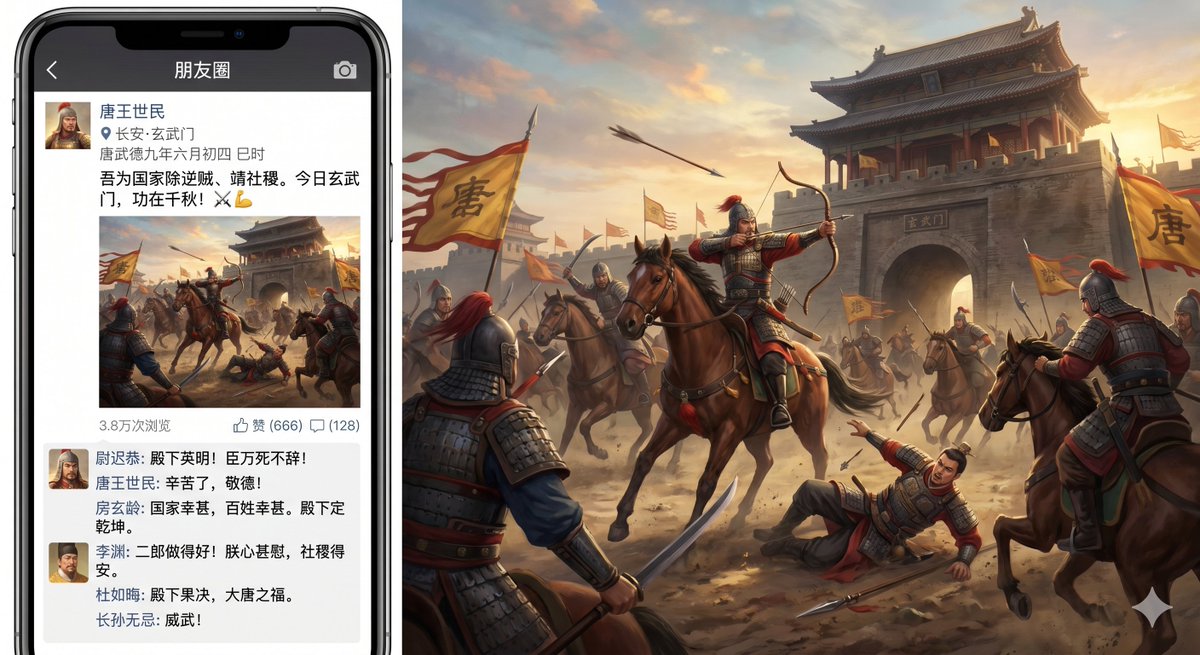
Momen-momen Pasca Insiden Gerbang Xuanwu
Perintah ini menghasilkan gambar satir tentang Insiden Gerbang Xuanwu yang disajikan sebagai unggahan Moments di media sosial Tiongkok, berdampingan dengan adegan pertempuran Dinasti Tang yang sinematik.
Ini adalah contoh kasus GPT Image 2 untuk Ilustrasi & Seni . Gunakan contoh siap salin di bawah ini untuk menghasilkan visual serupa, dan tinjau atribusi Awesome GPT Image 2 Prompts serta hak penggunaan komersial sebelum digunakan kembali.
Butuh seluruh rangkaian prompt? Gunakan Ilustrasi & Seni Untuk contoh terkait lainnya, kunjungi pusat topik, atau buka GPT Image 2 katalog cepat untuk indeks contoh lengkap, struktur yang dapat digunakan kembali, dan atribusi sumber.
Free 1K preview
Generate one preview image instantly, no sign-up required.
2845/4000
Mengingatkan
Prompt siap salin
A humorous and detailed composite image. On the left side is a modern smartphone displaying a WeChat Moments post about the Xuanwu Gate Incident. On the right side is the battlefield image from the post, extending into a grand, cinematic historical scene. The phone should be a black iPhone with extremely narrow bezels and a notch at the top, facing forward. On the phone screen, the application title bar is dark gray with white text reading “朋友圈 (Moments)”, with a back arrow on the left and a camera icon on the right. Below is a social post from {argument name="poster name" default="Emperor Taizong of Tang"}, with a square avatar of a Chinese ancient warrior in armor and helmet. Below the name is a location icon and the text “长安·玄武门 (Chang'an · Xuanwu Gate)”, and a timestamp “唐武德九年六月初四 巳时 (June 4th, 626 AD, Si hour)”. The Moments post reads: “I eliminate traitors for the country and pray for the dynasty. Today at Xuanwu Gate, my achievements will be remembered for a thousand years! ⚔️💪”. Below the text is a square battlefield image preview that corresponds to the large scene on the right. Below the image is a metadata row, accurately displaying three pieces of information: “38,000 views”, “Likes (666)” and “(128)” next to the comment icon. Below is a comment section visible with 5 comments, each with a miniature avatar, and the text style mimicking social media replies from historical figures. The commenters should include the following Chinese names: “尉迟恭 (Yuchi Gong)”, “房玄龄 (Fang Xuanling)”, “李渊 (Li Yuan)”, “杜如晦 (Du Ruhui)” and “长孙无忌 (Changsun Wuji)”, with tones praising the success of the action; one comment should hint that the emperor is shocked and the national situation is settled. On the right is a {argument name="gate name" default="Xuanwu Gate"} epic battlefield painting of the Tang Dynasty at sunset, with a massive gray stone city gate in the background, with the plaque reading “玄武门 (Xuanwu Gate)”. In the central foreground, a horse-riding archer wearing a red-plumed helmet is drawing his bow, riding a brown horse; around him are 7 clearly visible horse-riding or standing Tang Dynasty soldiers, and on the ground is 1 fallen soldier pointing upwards. Multiple yellow flags with large black characters “唐 (Tang)” are fluttering in the dust, with at least 4 flags visible. Arrows fly through the sky, warhorses neigh and leap, and the air is filled with dust, warm sunset glow, and the dynamism of the battlefield. The visual style is realistic historical epic art with a painted texture, but the overall concept is comedic and anachronistic, presenting the ancient coup as a social media Moments post. All visible interface text should be in Chinese, maintaining reasonable mobile UI spacing, and integrating the phone model with the extended battlefield artwork to present a widescreen composition.Variabel perintah
Placeholder argumen yang dapat diedit ditemukan dalam prompt, beserta nilai defaultnya.
Variabel
poster name
Bawaan
Emperor Taizong of Tang
Variabel
gate name
Bawaan
Xuanwu Gate
Best for
- - Ilustrasi & Seni visual exploration
- - Image generation and reference-image edits
- - Reusable briefs that keep source attribution visible
Change these parts
- - Subject, product, character, or scene
- - Aspect ratio, camera, lighting, and background
- - Brand, text, color, and output constraints
Recommended model and settings
- - Model: gpt-image-2
- - Input mode: Teks ke Gambar
- - Aspect ratio: source
- - Commercial status: review original source
How to use this prompt
- 1. Copy the prompt and preserve its structure for the first test.
- 2. Replace the subject, context, and publishing channel.
- 3. Change one camera, lighting, or style variable per iteration.
- 4. Inspect the output, source, text, and rights before reuse.
Limitations, source, and reuse cautions
- - Generated output is an editable draft, not factual, legal, or rights evidence.
- - Review the linked source, people, brands, logos, text, and third-party media before commercial use.
Diimpor dari Awesome GPT Image 2 Prompts . Atribusi diperlukan. Status penggunaan komersial adalah allowed ; tinjau hak sumber sebelum penggunaan berbayar.
Lebih banyak kasus dalam kategori ini
Diprioritaskan berdasarkan kategori, kompatibilitas mode input, kualitas, dan risiko yang lebih rendah.






Catatan penggunaan kembali dan sumber
Gunakan perintah ini dengan aman setelah melihat pratinjau kasus.
- 1.Salin perintah tersebut atau buka langsung di Dovoo dengan tombol pembuatan.
- 2.Sesuaikan variabel, rasio aspek, dan gambar referensi untuk kebutuhan Anda sendiri.
- 3.Sebelum mempublikasikan atau menggunakan untuk tujuan berbayar, verifikasi hak sumber, persyaratan atribusi, dan risiko merek atau citra.