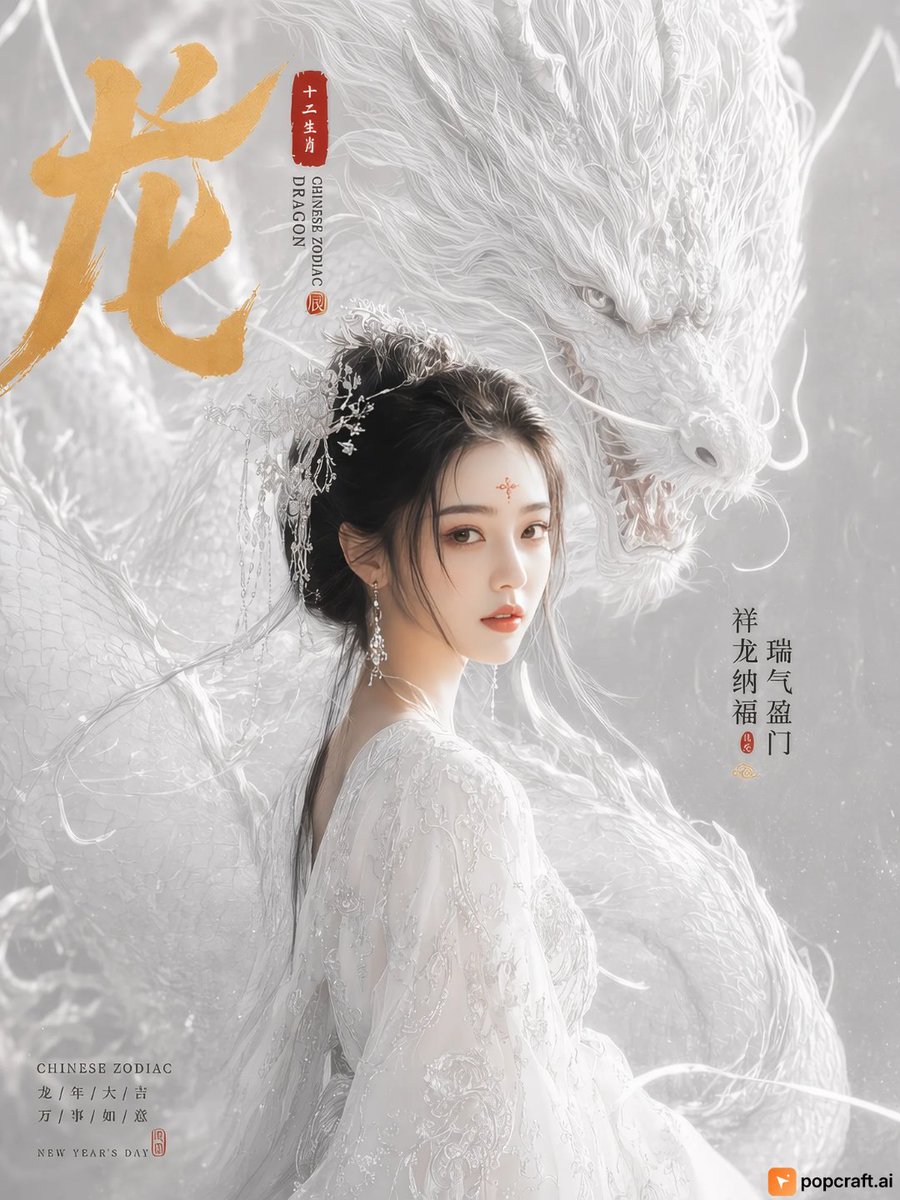
White Dragon Zodiac Portrait
An AI-generated portrait of a woman in traditional white attire accompanied by a majestic white dragon, featuring Chinese zodiac text overlays.
Ini adalah contoh kasus GPT Image 2 untuk Potret & Karakter . Gunakan contoh siap salin di bawah ini untuk menghasilkan visual serupa, dan tinjau atribusi Awesome GPT Image 2 Prompts serta hak penggunaan komersial sebelum digunakan kembali.
Butuh seluruh rangkaian prompt? Gunakan Potret & Karakter Untuk contoh terkait lainnya, kunjungi pusat topik, atau buka GPT Image 2 katalog cepat untuk indeks contoh lengkap, struktur yang dapat digunakan kembali, dan atribusi sumber.
Free 1K preview
Generate one preview image instantly, no sign-up required.
1208/4000
Mengingatkan
Prompt siap salin
This is a vertical portrait painting depicting an elegant young woman with fair skin and black hair styled in a traditional bun, adorned with delicate silver floral hairpins. She is wearing an intricately embroidered white Hanfu-style long dress, and a small red decorative mark is on her forehead. A large and ethereal white dragon coils behind her, with clearly visible scale details and flowing whiskers. The dragon's head is close to hers, as if guarding her. The background is a soft, hazy gray-white tone. In the upper left corner is a large golden Chinese character “龙” (dragon) written in a calligraphic style, next to a vertical red seal containing the characters “十二生肖” (Chinese Zodiac). Below the seal, smaller black text reads “CHINESE ZODIAC DRAGON”. On the right side, there are vertically arranged Chinese characters “瑞气盈门” (auspicious air fills the door) and “祥龙纳福” (auspicious dragon brings fortune). In the lower left corner, there is small text “CHINESE ZODIAC” followed by “龙 / 年 / 大 / 吉” (dragon / year / great / auspicious) and “万 / 事 / 如 / 意” (may all your wishes come true), and finally “NEW YEAR'S DAY”. A small orange logo labeled “popcraft.ai” is visible in the lower right corner.
Best for
- - Potret & Karakter visual exploration
- - Image generation and reference-image edits
- - Reusable briefs that keep source attribution visible
Change these parts
- - Subject, product, character, or scene
- - Aspect ratio, camera, lighting, and background
- - Brand, text, color, and output constraints
Recommended model and settings
- - Model: gpt-image-2
- - Input mode: Teks ke Gambar
- - Aspect ratio: source
- - Commercial status: review original source
How to use this prompt
- 1. Copy the prompt and preserve its structure for the first test.
- 2. Replace the subject, context, and publishing channel.
- 3. Change one camera, lighting, or style variable per iteration.
- 4. Inspect the output, source, text, and rights before reuse.
Limitations, source, and reuse cautions
- - Generated output is an editable draft, not factual, legal, or rights evidence.
- - Review the linked source, people, brands, logos, text, and third-party media before commercial use.
Diimpor dari Awesome GPT Image 2 Prompts . Atribusi diperlukan. Status penggunaan komersial adalah allowed ; tinjau hak sumber sebelum penggunaan berbayar.
Lebih banyak kasus dalam kategori ini
Diprioritaskan berdasarkan kategori, kompatibilitas mode input, kualitas, dan risiko yang lebih rendah.


Catatan penggunaan kembali dan sumber
Gunakan perintah ini dengan aman setelah melihat pratinjau kasus.
- 1.Salin perintah tersebut atau buka langsung di Dovoo dengan tombol pembuatan.
- 2.Sesuaikan variabel, rasio aspek, dan gambar referensi untuk kebutuhan Anda sendiri.
- 3.Sebelum mempublikasikan atau menggunakan untuk tujuan berbayar, verifikasi hak sumber, persyaratan atribusi, dan risiko merek atau citra.