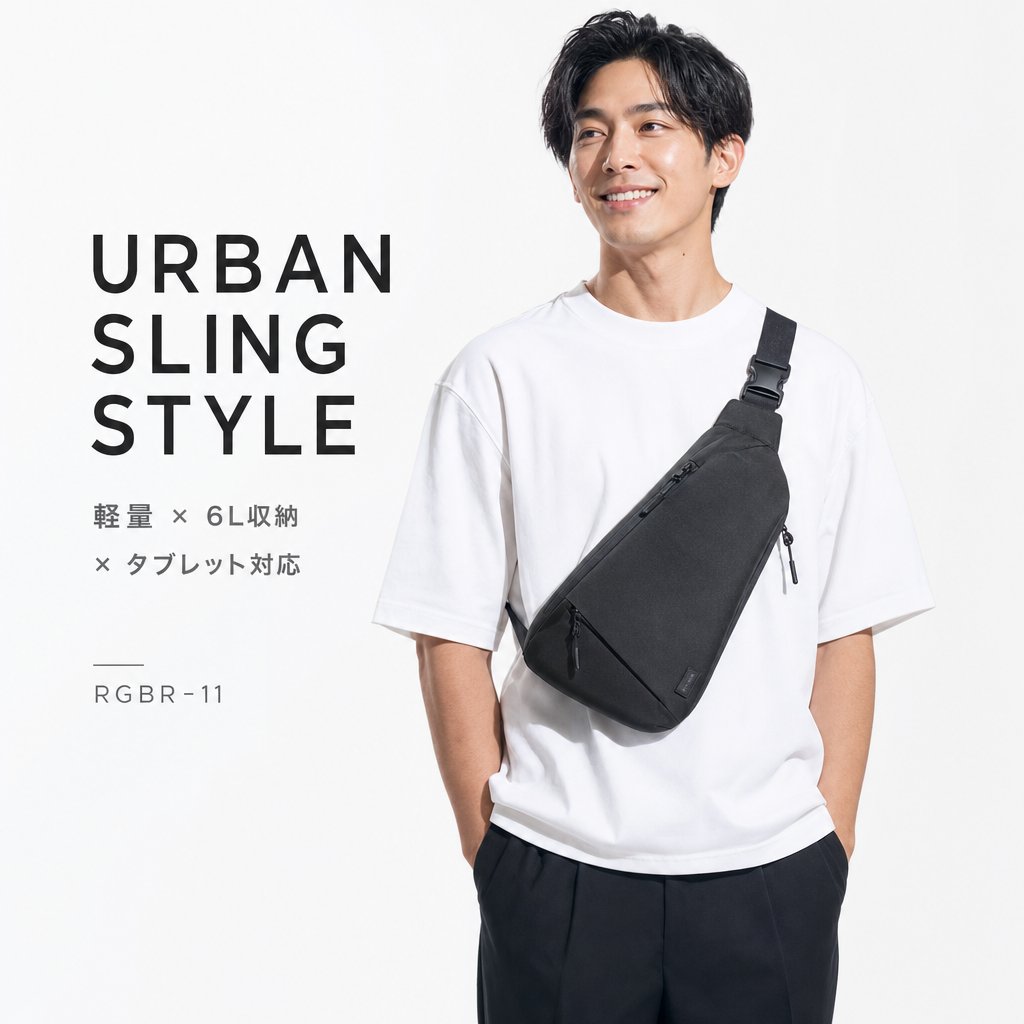
Iklan Katalog Tas Selempang Urban
Iklan katalog fesyen persegi minimalis yang menampilkan model pria mengenakan sling bag urban hitam dengan teks produk Jepang.
Ini adalah contoh kasus GPT Image 2 untuk Produk & Komersial . Gunakan contoh siap salin di bawah ini untuk menghasilkan visual serupa, dan tinjau atribusi Awesome GPT Image 2 Prompts serta hak penggunaan komersial sebelum digunakan kembali.
Butuh seluruh rangkaian prompt? Gunakan Produk & Komersial Untuk contoh terkait lainnya, kunjungi pusat topik, atau buka GPT Image 2 katalog cepat untuk indeks contoh lengkap, struktur yang dapat digunakan kembali, dan atribusi sumber.
Free 1K preview
Generate one preview image instantly, no sign-up required.
2207/4000
Mengingatkan
Prompt siap salin
Goal: Create a clean square fashion product advertisement for an urban sling bag, using a minimalist Japanese e-commerce/catalog aesthetic.

Canvas: 1:1 square image, bright white to very light gray studio background, high-key lighting, sharp commercial photography, no borders or watermark.

Layout: Split composition with large typography on the left third and a male model on the right two-thirds. The model is cropped from upper thighs to just above the hair, standing relaxed with both hands in pants pockets. Leave generous negative space around the left text.

Subject details: A young adult East Asian male model with short slightly wavy black hair, Show every face clearly with natural, detailed facial features. He wears an oversized plain {argument name="shirt color" default="white"} crew-neck T-shirt and loose dark trousers. Across his torso is a {argument name="bag color" default="black"} triangular urban sling bag worn diagonally from his right shoulder to his left waist. The sling bag has a wide black shoulder strap with buckle hardware, a clean matte fabric texture, one diagonal front zipper with a black pull cord, a small side zipper pull, and a tiny rectangular brand tag near the lower right edge. The bag should be the visual focus.

Text content: On the left, include exactly 4 text groups: 1) a large stacked uppercase headline reading {argument name="headline text" default="URBAN\nSLING\nSTYLE"}, set in bold modern sans-serif with wide letter spacing; 2) a smaller two-line Japanese feature statement reading {argument name="feature text" default="軽量 × 6L収納\n× タブレット対応"}; 3) a short thin horizontal divider line; 4) a small product code reading {argument name="product code" default="RGBR-11"}. Keep the text dark charcoal, aligned left, and spaced like a premium catalog poster.

Visual style: Photorealistic studio product photography, crisp fabric detail, soft shadows, monochrome black-and-white styling, modern Japanese streetwear catalog design, premium minimalism.

Constraints: Use exactly one model, one sling bag, one T-shirt, one pair of trousers, and four text groups. Do not add extra accessories, logos, scenery, props, decorative graphics, or additional text.
Variabel perintah
Placeholder argumen yang dapat diedit ditemukan dalam prompt, beserta nilai defaultnya.
Variabel
shirt color
Bawaan
white
Variabel
bag color
Bawaan
black
Variabel
headline text
Bawaan
URBAN\nSLING\nSTYLE
Variabel
feature text
Bawaan
軽量 × 6L収納\n× タブレット対応
Variabel
product code
Bawaan
RGBR-11
Best for
- - Produk & Komersial visual exploration
- - Image generation and reference-image edits
- - Reusable briefs that keep source attribution visible
Change these parts
- - Subject, product, character, or scene
- - Aspect ratio, camera, lighting, and background
- - Brand, text, color, and output constraints
Recommended model and settings
- - Model: gpt-image-2
- - Input mode: Teks ke Gambar
- - Aspect ratio: source
- - Commercial status: review original source
How to use this prompt
- 1. Copy the prompt and preserve its structure for the first test.
- 2. Replace the subject, context, and publishing channel.
- 3. Change one camera, lighting, or style variable per iteration.
- 4. Inspect the output, source, text, and rights before reuse.
Limitations, source, and reuse cautions
- - Generated output is an editable draft, not factual, legal, or rights evidence.
- - Review the linked source, people, brands, logos, text, and third-party media before commercial use.
Diimpor dari Awesome GPT Image 2 Prompts . Atribusi diperlukan. Status penggunaan komersial adalah allowed ; tinjau hak sumber sebelum penggunaan berbayar.
Related prompt packs
Lebih banyak kasus dalam kategori ini
Diprioritaskan berdasarkan kategori, kompatibilitas mode input, kualitas, dan risiko yang lebih rendah.






Catatan penggunaan kembali dan sumber
Gunakan perintah ini dengan aman setelah melihat pratinjau kasus.
- 1.Salin perintah tersebut atau buka langsung di Dovoo dengan tombol pembuatan.
- 2.Sesuaikan variabel, rasio aspek, dan gambar referensi untuk kebutuhan Anda sendiri.
- 3.Sebelum mempublikasikan atau menggunakan untuk tujuan berbayar, verifikasi hak sumber, persyaratan atribusi, dan risiko merek atau citra.