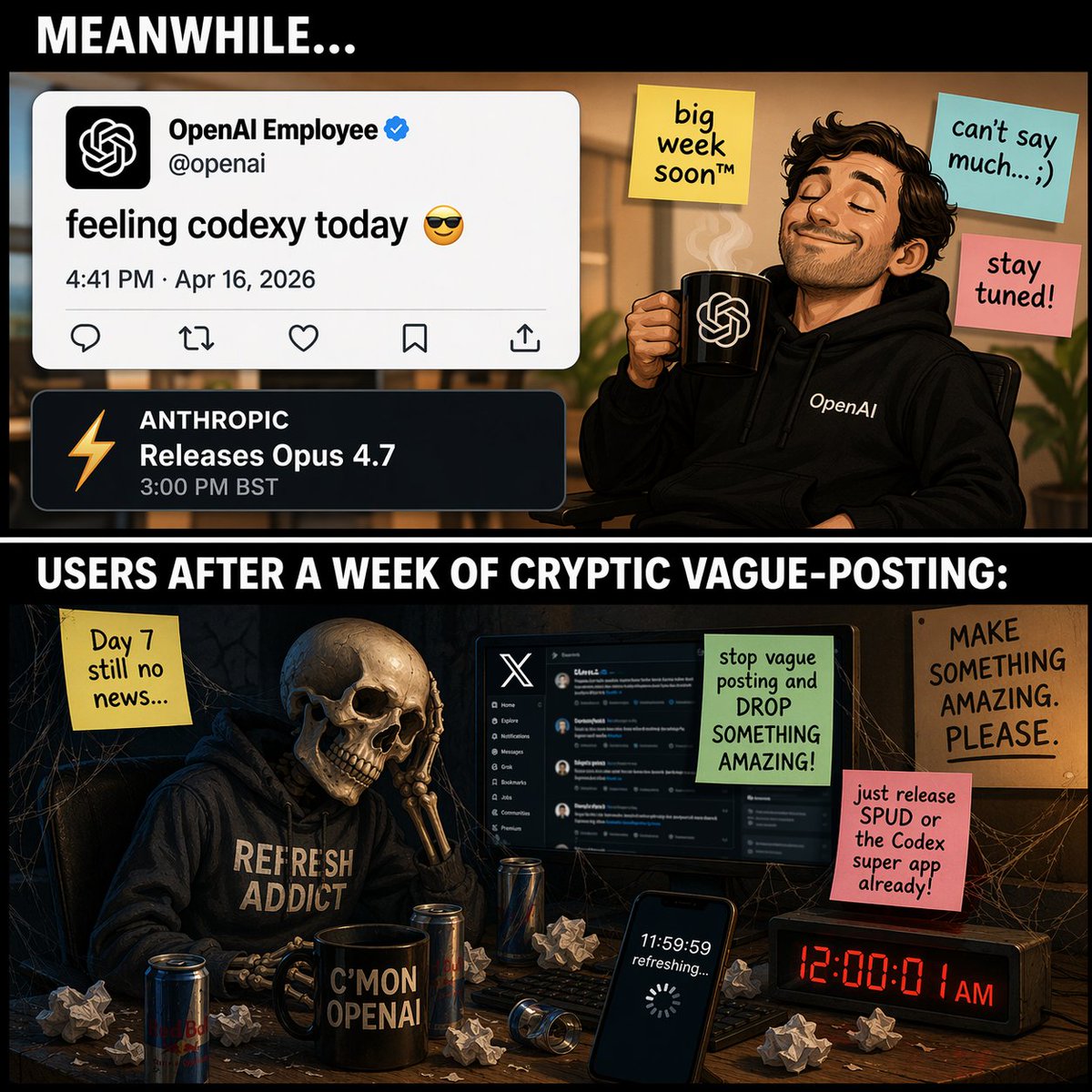
Komik Meme Teknologi Dua Panel
Menghasilkan meme dua panel yang membandingkan seorang karyawan teknologi yang sombong dengan postingan yang tidak jelas dan seorang pengguna kerangka yang menunggu tanpa henti untuk sebuah rilis.
Ini adalah contoh kasus GPT Image 2 untuk Ilustrasi & Seni . Gunakan contoh siap salin di bawah ini untuk menghasilkan visual serupa, dan tinjau atribusi Awesome GPT Image 2 Prompts serta hak penggunaan komersial sebelum digunakan kembali.
Butuh seluruh rangkaian prompt? Gunakan Ilustrasi & Seni Untuk contoh terkait lainnya, kunjungi pusat topik, atau buka GPT Image 2 katalog cepat untuk indeks contoh lengkap, struktur yang dapat digunakan kembali, dan atribusi sumber.
Free 1K preview
Generate one preview image instantly, no sign-up required.
2389/4000
Mengingatkan
Prompt siap salin
{
  "type": "two-panel meme comic",
  "layout": {
    "structure": "vertical split with black divider bars containing white text",
    "top_header_text": "{argument name=\"top panel header\" default=\"MEANWHILE...\"}",
    "middle_divider_text": "{argument name=\"bottom panel header\" default=\"USERS AFTER A WEEK OF CRYPTIC VAGUE-POSTING:\"}"
  },
  "panels": [
    {
      "position": "top",
      "setting": "bright office environment",
      "character": "smug man with a beard, wearing a black hoodie with 'OpenAI' text, eyes closed, smiling, holding a black mug with the OpenAI logo and rising steam",
      "ui_elements": {
        "count": 2,
        "items": [
          "Tweet mockup: Profile 'OpenAI Employee' with verified checkmark, handle '@openai', text '{argument name=\"tweet text\" default=\"feeling codexy today 😎\"}', date '4:41 PM · Apr 16, 2026'",
          "Notification mockup: Dark theme, orange lightning bolt icon, text 'ANTHROPIC Releases Opus 4.7 3:00 PM BST'"
        ]
      },
      "sticky_notes": {
        "count": 3,
        "items": [
          "Yellow note: 'big week soon™'",
          "Light blue note: 'can't say much... ;)'",
          "Pink note: 'stay tuned!'"
        ]
      }
    },
    {
      "position": "bottom",
      "setting": "dark, cobweb-filled room at a messy desk",
      "character": "skeleton wearing a dark hoodie with '{argument name=\"skeleton hoodie text\" default=\"REFRESH ADDICT\"}', resting its skull on its bony hand in despair",
      "desk_objects": {
        "count": 6,
        "items": [
          "Computer monitor displaying the X (Twitter) dark mode interface",
          "Black mug with text 'C'MON OPENAI'",
          "Smartphone screen showing '11:59:59 refreshing...' with a loading spinner",
          "Digital clock displaying red text '12:00:01 AM'",
          "3 energy drink cans",
          "Scattered crumpled paper balls"
        ]
      },
      "sticky_notes_and_signs": {
        "count": 4,
        "items": [
          "Yellow note (left): 'Day 7 still no news...'",
          "Green note (on monitor): 'stop vague posting and DROP SOMETHING AMAZING!'",
          "Pink note (right): '{argument name=\"user complaint note\" default=\"just release SPUD or the Codex super app already!\"}'",
          "Cardboard sign (far right): 'MAKE SOMETHING AMAZING. PLEASE.'"
        ]
      }
    }
  ]
}
Variabel perintah
Placeholder argumen yang dapat diedit ditemukan dalam prompt, beserta nilai defaultnya.
Variabel
top panel header
Bawaan
MEANWHILE...
Variabel
bottom panel header
Bawaan
USERS AFTER A WEEK OF CRYPTIC VAGUE-POSTING:
Variabel
tweet text
Bawaan
feeling codexy today 😎
Variabel
skeleton hoodie text
Bawaan
REFRESH ADDICT
Variabel
user complaint note
Bawaan
just release SPUD or the Codex super app already!
Best for
- - Ilustrasi & Seni visual exploration
- - Image generation and reference-image edits
- - Reusable briefs that keep source attribution visible
Change these parts
- - Subject, product, character, or scene
- - Aspect ratio, camera, lighting, and background
- - Brand, text, color, and output constraints
Recommended model and settings
- - Model: gpt-image-2
- - Input mode: Teks ke Gambar
- - Aspect ratio: source
- - Commercial status: review original source
How to use this prompt
- 1. Copy the prompt and preserve its structure for the first test.
- 2. Replace the subject, context, and publishing channel.
- 3. Change one camera, lighting, or style variable per iteration.
- 4. Inspect the output, source, text, and rights before reuse.
Limitations, source, and reuse cautions
- - Generated output is an editable draft, not factual, legal, or rights evidence.
- - Review the linked source, people, brands, logos, text, and third-party media before commercial use.
Diimpor dari Awesome GPT Image 2 Prompts . Atribusi diperlukan. Status penggunaan komersial adalah allowed ; tinjau hak sumber sebelum penggunaan berbayar.
Lebih banyak kasus dalam kategori ini
Diprioritaskan berdasarkan kategori, kompatibilitas mode input, kualitas, dan risiko yang lebih rendah.

Boisterous Shrimpers Entering Pub
Teks ke Gambar

Tuxedo Cat Photo and Line Art Diptych
Teks ke Gambar

Cute Focus Desk Flat Lay and Kawaii Illustration
Teks ke Gambar

Morning Bed Stretching Legs Prompt
Teks ke Gambar
GPT Image 2 Prompt for Mirror Selfie with Flowers
Teks ke Gambar

Playful Morning Selfie Portrait
Teks ke Gambar
Catatan penggunaan kembali dan sumber
Gunakan perintah ini dengan aman setelah melihat pratinjau kasus.
- 1.Salin perintah tersebut atau buka langsung di Dovoo dengan tombol pembuatan.
- 2.Sesuaikan variabel, rasio aspek, dan gambar referensi untuk kebutuhan Anda sendiri.
- 3.Sebelum mempublikasikan atau menggunakan untuk tujuan berbayar, verifikasi hak sumber, persyaratan atribusi, dan risiko merek atau citra.