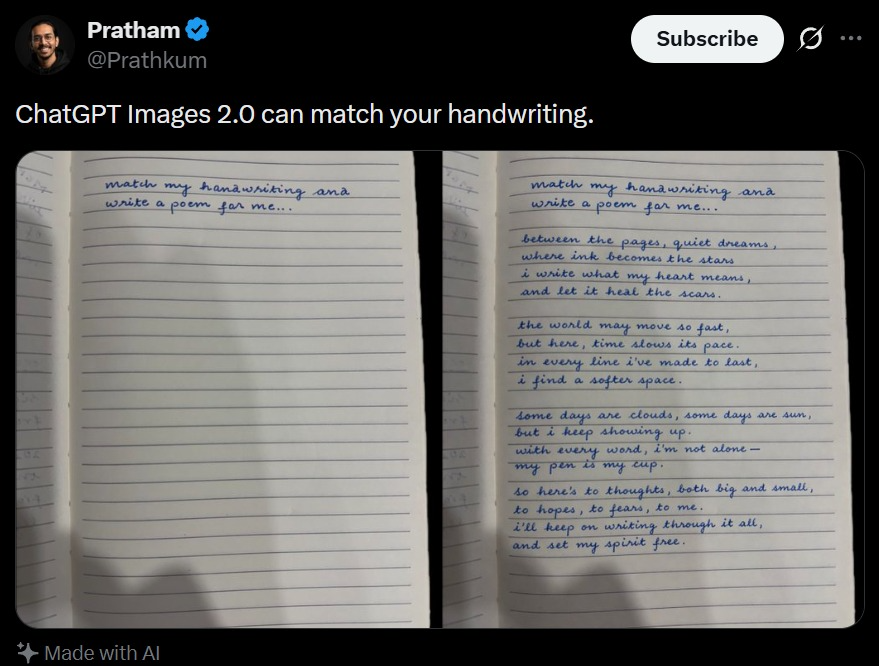
Tangkapan Layar Tweet dengan Tulisan Tangan yang Sesuai
Tangkapan layar media sosial realistis yang menunjukkan perbandingan buku catatan dengan pencocokan tulisan tangan, berguna untuk menghasilkan maket postingan demo AI yang viral.
Ini adalah contoh kasus GPT Image 2 untuk Inspirasi Lainnya . Gunakan contoh siap salin di bawah ini untuk menghasilkan visual serupa, dan tinjau atribusi Awesome GPT Image 2 Prompts serta hak penggunaan komersial sebelum digunakan kembali.
Butuh seluruh rangkaian prompt? Gunakan Inspirasi Lainnya Untuk contoh terkait lainnya, kunjungi pusat topik, atau buka GPT Image 2 katalog cepat untuk indeks contoh lengkap, struktur yang dapat digunakan kembali, dan atribusi sumber.
Free 1K preview
Generate one preview image instantly, no sign-up required.
2144/4000
Mengingatkan
Prompt siap salin
A realistic dark-mode social media post screenshot styled like X/Twitter on a black interface. At the top left is a small blurred circular profile photo beside the display name {argument name="profile name" default="Pratham"} with a blue verification badge, and the handle {argument name="handle" default="@Prathkum"} underneath. At the top right is a rounded white Subscribe button plus two small interface icons. The tweet text in large white sans-serif type reads: {argument name="tweet text" default="ChatGPT Images 2.0 can match your handwriting."} Below it is a side-by-side comparison image made of 2 notebook photos separated by a narrow black vertical gap. Both photos show an open lined notebook page shot from above under dim indoor lighting with soft shadows near the bottom edge. The left notebook page is mostly blank except for 2 handwritten lines in neat blue cursive at the top that say: {argument name="handwriting prompt text" default="match my hanawriting ana write a poem for me.."} Keep the misspellings and punctuation exactly as written. The right notebook page shows the same first 2 handwritten lines at the top, followed by a handwritten poem in matching blue cursive handwriting filling the page in 4 stanzas. The poem text reads exactly: {argument name="poem text" default="between the pages, quiet dreams, where ink becomes the stars, i write what my heart means, and let it heal the scars.

the world may move so fast, but here, time slows its pace. in every line i’ve made to last, i find a softer space.

some days are clouds, some days are sun, but i keep showing up. with every word, i’m not alone— my pen is my cup.

so here’s to thoughts, both big and small, to hopes, to fears, to me. i’ll keep on writing through it all, and set my spirit free."} The handwriting should look natural, slightly uneven, and convincingly human, with blue ballpoint pen texture. At the bottom left of the post, include a small sparkle icon and the words “Made with AI”. Preserve the look of a genuine mobile app screenshot with realistic spacing, rounded image corners, crisp UI typography, and subtle screen-capture softness.
Variabel perintah
Placeholder argumen yang dapat diedit ditemukan dalam prompt, beserta nilai defaultnya.
Variabel
profile name
Bawaan
Pratham
Variabel
handle
Bawaan
@Prathkum
Variabel
tweet text
Bawaan
ChatGPT Images 2.0 can match your handwriting.
Variabel
handwriting prompt text
Bawaan
match my hanawriting ana write a poem for me..
Variabel
poem text
Bawaan
between the pages, quiet dreams, where ink becomes the stars, i write what my heart means, and let it heal the scars.
the world may move so fast, but here, time slows its pace. in every line i’ve made to last, i find a softer space.
some days are clouds, some days are sun, but i keep showing up. with every word, i’m not alone— my pen is my cup.
so here’s to thoughts, both big and small, to hopes, to fears, to me. i’ll keep on writing through it all, and set my spirit free.
Best for
- - Inspirasi Lainnya visual exploration
- - Image generation and reference-image edits
- - Reusable briefs that keep source attribution visible
Change these parts
- - Subject, product, character, or scene
- - Aspect ratio, camera, lighting, and background
- - Brand, text, color, and output constraints
Recommended model and settings
- - Model: gpt-image-2
- - Input mode: Teks ke Gambar
- - Aspect ratio: source
- - Commercial status: review original source
How to use this prompt
- 1. Copy the prompt and preserve its structure for the first test.
- 2. Replace the subject, context, and publishing channel.
- 3. Change one camera, lighting, or style variable per iteration.
- 4. Inspect the output, source, text, and rights before reuse.
Limitations, source, and reuse cautions
- - Generated output is an editable draft, not factual, legal, or rights evidence.
- - Review the linked source, people, brands, logos, text, and third-party media before commercial use.
Diimpor dari Awesome GPT Image 2 Prompts . Atribusi diperlukan. Status penggunaan komersial adalah allowed ; tinjau hak sumber sebelum penggunaan berbayar.
Lebih banyak kasus dalam kategori ini
Diprioritaskan berdasarkan kategori, kompatibilitas mode input, kualitas, dan risiko yang lebih rendah.






Catatan penggunaan kembali dan sumber
Gunakan perintah ini dengan aman setelah melihat pratinjau kasus.
- 1.Salin perintah tersebut atau buka langsung di Dovoo dengan tombol pembuatan.
- 2.Sesuaikan variabel, rasio aspek, dan gambar referensi untuk kebutuhan Anda sendiri.
- 3.Sebelum mempublikasikan atau menggunakan untuk tujuan berbayar, verifikasi hak sumber, persyaratan atribusi, dan risiko merek atau citra.