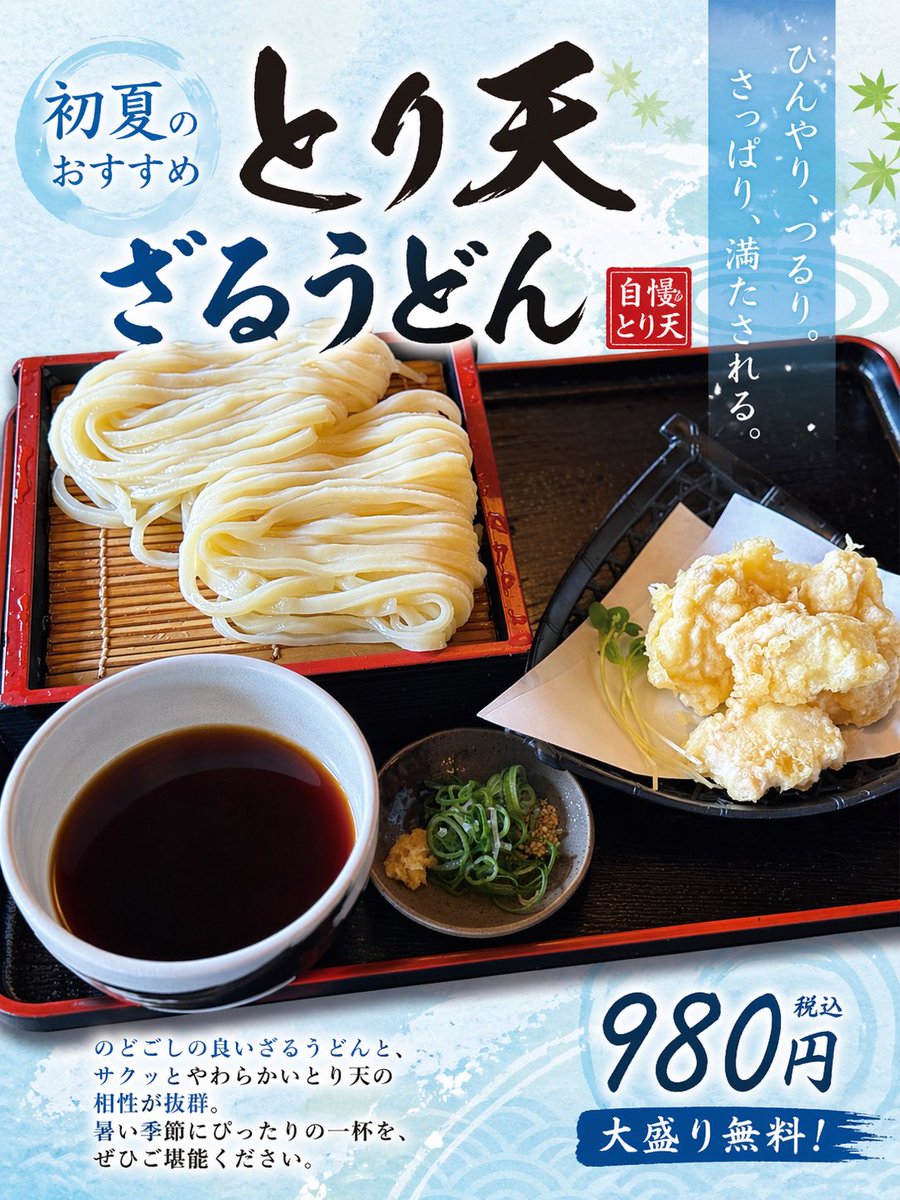
Ubah Foto Makanan Menjadi Poster Jepang
Tugas ini mengubah foto makanan referensi menjadi poster iklan restoran Jepang yang menarik, berguna untuk promosi menu dan pemasaran makanan di media sosial.
Ini adalah contoh kasus GPT Image 2 untuk Grafis & Poster . Gunakan contoh siap salin di bawah ini untuk menghasilkan visual serupa, dan tinjau atribusi Awesome GPT Image 2 Prompts serta hak penggunaan komersial sebelum digunakan kembali.
Butuh seluruh rangkaian prompt? Gunakan Grafis & Poster Untuk contoh terkait lainnya, kunjungi pusat topik, atau buka GPT Image 2 katalog cepat untuk indeks contoh lengkap, struktur yang dapat digunakan kembali, dan atribusi sumber.
Free 1K preview
Generate one preview image instantly, no sign-up required.
Free text preview doesn’t preserve reference-image consistency.
1233/4000
Mengingatkan
Prompt siap salin
Using the provided reference image of the udon meal, turn it into a clean, print-ready Japanese restaurant promotional poster while keeping the food photo itself as the main hero image. Expand the composition vertically into a portrait flyer layout, add a light icy-blue seasonal background with subtle watercolor texture and faint wave motifs, and overlay decorative green maple leaves for an early-summer feel. Add 5 text elements in Japanese: a blue circular badge at the upper left reading "初夏のおすすめ", a large bold brush-calligraphy headline across the top in 2 lines reading "とり天" and "ざるうどん", a small red vertical seal near the headline reading "自慢のとり天", a tall translucent blue vertical copy block at the upper right reading "ひんやり、つるり。さっぱり、満たされる。", and a price block at the lower right reading "980円 税込" with a blue brushstroke banner below that says "大盛り無料!". Add a short 4-line Japanese body copy paragraph at the lower left describing the dish in a menu-poster style. Preserve the original meal arrangement and realistic photography, but enhance it slightly for advertising: brighter, more appetizing, crisp, and high contrast. Make the overall design look like a polished restaurant poster created from a casual food photo.
Best for
- - Grafis & Poster visual exploration
- - Image generation and reference-image edits
- - Reusable briefs that keep source attribution visible
Change these parts
- - Subject, product, character, or scene
- - Aspect ratio, camera, lighting, and background
- - Brand, text, color, and output constraints
Recommended model and settings
- - Model: gpt-image-2
- - Input mode: Gambar ke Gambar
- - Aspect ratio: source
- - Commercial status: review original source
How to use this prompt
- 1. Copy the prompt and preserve its structure for the first test.
- 2. Replace the subject, context, and publishing channel.
- 3. Change one camera, lighting, or style variable per iteration.
- 4. Inspect the output, source, text, and rights before reuse.
Limitations, source, and reuse cautions
- - Generated output is an editable draft, not factual, legal, or rights evidence.
- - Review the linked source, people, brands, logos, text, and third-party media before commercial use.
Diimpor dari Awesome GPT Image 2 Prompts . Atribusi diperlukan. Status penggunaan komersial adalah allowed ; tinjau hak sumber sebelum penggunaan berbayar.
Lebih banyak kasus dalam kategori ini
Diprioritaskan berdasarkan kategori, kompatibilitas mode input, kualitas, dan risiko yang lebih rendah.






Catatan penggunaan kembali dan sumber
Gunakan perintah ini dengan aman setelah melihat pratinjau kasus.
- 1.Salin perintah tersebut atau buka langsung di Dovoo dengan tombol pembuatan.
- 2.Sesuaikan variabel, rasio aspek, dan gambar referensi untuk kebutuhan Anda sendiri.
- 3.Sebelum mempublikasikan atau menggunakan untuk tujuan berbayar, verifikasi hak sumber, persyaratan atribusi, dan risiko merek atau citra.