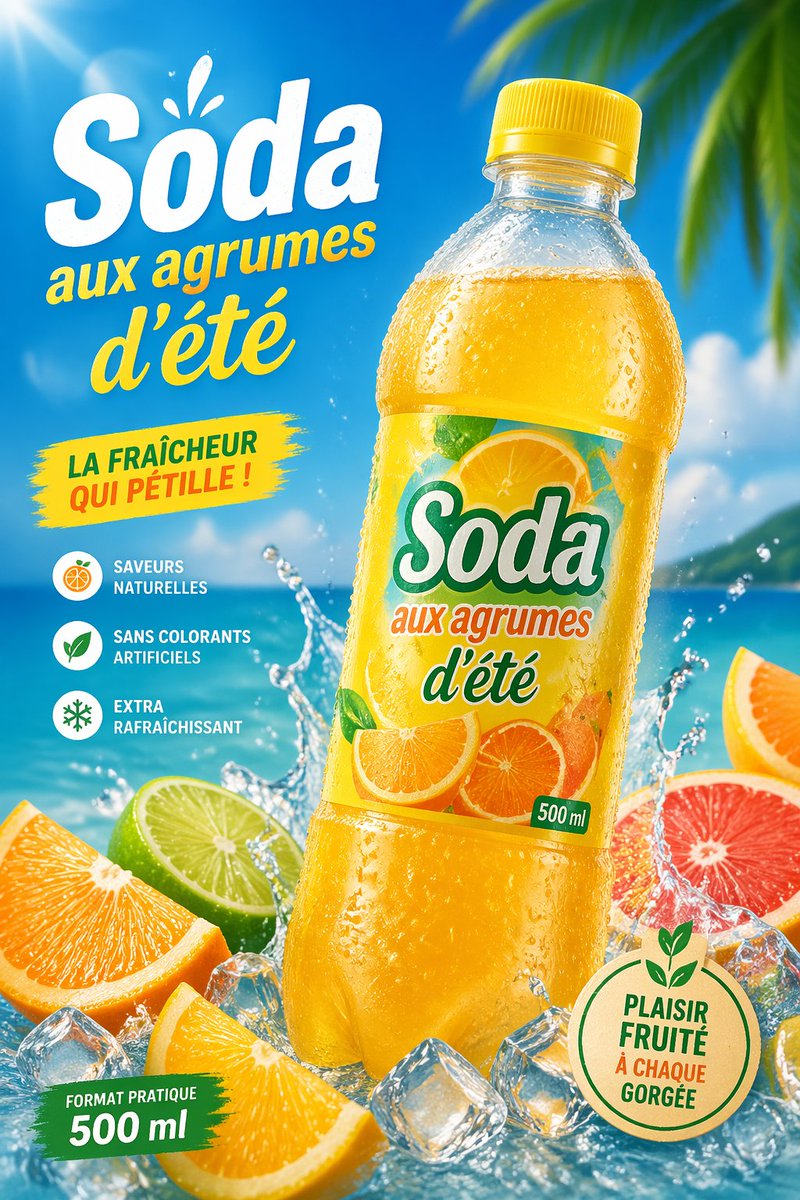
Poster Iklan Soda Jeruk Tropis
Iklan minuman berbahasa Prancis yang cerah menampilkan botol soda jeruk dingin di pantai tropis, ideal untuk pemasaran produk musim panas dan maket kemasan.
Ini adalah contoh kasus GPT Image 2 untuk Produk & Komersial . Gunakan contoh siap salin di bawah ini untuk menghasilkan visual serupa, dan tinjau atribusi Awesome GPT Image 2 Prompts serta hak penggunaan komersial sebelum digunakan kembali.
Butuh seluruh rangkaian prompt? Gunakan Produk & Komersial Untuk contoh terkait lainnya, kunjungi pusat topik, atau buka GPT Image 2 katalog cepat untuk indeks contoh lengkap, struktur yang dapat digunakan kembali, dan atribusi sumber.
Free 1K preview
Generate one preview image instantly, no sign-up required.
1863/4000
Mengingatkan
Prompt siap salin
Create a vibrant tropical commercial poster for a citrus soda bottle, in a bright summer advertising style. Show a single large plastic bottle of {argument name="product name" default="Soda"} centered slightly to the right, tilted a little left, with a yellow cap and transparent bottle covered in cold condensation droplets, filled with glowing golden-orange soda. The label should feature sliced oranges and citrus artwork with the brand text "{argument name="product name" default="Soda"}", the phrase "aux agrumes d'été", and a small green "500 ml" mark. Use a sunny beach background with vivid blue sky, turquoise ocean, soft clouds, and blurred tropical palm leaves entering from the upper right corner. Add dramatic water splashes around the base of the bottle, scattered clear ice cubes, and 5 visible citrus pieces in the foreground: 2 orange wedges, 1 lime half, 1 grapefruit half, and 1 partial orange slice at the far right edge. Place large French promotional text on the left: a huge white headline "{argument name="headline text" default="Soda"}" with a small splash accent above it, then yellow script text "aux agrumes d'été" underneath. Add a yellow paint-stroke badge at mid-left with the text "LA FRAÎCHEUR QUI PÉTILLE !". Add a vertical feature list on the lower left with 3 round icons and French captions: "SAVEURS NATURELLES", "SANS COLORANTS ARTIFICIELS", and "EXTRA RAFRAÎCHISSANT". Add a green brushstroke banner at the bottom left reading "FORMAT PRATIQUE 500 ml". Add a round beige eco-style seal at the bottom right with green outline and leaf motif, containing the text "{argument name="seal text" default="PLAISIR FRUITÉ À CHAQUE GORGÉE"}". Lighting should be glossy and high-energy with strong sun flare from the upper left, saturated citrus colors, crisp packaging detail, realistic droplets, and polished supermarket-ad realism.Variabel perintah
Placeholder argumen yang dapat diedit ditemukan dalam prompt, beserta nilai defaultnya.
Variabel
product name
Bawaan
Soda
Variabel
headline text
Bawaan
Soda
Variabel
seal text
Bawaan
PLAISIR FRUITÉ À CHAQUE GORGÉE
Best for
- - Produk & Komersial visual exploration
- - Image generation and reference-image edits
- - Reusable briefs that keep source attribution visible
Change these parts
- - Subject, product, character, or scene
- - Aspect ratio, camera, lighting, and background
- - Brand, text, color, and output constraints
Recommended model and settings
- - Model: gpt-image-2
- - Input mode: Teks ke Gambar
- - Aspect ratio: source
- - Commercial status: review original source
How to use this prompt
- 1. Copy the prompt and preserve its structure for the first test.
- 2. Replace the subject, context, and publishing channel.
- 3. Change one camera, lighting, or style variable per iteration.
- 4. Inspect the output, source, text, and rights before reuse.
Limitations, source, and reuse cautions
- - Generated output is an editable draft, not factual, legal, or rights evidence.
- - Review the linked source, people, brands, logos, text, and third-party media before commercial use.
Diimpor dari Awesome GPT Image 2 Prompts . Atribusi diperlukan. Status penggunaan komersial adalah allowed ; tinjau hak sumber sebelum penggunaan berbayar.
Lebih banyak kasus dalam kategori ini
Diprioritaskan berdasarkan kategori, kompatibilitas mode input, kualitas, dan risiko yang lebih rendah.






Catatan penggunaan kembali dan sumber
Gunakan perintah ini dengan aman setelah melihat pratinjau kasus.
- 1.Salin perintah tersebut atau buka langsung di Dovoo dengan tombol pembuatan.
- 2.Sesuaikan variabel, rasio aspek, dan gambar referensi untuk kebutuhan Anda sendiri.
- 3.Sebelum mempublikasikan atau menggunakan untuk tujuan berbayar, verifikasi hak sumber, persyaratan atribusi, dan risiko merek atau citra.