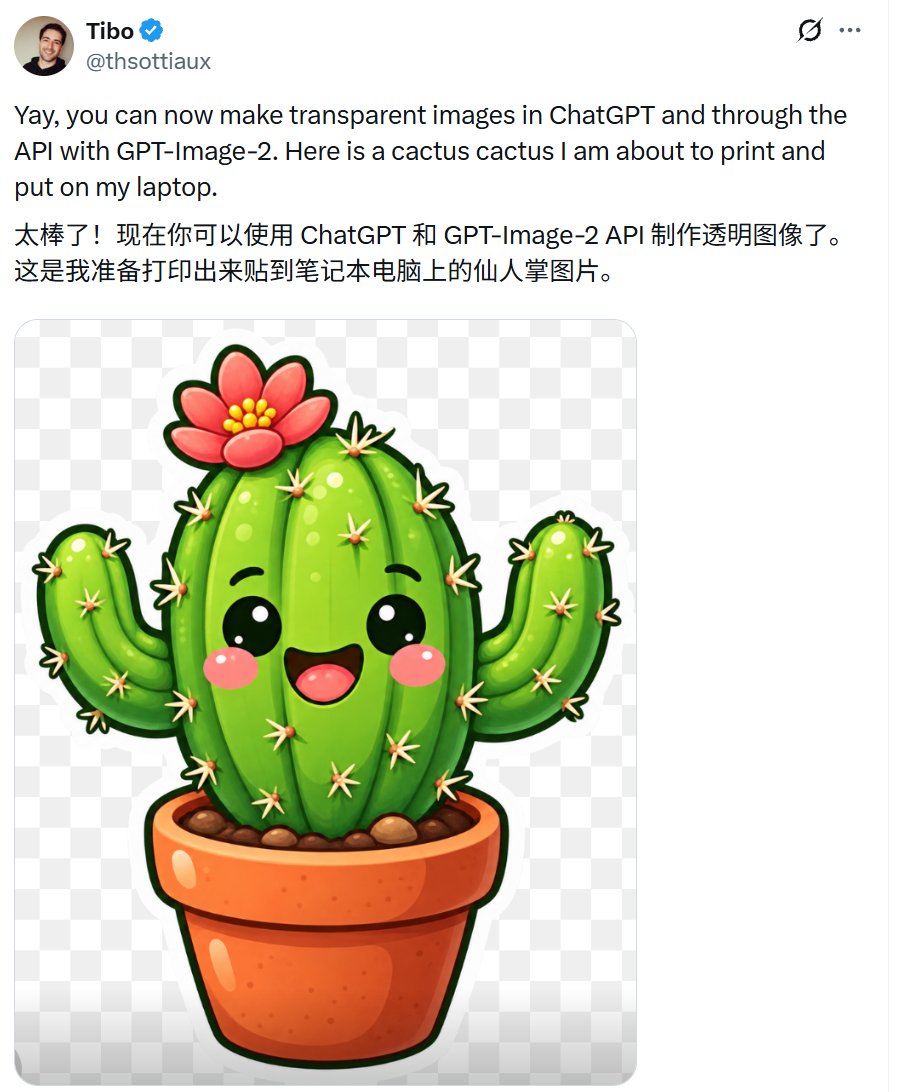
Tweet Screenshot with Kawaii Cactus Sticker
Generates an X-style post screenshot announcing transparent image support with a cute printable cactus sticker on a checkerboard background.
Ini adalah contoh kasus GPT Image 2 untuk Grafis & Poster . Gunakan contoh siap salin di bawah ini untuk menghasilkan visual serupa, dan tinjau atribusi Awesome GPT Image 2 Prompts serta hak penggunaan komersial sebelum digunakan kembali.
Butuh seluruh rangkaian prompt? Gunakan Grafis & Poster Untuk contoh terkait lainnya, kunjungi pusat topik, atau buka GPT Image 2 katalog cepat untuk indeks contoh lengkap, struktur yang dapat digunakan kembali, dan atribusi sumber.
Free 1K preview
Generate one preview image instantly, no sign-up required.
1856/4000
Mengingatkan
Prompt siap salin
Create a realistic social-media post screenshot on a white interface, like an X/Twitter post, showing a verified user announcing transparent background images. At the top left, include a small circular profile photo of a smiling man, the display name {argument name="display name" default="Tibo"} in bold with a blue verified checkmark, and the handle {argument name="handle" default="@thsottiaux"} in gray beneath it. At the top right show two small interface icons: a circular refresh-like icon and a three-dot menu. The post text should be large black sans-serif and contain exactly two paragraphs: first, “{argument name="English post text" default="Yay, you can now make transparent images in ChatGPT and through the API with GPT-Image-2. Here is a cactus cactus I am about to print and put on my laptop."}” and second, Chinese text “{argument name="Chinese post text" default="Awesome! Now you can use the ChatGPT and GPT-Image-2 API to create transparent images.\nThis is a picture of a cactus that I'm preparing to print out and stick on my laptop."}”. Below the text, embed one large rounded-corner image preview with a light gray-and-white checkerboard transparency pattern. Centered inside the preview is a glossy kawaii sticker illustration of a potted cactus on a transparent background: exactly 1 central tall oval cactus body, exactly 2 raised side arms, exactly 1 terracotta flowerpot, exactly 1 pink-red flower with yellow center dots on top, many small cream-colored star-shaped spines, black cute oval eyes with white highlights, rosy pink cheeks, and an open smiling mouth. Use vibrant saturated greens, thick dark green sticker outline, shiny highlights, soft shadows, and a clean sticker-print style. Keep the screenshot composition vertical, cropped around the post, with generous white margins and no extra UI elements or watermark.Variabel perintah
Placeholder argumen yang dapat diedit ditemukan dalam prompt, beserta nilai defaultnya.
Variabel
display name
Bawaan
Tibo
Variabel
handle
Bawaan
@thsottiaux
Variabel
English post text
Bawaan
Yay, you can now make transparent images in ChatGPT and through the API with GPT-Image-2. Here is a cactus cactus I am about to print and put on my laptop.
Variabel
Chinese post text
Bawaan
Awesome! Now you can use the ChatGPT and GPT-Image-2 API to create transparent images.\nThis is a picture of a cactus that I'm preparing to print out and stick on my laptop.
Best for
- - Grafis & Poster visual exploration
- - Image generation and reference-image edits
- - Reusable briefs that keep source attribution visible
Change these parts
- - Subject, product, character, or scene
- - Aspect ratio, camera, lighting, and background
- - Brand, text, color, and output constraints
Recommended model and settings
- - Model: gpt-image-2
- - Input mode: Teks ke Gambar
- - Aspect ratio: source
- - Commercial status: review original source
How to use this prompt
- 1. Copy the prompt and preserve its structure for the first test.
- 2. Replace the subject, context, and publishing channel.
- 3. Change one camera, lighting, or style variable per iteration.
- 4. Inspect the output, source, text, and rights before reuse.
Limitations, source, and reuse cautions
- - Generated output is an editable draft, not factual, legal, or rights evidence.
- - Review the linked source, people, brands, logos, text, and third-party media before commercial use.
Diimpor dari Awesome GPT Image 2 Prompts . Atribusi diperlukan. Status penggunaan komersial adalah allowed ; tinjau hak sumber sebelum penggunaan berbayar.
Lebih banyak kasus dalam kategori ini
Diprioritaskan berdasarkan kategori, kompatibilitas mode input, kualitas, dan risiko yang lebih rendah.

Cute Focus Desk Flat Lay and Kawaii Illustration
Teks ke Gambar

Street Selfie with Cat in Matching Cap
Teks ke Gambar

Cute Speech Bubble Mascot Profile Icon
Teks ke Gambar

Playful Morning Selfie Portrait
Teks ke Gambar

Autumn Cozy Casual Outfit Prompt
Teks ke Gambar

Studio Portrait of Woman with Sunglasses
Teks ke Gambar
Catatan penggunaan kembali dan sumber
Gunakan perintah ini dengan aman setelah melihat pratinjau kasus.
- 1.Salin perintah tersebut atau buka langsung di Dovoo dengan tombol pembuatan.
- 2.Sesuaikan variabel, rasio aspek, dan gambar referensi untuk kebutuhan Anda sendiri.
- 3.Sebelum mempublikasikan atau menggunakan untuk tujuan berbayar, verifikasi hak sumber, persyaratan atribusi, dan risiko merek atau citra.