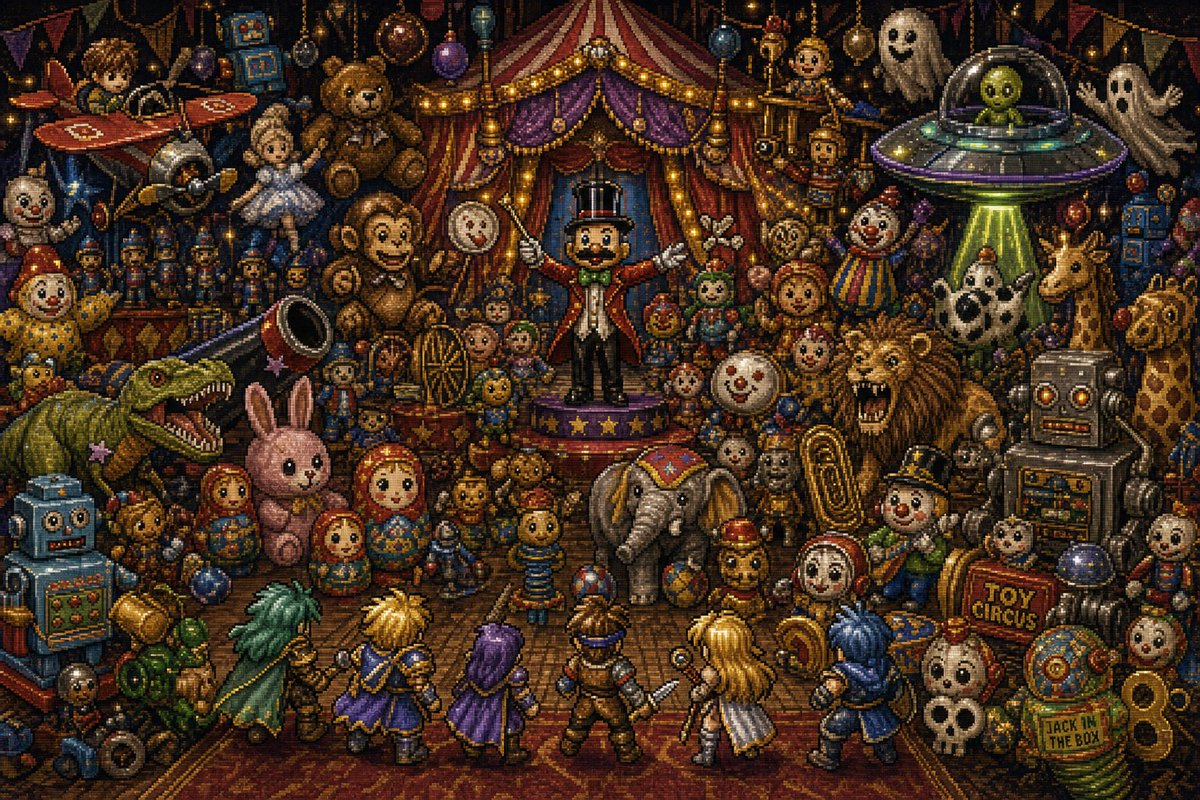
Pertempuran JRPG Sirkus Mainan
Menghasilkan adegan pertempuran JRPG bergaya pixel-art retro yang padat di dalam sirkus mainan yang kacau balau yang dipenuhi boneka, monster, robot, hantu, dan kelompok pahlawan beranggotakan enam orang.
Ini adalah contoh kasus GPT Image 2 untuk Anime & Game . Gunakan contoh siap salin di bawah ini untuk menghasilkan visual serupa, dan tinjau atribusi Awesome GPT Image 2 Prompts serta hak penggunaan komersial sebelum digunakan kembali.
Butuh seluruh rangkaian prompt? Gunakan Anime & Game Untuk contoh terkait lainnya, kunjungi pusat topik, atau buka GPT Image 2 katalog cepat untuk indeks contoh lengkap, struktur yang dapat digunakan kembali, dan atribusi sumber.
Free 1K preview
Generate one preview image instantly, no sign-up required.
3850/4000
Mengingatkan
Prompt siap salin
{
  "type": "dense 16-bit JRPG pixel-art battle scene",
  "style": "Romancing SaGa-inspired fantasy battle screen, ornate retro pixel art, high-detail sprite work, dark whimsical toy-box atmosphere, dramatic stage lighting, no modern UI, no text boxes, wide 3:2 composition",
  "setting": "a chaotic indoor toy circus packed from edge to edge with antique toys, carnival props, ghosts, robots, monsters, and circus decorations; the background is a red-and-gold striped circus tent stage with purple curtains, warm string lights, bunting, hanging baubles, and shelves overflowing with toys",
  "theme": "{argument name=\"scene theme\" default=\"chaos, toys, circus\"}",
  "centerpiece": "a ringmaster toy stands on a small star-trimmed stage at the center, wearing a black top hat, red tailcoat, white gloves, green bow tie, and holding both arms open as if commanding the battle",
  "player_party": {
    "position": "bottom foreground, backs facing the viewer in classic JRPG battle formation",
    "count": 6,
    "members": [
      "green-caped swordsman with long teal hair on the far left",
      "blond spiky-haired warrior in blue and gold",
      "purple-haired robed mage in a violet cloak",
      "brown-armored central adventurer holding a short sword",
      "long-blond-haired white-and-gold fighter",
      "blue-haired warrior in a dark blue coat on the far right"
    ]
  },
  "enemy_and_toy_crowd": {
    "position": "middle and background facing the party",
    "count_key_visible_elements": 34,
    "elements": [
      "top-left red toy airplane",
      "small silver rocket or space capsule",
      "large brown teddy bear near upper left",
      "white ballerina doll",
      "striped big-top circus tent",
      "central ringmaster toy",
      "round clock-face toy",
      "clown doll in rainbow outfit",
      "UFO with green tractor beam",
      "two white sheet ghosts",
      "small wooden puppet figures on platforms",
      "large green dinosaur with open jaws wearing a tiny party hat",
      "blue boxy robot at lower left",
      "pink plush rabbit",
      "three nested matryoshka dolls",
      "gray toy elephant with circus blanket",
      "roaring lion",
      "large silver robot on the right",
      "giraffe toy on the far right",
      "white-and-black spotted horse or cow toy",
      "gold brass tuba",
      "small skull mask or skull toy near lower right",
      "red sign reading TOY CIRCUS",
      "green jack-in-the-box sign reading JACK IN THE BOX",
      "springs and gears",
      "clockwork dolls",
      "toy soldiers",
      "balloons and ornaments",
      "small drum",
      "stacked toy blocks",
      "cymbals and brass instruments",
      "small stuffed bears",
      "rag dolls",
      "scattered balls and marbles"
    ]
  },
  "occlusion_patches": {
    "count": 8,
    "description": "eight soft brown square censor-like patches obscure selected toy faces: upper-left airplane rider, upper-left ballerina, left clown, center teddy bear, alien inside the UFO, mid-right doll, lower-right small character, and lower-center red-hooded doll"
  },
  "lighting": "warm golden carnival bulbs mixed with eerie blue shadows and a green UFO beam, high contrast, sparkling highlights on metal toys",
  "color_palette": "deep browns, burgundy, gold, purple, teal, clown primary colors, aged brass and toy-paint patina",
  "mood": "playful but ominous, overcrowded, magical, chaotic battle about to begin",
  "rendering": "crisp pixel-art mosaic texture, tiny detailed sprites, dense object placement, nostalgic Super Famicom RPG aesthetics, cinematic wide shot",
  "text_to_include": [
    "TOY CIRCUS",
    "JACK IN THE BOX"
  ],
  "negative_prompt": "photorealism, smooth vector art, modern 3D render, empty background, minimal composition, UI menus, dialogue boxes, realistic humans, low detail"
}
Variabel perintah
Placeholder argumen yang dapat diedit ditemukan dalam prompt, beserta nilai defaultnya.
Variabel
scene theme
Bawaan
chaos, toys, circus
Best for
- - Anime & Game visual exploration
- - Image generation and reference-image edits
- - Reusable briefs that keep source attribution visible
Change these parts
- - Subject, product, character, or scene
- - Aspect ratio, camera, lighting, and background
- - Brand, text, color, and output constraints
Recommended model and settings
- - Model: gpt-image-2
- - Input mode: Teks ke Gambar
- - Aspect ratio: source
- - Commercial status: review original source
How to use this prompt
- 1. Copy the prompt and preserve its structure for the first test.
- 2. Replace the subject, context, and publishing channel.
- 3. Change one camera, lighting, or style variable per iteration.
- 4. Inspect the output, source, text, and rights before reuse.
Limitations, source, and reuse cautions
- - Generated output is an editable draft, not factual, legal, or rights evidence.
- - Review the linked source, people, brands, logos, text, and third-party media before commercial use.
Diimpor dari Awesome GPT Image 2 Prompts . Atribusi diperlukan. Status penggunaan komersial adalah allowed ; tinjau hak sumber sebelum penggunaan berbayar.
Lebih banyak kasus dalam kategori ini
Diprioritaskan berdasarkan kategori, kompatibilitas mode input, kualitas, dan risiko yang lebih rendah.

Anime Girl Heterochromia Portrait
Teks ke Gambar

Hell Hound Character Sheet Infographic
Teks ke Gambar

Autumn Cozy Casual Outfit Prompt
Teks ke Gambar

Cute Focus Desk Flat Lay and Kawaii Illustration
Teks ke Gambar

Street Selfie with Cat in Matching Cap
Teks ke Gambar

Morning Bed Stretching Legs Prompt
Teks ke Gambar
Catatan penggunaan kembali dan sumber
Gunakan perintah ini dengan aman setelah melihat pratinjau kasus.
- 1.Salin perintah tersebut atau buka langsung di Dovoo dengan tombol pembuatan.
- 2.Sesuaikan variabel, rasio aspek, dan gambar referensi untuk kebutuhan Anda sendiri.
- 3.Sebelum mempublikasikan atau menggunakan untuk tujuan berbayar, verifikasi hak sumber, persyaratan atribusi, dan risiko merek atau citra.