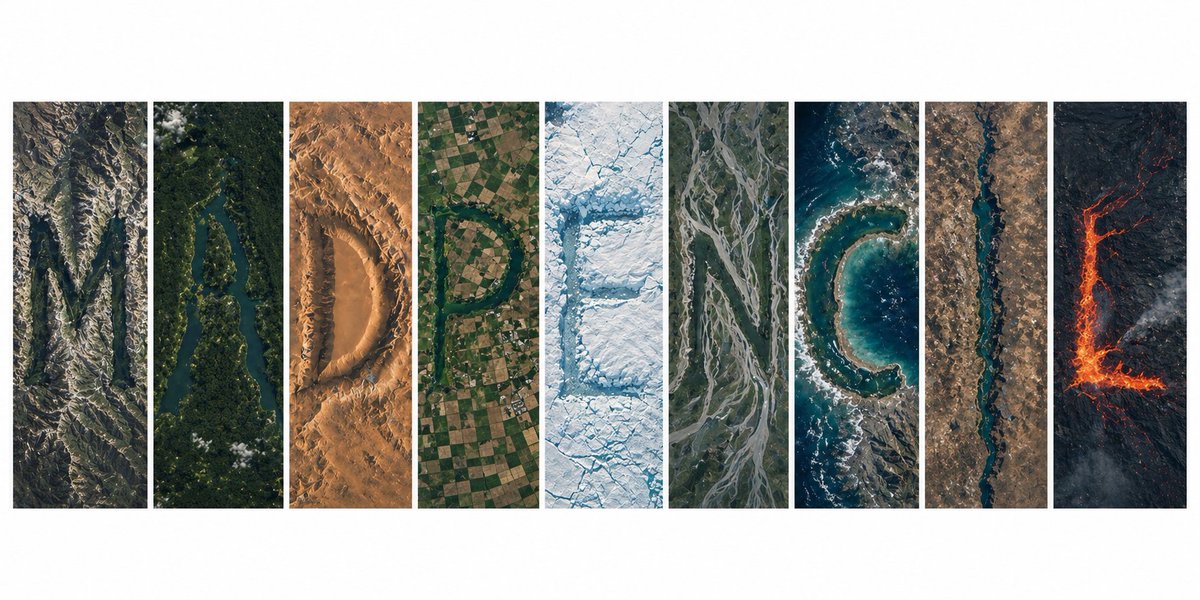
Topografi Tipografi Tampilan Satelit
Sebuah petunjuk kompleks yang menciptakan formasi kata organik dari topografi Bumi, dilihat dari perspektif satelit yang sangat realistis.
Ini adalah contoh kasus GPT Image 2 untuk Grafis & Poster . Gunakan contoh siap salin di bawah ini untuk menghasilkan visual serupa, dan tinjau atribusi Awesome GPT Image 2 Prompts serta hak penggunaan komersial sebelum digunakan kembali.
Butuh seluruh rangkaian prompt? Gunakan Grafis & Poster Untuk contoh terkait lainnya, kunjungi pusat topik, atau buka GPT Image 2 katalog cepat untuk indeks contoh lengkap, struktur yang dapat digunakan kembali, dan atribusi sumber.
Free 1K preview
Generate one preview image instantly, no sign-up required.
1819/4000
Mengingatkan
Prompt siap salin
Ultra-realistic satellite view from space, a clean modern editorial layout of 9 vertical panels arranged side-by-side on a white background, together forming the word "{argument name="word" default="MADPENCIL"}", each panel containing one letter created entirely from natural Earth topography, no artificial text overlays: Panel 1 (M): rugged mountain ranges and deep valleys forming a sharp, angular "M", rocky textures, high elevation shadows Panel 2 (A): winding river cutting through dense green forest forming an organic "A", strong contrast between water and vegetation Panel 3 (D): desert dunes and wind-sculpted sand patterns shaping a smooth "D", warm tones, soft gradients Panel 4 (P): agricultural farmland grids and patchwork fields forming a structured "P", geometric patterns clearly visible Panel 5 (E): glacier and ice formations carving a crisp "E", bright whites and icy blues, fractured textures Panel 6 (N): braided river system across floodplains forming "N", branching channels with natural flow lines Panel 7 (C): coastal shoreline and ocean edge shaping a curved "C", waves and sediment gradients visible Panel 8 (I): narrow canyon or straight river cutting through terrain forming a minimal "I", strong vertical emphasis Panel 9 (L): volcanic terrain with lava flows forming an "L", dark rock with glowing red/orange lava accents top-down satellite perspective, NASA Earth observation style, hyper-detailed textures, realistic geography, consistent scale and lighting across all panels, minimal clouds, high contrast, sharp focus, subtle atmospheric haze, natural color grading, ultra high resolution 8K, clean spacing between panels, modern gallery-style composition, visually cohesive but each panel distinctly different biome, letters clearly readable yet organically integrated into terrainVariabel perintah
Placeholder argumen yang dapat diedit ditemukan dalam prompt, beserta nilai defaultnya.
Variabel
word
Bawaan
MADPENCIL
Best for
- - Grafis & Poster visual exploration
- - Image generation and reference-image edits
- - Reusable briefs that keep source attribution visible
Change these parts
- - Subject, product, character, or scene
- - Aspect ratio, camera, lighting, and background
- - Brand, text, color, and output constraints
Recommended model and settings
- - Model: gpt-image-2
- - Input mode: Teks ke Gambar
- - Aspect ratio: source
- - Commercial status: review original source
How to use this prompt
- 1. Copy the prompt and preserve its structure for the first test.
- 2. Replace the subject, context, and publishing channel.
- 3. Change one camera, lighting, or style variable per iteration.
- 4. Inspect the output, source, text, and rights before reuse.
Limitations, source, and reuse cautions
- - Generated output is an editable draft, not factual, legal, or rights evidence.
- - Review the linked source, people, brands, logos, text, and third-party media before commercial use.
Diimpor dari Awesome GPT Image 2 Prompts . Atribusi diperlukan. Status penggunaan komersial adalah allowed ; tinjau hak sumber sebelum penggunaan berbayar.
Lebih banyak kasus dalam kategori ini
Diprioritaskan berdasarkan kategori, kompatibilitas mode input, kualitas, dan risiko yang lebih rendah.






Catatan penggunaan kembali dan sumber
Gunakan perintah ini dengan aman setelah melihat pratinjau kasus.
- 1.Salin perintah tersebut atau buka langsung di Dovoo dengan tombol pembuatan.
- 2.Sesuaikan variabel, rasio aspek, dan gambar referensi untuk kebutuhan Anda sendiri.
- 3.Sebelum mempublikasikan atau menggunakan untuk tujuan berbayar, verifikasi hak sumber, persyaratan atribusi, dan risiko merek atau citra.