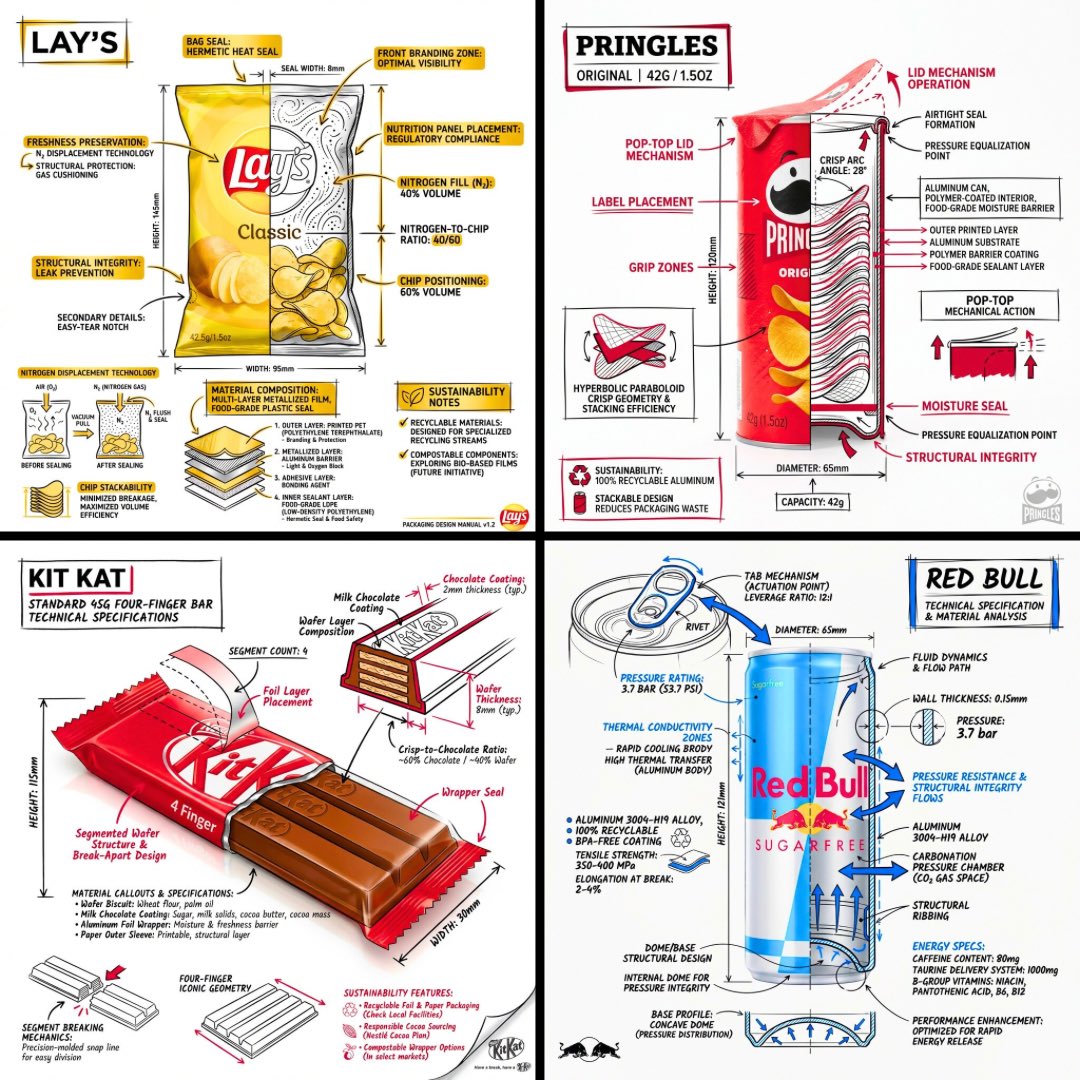
Infografis Produk Teknik Rekayasa
Sebuah prompt untuk membuat infografis teknis bergaya arsitektur yang menempatkan anotasi dan diagram di atas render produk realistis.
Ini adalah contoh kasus GPT Image 2 untuk Grafis & Poster . Gunakan contoh siap salin di bawah ini untuk menghasilkan visual serupa, dan tinjau atribusi Awesome GPT Image 2 Prompts serta hak penggunaan komersial sebelum digunakan kembali.
Butuh seluruh rangkaian prompt? Gunakan Grafis & Poster Untuk contoh terkait lainnya, kunjungi pusat topik, atau buka GPT Image 2 katalog cepat untuk indeks contoh lengkap, struktur yang dapat digunakan kembali, dan atribusi sumber.
Free 1K preview
Generate one preview image instantly, no sign-up required.
1837/4000
Mengingatkan
Prompt siap salin
Design a branded technical infographic of a {argument name="subject" default="[SNACK]"} that overlays architectural-style annotations onto a realistic product photograph or photoreal render. Place everything on a pure white studio background, with black ink linework as the primary technical language and strategic {argument name="brand color" default="[BRAND COLOR]"} accents (engineer-sketch energy on premium packaging).

Layer the following annotations on top of the product:
• Labels calling out every key component
• An internal cross-section that reveals layering, structure, or internal design
• Dimensions, measurements, and product specifications
• Material callouts listing composition and quantities
• Arrows pointing to primary features and structural details
• A small schematic or sectional diagram showing mechanical / design logic
• Sustainability callouts
Set the product name in bold font inside a hand-drawn annotation box with an accent-color border, anchored in an upper corner as the title.

Style and layout rules:
• Keep the realistic product fully visible underneath all the linework
• Annotations should read as sketched, technical, and architectural
• About 70-80% black linework for primary technical lines, 20-30% {argument name="accent color" default="[BRAND COLOR]"} for accent highlights
• Balanced composition with generous negative space
• Educational food-engineering tone with premium brand polish
• Drop a subtle brand logo mark in one corner

Visual style: minimal technical-illustration aesthetic, black linework with accent color over realistic imagery, precise but with a slightly hand-drawn feel.
Color palette: white background, black annotation lines and text, [BRAND COLOR] reserved for accents and key callouts only.
Output: 1080×1080, ultra-crisp, optimized for social feeds, no watermark.
Variabel perintah
Placeholder argumen yang dapat diedit ditemukan dalam prompt, beserta nilai defaultnya.
Variabel
subject
Bawaan
[SNACK]
Variabel
brand color
Bawaan
[BRAND COLOR]
Variabel
accent color
Bawaan
[BRAND COLOR]
Best for
- - Grafis & Poster visual exploration
- - Image generation and reference-image edits
- - Reusable briefs that keep source attribution visible
Change these parts
- - Subject, product, character, or scene
- - Aspect ratio, camera, lighting, and background
- - Brand, text, color, and output constraints
Recommended model and settings
- - Model: gpt-image-2
- - Input mode: Teks ke Gambar
- - Aspect ratio: source
- - Commercial status: review original source
How to use this prompt
- 1. Copy the prompt and preserve its structure for the first test.
- 2. Replace the subject, context, and publishing channel.
- 3. Change one camera, lighting, or style variable per iteration.
- 4. Inspect the output, source, text, and rights before reuse.
Limitations, source, and reuse cautions
- - Generated output is an editable draft, not factual, legal, or rights evidence.
- - Review the linked source, people, brands, logos, text, and third-party media before commercial use.
Diimpor dari Awesome GPT Image 2 Prompts . Atribusi diperlukan. Status penggunaan komersial adalah allowed ; tinjau hak sumber sebelum penggunaan berbayar.
Related prompt packs
Lebih banyak kasus dalam kategori ini
Diprioritaskan berdasarkan kategori, kompatibilitas mode input, kualitas, dan risiko yang lebih rendah.

Tuxedo Cat Photo and Line Art Diptych
Teks ke Gambar

Studio Portrait of Woman with Sunglasses
Teks ke Gambar

Matte Black B.AI Keyboard Keycap
Teks ke Gambar

Luxury Travel Fashion Portrait Prompt
Teks ke Gambar

Autumn Cozy Casual Outfit Prompt
Teks ke Gambar

Gray Denim Lace-Up Top Prompt for GPT Image 2
Teks ke Gambar
Catatan penggunaan kembali dan sumber
Gunakan perintah ini dengan aman setelah melihat pratinjau kasus.
- 1.Salin perintah tersebut atau buka langsung di Dovoo dengan tombol pembuatan.
- 2.Sesuaikan variabel, rasio aspek, dan gambar referensi untuk kebutuhan Anda sendiri.
- 3.Sebelum mempublikasikan atau menggunakan untuk tujuan berbayar, verifikasi hak sumber, persyaratan atribusi, dan risiko merek atau citra.