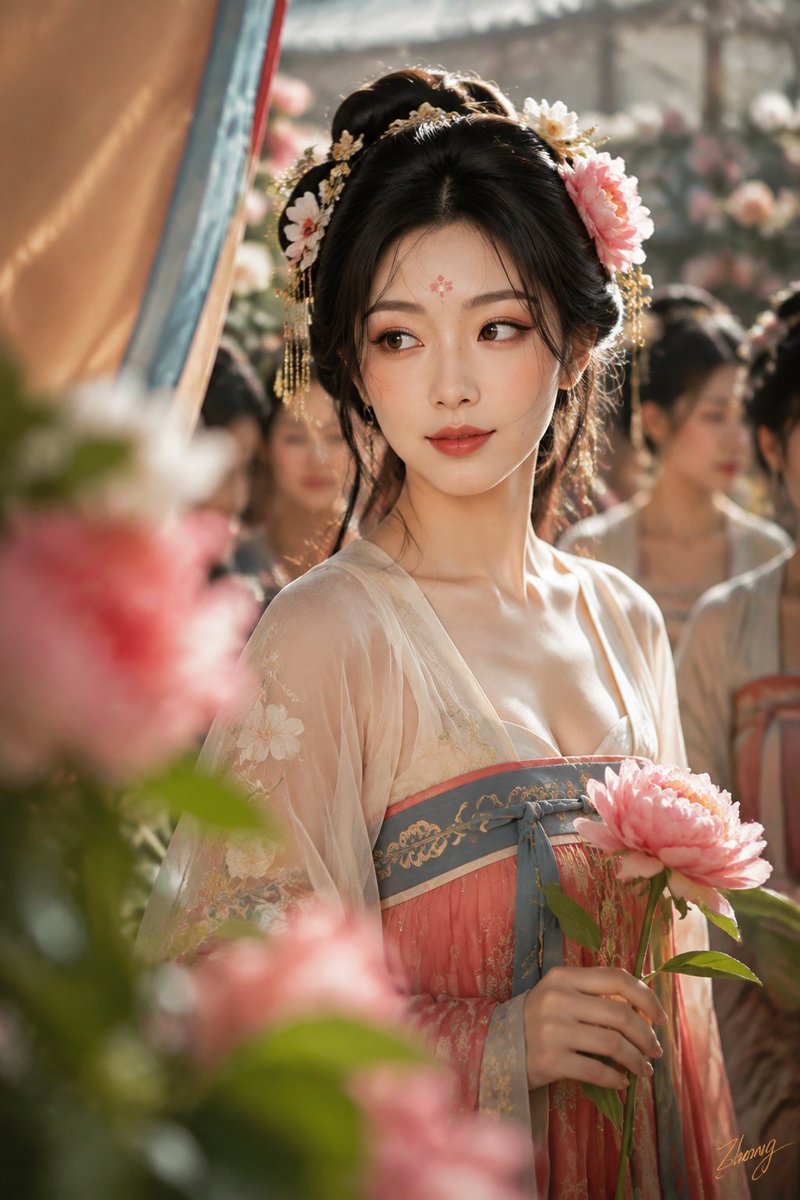
Tang Dynasty Realistic Lifestyle Scene
A comprehensive prompt for generating a series of realistic Tang Dynasty lifestyle photographs, focusing on specific cultural activities and authentic character details.
Ini adalah contoh kasus GPT Image 2 untuk Potret & Karakter . Gunakan contoh siap salin di bawah ini untuk menghasilkan visual serupa, dan tinjau atribusi Awesome GPT Image 2 Prompts serta hak penggunaan komersial sebelum digunakan kembali.
Free 1K preview
Generate one preview image instantly, no sign-up required.
Free text preview doesn’t preserve reference-image consistency.
Mengingatkan
Prompt siap salin
Facial Identity: Use the provided facial identity as the sole facial reference. All four photos must consistently match the same facial proportions, skin tone, age perception, and overall identity. Body: An {argument name="age" default="adult female in her early 20s"}. Use the provided body reference as the sole reference for body proportions, maintaining realistic anatomy, natural curves, and skin texture. Themes: {argument name="scenarios" default="Four scenes of Tang Dynasty entertainment"}: Flower competition at Qujiang, a Chang'an wine shop, after a performance at a music hall, and after a polo match. Subjects: Generate four separate vertical 2:3 color realistic photos, no collages. Keep the character consistent across the four photos, but change hairstyles, costumes, expressions, and photographic language to fit Tang Dynasty aesthetics for each activity. First: 'Winning Reveal among Flowers' - Close-up shot through peonies. High-turn bun, asymmetrical floral hairpin, modern-aesthetic Tang-style chest-high Ruqun in apricot white, slate blue, and peony red. Second: 'Seventh Round at the Wine Shop' - Sitting at a low table in a Hu-style wine shop, laughing with friends. Wu-man bun, peacock blue brocade, vermilion short-sleeved top, and deep crimson skirt. Documentary 35mm perspective. Third: 'Breathing after the Dance' - Pausing by a silk curtain to catch breath. High dance-bun with a loose strand. Dark red and peacock green dance clothes with opaque inner layers. Fourth: 'Turning back after Polo' - Female rider walking to the rest area. Double-screw riding bun, dark red inner layer, slate blue narrow-sleeved robe, dark split skirt-trousers, leather boots. 135mm long lens with 1/40s shutter speed for motion blur. Lighting: Broad natural light or hooded indoor lamps to illuminate the face continuously. Texture: Real color photography, preserving pores, fine hair, natural flush, fabric weight, and slight film grain. Lower right corner signature: '{argument name="signature" default="Zhong"}'. Negative Prompts: Collages, multiple frames, drifting identity, modern ponytails, cheap costumes, plastic skin, black and white, modern settings.Variabel perintah
Placeholder argumen yang dapat diedit ditemukan dalam prompt, beserta nilai defaultnya.
Best for
- - Potret & Karakter visual exploration
- - Image generation and reference-image edits
- - Reusable briefs that keep source attribution visible
Change these parts
- - Subject, product, character, or scene
- - Aspect ratio, camera, lighting, and background
- - Brand, text, color, and output constraints
Recommended model and settings
- - Model: gpt-image-2
- - Input mode: Gambar ke Gambar
- - Aspect ratio: source
- - Commercial status: review original source
How to use this prompt
- 1. Copy the prompt and preserve its structure for the first test.
- 2. Replace the subject, context, and publishing channel.
- 3. Change one camera, lighting, or style variable per iteration.
- 4. Inspect the output, source, text, and rights before reuse.
Limitations, source, and reuse cautions
- - Generated output is an editable draft, not factual, legal, or rights evidence.
- - Review the linked source, people, brands, logos, text, and third-party media before commercial use.
Lebih banyak kasus dalam kategori ini
Diprioritaskan berdasarkan kategori, kompatibilitas mode input, kualitas, dan risiko yang lebih rendah.




Catatan penggunaan kembali dan sumber
Gunakan perintah ini dengan aman setelah melihat pratinjau kasus.
- 1.Salin perintah tersebut atau buka langsung di Dovoo dengan tombol pembuatan.
- 2.Sesuaikan variabel, rasio aspek, dan gambar referensi untuk kebutuhan Anda sendiri.
- 3.Sebelum mempublikasikan atau menggunakan untuk tujuan berbayar, verifikasi hak sumber, persyaratan atribusi, dan risiko merek atau citra.