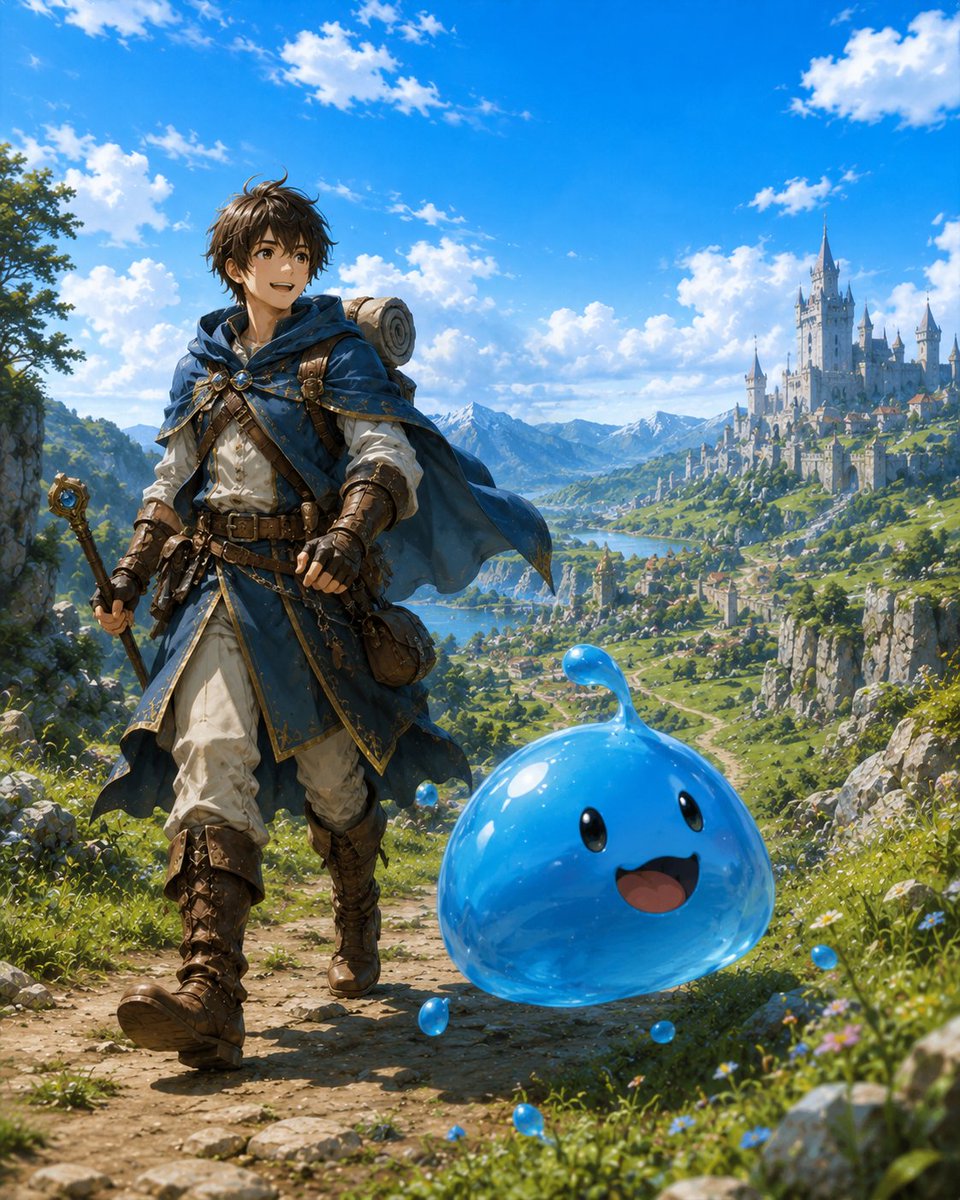
Adventurer and Tamed Slime Journey
A bright anime fantasy scene showing a young adventurer walking through a scenic valley with a cheerful blue slime companion.
Ini adalah contoh kasus GPT Image 2 untuk Anime & Game . Gunakan contoh siap salin di bawah ini untuk menghasilkan visual serupa, dan tinjau atribusi Awesome GPT Image 2 Prompts serta hak penggunaan komersial sebelum digunakan kembali.
Butuh seluruh rangkaian prompt? Gunakan Anime & Game Untuk contoh terkait lainnya, kunjungi pusat topik, atau buka GPT Image 2 katalog cepat untuk indeks contoh lengkap, struktur yang dapat digunakan kembali, dan atribusi sumber.
Free 1K preview
Generate one preview image instantly, no sign-up required.
1541/4000
Mengingatkan
Prompt siap salin
Create a vibrant anime-style fantasy adventure illustration of {argument name="character name" default="a young male adventurer"} traveling with a tamed slime companion. The scene is a sunlit mountain path in a lush high-fantasy valley, vertical 4:5 composition. In the left foreground, show the adventurer walking forward with an excited smile, looking toward the right and slightly upward, with tousled dark brown hair, warm brown eyes, a blue hooded cloak fluttering in the wind, white tunic, layered leather belts and pouches, brown gloves, tall worn leather boots, a rolled bedroll on his back, and a staff or wand in one hand. In the right foreground, place exactly 1 large translucent glossy blue slime companion, floating or bouncing beside him, with a rounded teardrop body, a small curved droplet antenna on top, 2 black oval eyes, and 1 open happy smiling mouth. Add exactly 6 tiny blue slime droplets around it: one near the adventurer’s waist, one beside the large slime’s left lower edge, one on the path in front, one near the grass at the bottom, one to the right in the wildflowers, and one behind the slime. The background should show a sweeping valley with green hills, cliffs, a river or lake, distant snowy mountains, and a grand white fairytale castle city with many towers on the right hillside. Use a bright blue sky with scattered white clouds, sparkling midday sunlight, saturated colors, detailed painterly anime rendering, crisp character detail, atmospheric depth, joyful adventurous mood, no text, no watermark.Variabel perintah
Placeholder argumen yang dapat diedit ditemukan dalam prompt, beserta nilai defaultnya.
Variabel
character name
Bawaan
a young male adventurer
Best for
- - Anime & Game visual exploration
- - Image generation and reference-image edits
- - Reusable briefs that keep source attribution visible
Change these parts
- - Subject, product, character, or scene
- - Aspect ratio, camera, lighting, and background
- - Brand, text, color, and output constraints
Recommended model and settings
- - Model: gpt-image-2
- - Input mode: Teks ke Gambar
- - Aspect ratio: source
- - Commercial status: review original source
How to use this prompt
- 1. Copy the prompt and preserve its structure for the first test.
- 2. Replace the subject, context, and publishing channel.
- 3. Change one camera, lighting, or style variable per iteration.
- 4. Inspect the output, source, text, and rights before reuse.
Limitations, source, and reuse cautions
- - Generated output is an editable draft, not factual, legal, or rights evidence.
- - Review the linked source, people, brands, logos, text, and third-party media before commercial use.
Diimpor dari Awesome GPT Image 2 Prompts . Atribusi diperlukan. Status penggunaan komersial adalah allowed ; tinjau hak sumber sebelum penggunaan berbayar.
Lebih banyak kasus dalam kategori ini
Diprioritaskan berdasarkan kategori, kompatibilitas mode input, kualitas, dan risiko yang lebih rendah.
Catatan penggunaan kembali dan sumber
Gunakan perintah ini dengan aman setelah melihat pratinjau kasus.
- 1.Salin perintah tersebut atau buka langsung di Dovoo dengan tombol pembuatan.
- 2.Sesuaikan variabel, rasio aspek, dan gambar referensi untuk kebutuhan Anda sendiri.
- 3.Sebelum mempublikasikan atau menggunakan untuk tujuan berbayar, verifikasi hak sumber, persyaratan atribusi, dan risiko merek atau citra.