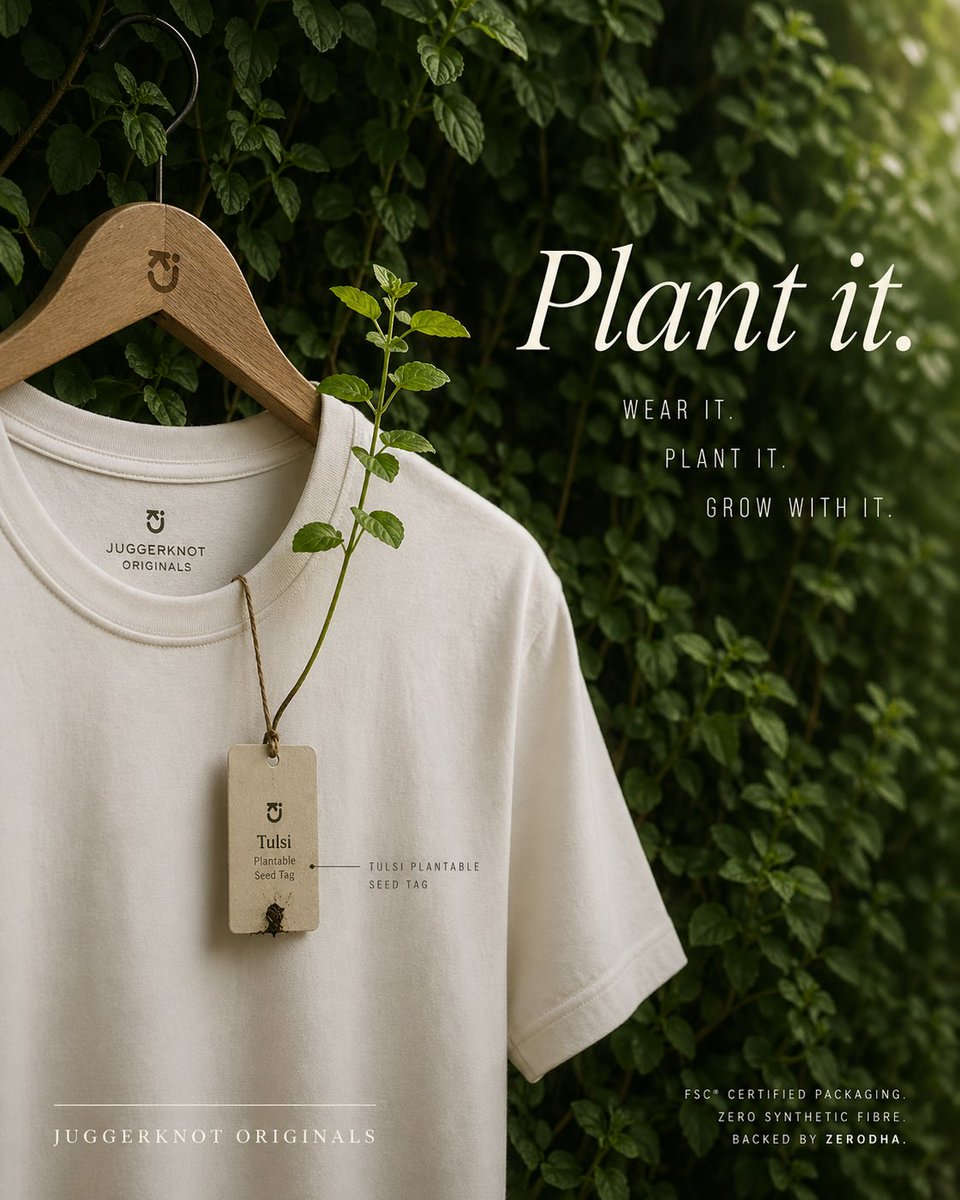
Iklan Label yang Dapat Ditanam pada Kaos Berkelanjutan
Iklan fesyen vertikal premium yang menampilkan kaos minimalis dengan label benih yang dapat ditanam dan tumbuh menjadi kecambah tulsi, ideal untuk branding pakaian berkelanjutan dan visual kampanye.
Ini adalah contoh kasus GPT Image 2 untuk Produk & Komersial . Gunakan contoh siap salin di bawah ini untuk menghasilkan visual serupa, dan tinjau atribusi Awesome GPT Image 2 Prompts serta hak penggunaan komersial sebelum digunakan kembali.
Butuh seluruh rangkaian prompt? Gunakan Produk & Komersial Untuk contoh terkait lainnya, kunjungi pusat topik, atau buka GPT Image 2 katalog cepat untuk indeks contoh lengkap, struktur yang dapat digunakan kembali, dan atribusi sumber.
Free 1K preview
Generate one preview image instantly, no sign-up required.
1912/4000
Mengingatkan
Prompt siap salin
A premium eco-conscious fashion advertisement, shot as a refined editorial product photo. A single off-white or natural cream crew-neck T-shirt hangs on a smooth wooden hanger with a black metal hook, placed against a lush wall of dense green leaves and climbing vines. The hanger has a small minimalist brand monogram engraved near the neck. The shirt is shown from the upper torso down to part of the hem, slightly angled, with soft natural folds and high-quality cotton texture. Printed inside the collar is a minimalist brand mark and the text "JUGGERKNOT ORIGINALS". Hanging from the neckline is 1 rectangular recycled-paper seed tag tied with rustic brown twine; the tag reads "Tulsi" and "Plantable Seed Tag" with a tiny sprouting seed detail near the bottom. From the tag, 1 real tulsi plant stem grows upward across the front of the shirt, with several fresh green leaves, visually demonstrating that the tag is plantable. Add a small fine-label annotation near the tag reading "TULSI PLANTABLE SEED TAG". On the right side, large elegant white serif typography says {argument name="headline text" default="Plant it."}. Beneath it, place 3 stacked lines of narrow uppercase sans-serif copy: "WEAR IT.", "PLANT IT.", and "GROW WITH IT.". At the lower left, add the brand name in spaced uppercase serif text: {argument name="brand name" default="JUGGERKNOT ORIGINALS"}, with a thin horizontal line above it. At the lower right, add 3 lines of small uppercase sans-serif text: "FSC® CERTIFIED PACKAGING.", "ZERO SYNTHETIC FIBRE", and "BACKED BY ZERODHA.". Use soft diffused daylight, shallow depth of field, moody green-and-cream color grading, luxury sustainable-brand aesthetics, clean composition, vertical poster layout, subtle shadows, and a calm organic atmosphere. Keep the design minimal, premium, and photorealistic, with the shirt occupying the left half and the typography balanced on the right.Variabel perintah
Placeholder argumen yang dapat diedit ditemukan dalam prompt, beserta nilai defaultnya.
Variabel
headline text
Bawaan
Plant it.
Variabel
brand name
Bawaan
JUGGERKNOT ORIGINALS
Best for
- - Produk & Komersial visual exploration
- - Image generation and reference-image edits
- - Reusable briefs that keep source attribution visible
Change these parts
- - Subject, product, character, or scene
- - Aspect ratio, camera, lighting, and background
- - Brand, text, color, and output constraints
Recommended model and settings
- - Model: gpt-image-2
- - Input mode: Teks ke Gambar
- - Aspect ratio: source
- - Commercial status: review original source
How to use this prompt
- 1. Copy the prompt and preserve its structure for the first test.
- 2. Replace the subject, context, and publishing channel.
- 3. Change one camera, lighting, or style variable per iteration.
- 4. Inspect the output, source, text, and rights before reuse.
Limitations, source, and reuse cautions
- - Generated output is an editable draft, not factual, legal, or rights evidence.
- - Review the linked source, people, brands, logos, text, and third-party media before commercial use.
Diimpor dari Awesome GPT Image 2 Prompts . Atribusi diperlukan. Status penggunaan komersial adalah allowed ; tinjau hak sumber sebelum penggunaan berbayar.
Lebih banyak kasus dalam kategori ini
Diprioritaskan berdasarkan kategori, kompatibilitas mode input, kualitas, dan risiko yang lebih rendah.






Catatan penggunaan kembali dan sumber
Gunakan perintah ini dengan aman setelah melihat pratinjau kasus.
- 1.Salin perintah tersebut atau buka langsung di Dovoo dengan tombol pembuatan.
- 2.Sesuaikan variabel, rasio aspek, dan gambar referensi untuk kebutuhan Anda sendiri.
- 3.Sebelum mempublikasikan atau menggunakan untuk tujuan berbayar, verifikasi hak sumber, persyaratan atribusi, dan risiko merek atau citra.