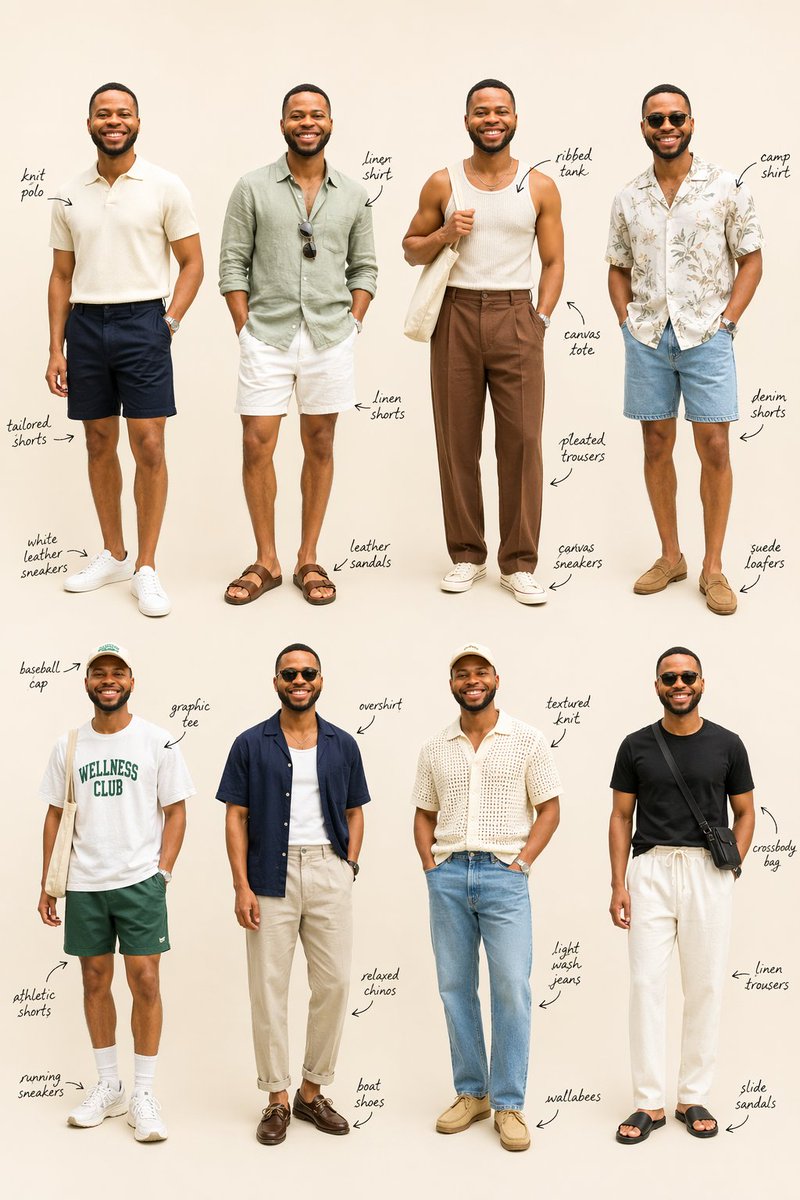
Tampilan Busana Pria Musim Panas (Grid Lookbook)
Prompt ini mengubah satu potret referensi menjadi papan penataan gaya busana pria berisi 8 tampilan dengan variasi pakaian seluruh tubuh dan label item tulisan tangan, yang berguna untuk visualisasi lemari pakaian dan perencanaan pakaian editorial.
Ini adalah contoh kasus GPT Image 2 untuk Mode & Kecantikan . Gunakan contoh siap salin di bawah ini untuk menghasilkan visual serupa, dan tinjau atribusi Awesome GPT Image 2 Prompts serta hak penggunaan komersial sebelum digunakan kembali.
Free 1K preview
Generate one preview image instantly, no sign-up required.
Free text preview doesn’t preserve reference-image consistency.
Mengingatkan
Prompt siap salin
Using the provided reference image as the same person and body base, transform it into a clean men's summer fashion lookbook on a plain warm beige studio background. Keep the subject recognizable, Show every face clearly with natural, detailed facial features, and generate 8 full-body outfit variations arranged in a 4-by-2 editorial grid. Add handwritten stylist notes with arrows labeling the key clothing items for each outfit.

Top row look 1: cream knit polo, navy tailored shorts, white leather sneakers.
Top row look 2: sage green linen shirt, white linen shorts, brown leather sandals, sunglasses hanging from the shirt.
Top row look 3: off-white ribbed tank, brown pleated trousers, white canvas sneakers, cream canvas tote bag over one shoulder.
Top row look 4: light camp-collar floral shirt, light blue denim shorts, tan suede loafers.
Bottom row look 5: white graphic tee with green "WELLNESS CLUB" text, dark green athletic shorts, white running sneakers, white crew socks, light baseball cap, canvas tote bag.
Bottom row look 6: navy short-sleeve overshirt worn open over a white tank, beige relaxed chinos, dark brown boat shoes.
Bottom row look 7: cream textured knit short-sleeve shirt, light wash jeans, tan wallabees, light cap.
Bottom row look 8: black fitted tee, white linen drawstring trousers, black slide sandals, black crossbody bag.

Make it look like a polished fashion styling guide with realistic proportions, soft even lighting, minimal shadows, and elegant handwritten annotations beside each person.
Best for
- - Mode & Kecantikan visual exploration
- - Image generation and reference-image edits
- - Reusable briefs that keep source attribution visible
Change these parts
- - Subject, product, character, or scene
- - Aspect ratio, camera, lighting, and background
- - Brand, text, color, and output constraints
Recommended model and settings
- - Model: gpt-image-2
- - Input mode: Gambar ke Gambar
- - Aspect ratio: source
- - Commercial status: review original source
How to use this prompt
- 1. Copy the prompt and preserve its structure for the first test.
- 2. Replace the subject, context, and publishing channel.
- 3. Change one camera, lighting, or style variable per iteration.
- 4. Inspect the output, source, text, and rights before reuse.
Limitations, source, and reuse cautions
- - Generated output is an editable draft, not factual, legal, or rights evidence.
- - Review the linked source, people, brands, logos, text, and third-party media before commercial use.
Lebih banyak kasus dalam kategori ini
Diprioritaskan berdasarkan kategori, kompatibilitas mode input, kualitas, dan risiko yang lebih rendah.






Catatan penggunaan kembali dan sumber
Gunakan perintah ini dengan aman setelah melihat pratinjau kasus.
- 1.Salin perintah tersebut atau buka langsung di Dovoo dengan tombol pembuatan.
- 2.Sesuaikan variabel, rasio aspek, dan gambar referensi untuk kebutuhan Anda sendiri.
- 3.Sebelum mempublikasikan atau menggunakan untuk tujuan berbayar, verifikasi hak sumber, persyaratan atribusi, dan risiko merek atau citra.