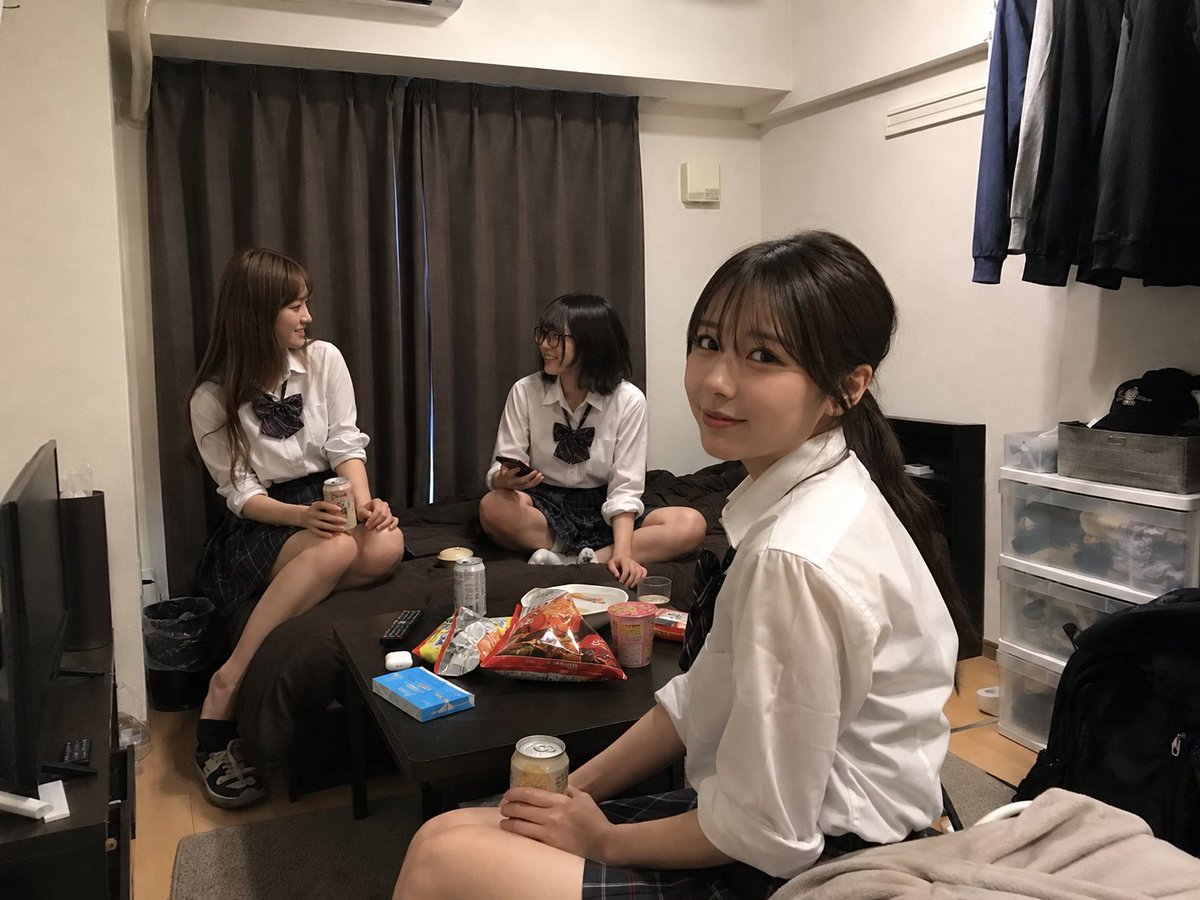
Transformasi Ruang Nongkrong Mahasiswa
Mengubah foto ruangan yang diunggah menjadi adegan nongkrong santai yang realistis dengan tiga mahasiswa berpakaian seragam dan tambahan camilan.
Ini adalah contoh kasus GPT Image 2 untuk Interior & Arsitektur . Gunakan contoh siap salin di bawah ini untuk menghasilkan visual serupa, dan tinjau atribusi Awesome GPT Image 2 Prompts serta hak penggunaan komersial sebelum digunakan kembali.
Free 1K preview
Generate one preview image instantly, no sign-up required.
Free text preview doesn’t preserve reference-image consistency.
Mengingatkan
Prompt siap salin
Using REFERENCE_0 as the room base, create a natural realistic photo as if this room has become a casual hangout for {argument name="number of students" default="three"} {argument name="student type" default="20-year-old female university students"}. Keep the room layout, camera angle, furniture, curtains, bed, table, storage drawers, hanging clothes, lighting, and lived-in atmosphere from the uploaded room photo unchanged as much as possible.

Add exactly 3 people: one sitting on the left edge of the bed holding a canned drink, one sitting cross-legged on the bed near the center holding a smartphone, and one in the foreground on the right sitting near the table/bed edge holding a canned drink and turned toward the others. Dress them in coordinated {argument name="outfit style" default="Japanese school-uniform-inspired white shirts with dark plaid skirts and ribbon ties"}. Make them look relaxed, chatting, and comfortable in the room; vary their hairstyles and poses naturally.

Add casual hangout clutter on the table: exactly 7 visible snack/drink items — 2 canned drinks, 1 large open snack bag, 1 cup noodle container, 1 plate or small dish, 1 colorful snack package, and 1 small boxed item — while preserving existing objects such as the remote, blue box, and earbuds where plausible. Keep the result photorealistic, unposed, and like a spontaneous phone snapshot. Faces may be anonymized/blurred for privacy. Do not make it look like a studio shoot, illustration, cosplay poster, or heavily edited composite.
Variabel perintah
Placeholder argumen yang dapat diedit ditemukan dalam prompt, beserta nilai defaultnya.
Best for
- - Interior & Arsitektur visual exploration
- - Image generation and reference-image edits
- - Reusable briefs that keep source attribution visible
Change these parts
- - Subject, product, character, or scene
- - Aspect ratio, camera, lighting, and background
- - Brand, text, color, and output constraints
Recommended model and settings
- - Model: gpt-image-2
- - Input mode: Gambar ke Gambar
- - Aspect ratio: source
- - Commercial status: review original source
How to use this prompt
- 1. Copy the prompt and preserve its structure for the first test.
- 2. Replace the subject, context, and publishing channel.
- 3. Change one camera, lighting, or style variable per iteration.
- 4. Inspect the output, source, text, and rights before reuse.
Limitations, source, and reuse cautions
- - Generated output is an editable draft, not factual, legal, or rights evidence.
- - Review the linked source, people, brands, logos, text, and third-party media before commercial use.
Lebih banyak kasus dalam kategori ini
Diprioritaskan berdasarkan kategori, kompatibilitas mode input, kualitas, dan risiko yang lebih rendah.






Catatan penggunaan kembali dan sumber
Gunakan perintah ini dengan aman setelah melihat pratinjau kasus.
- 1.Salin perintah tersebut atau buka langsung di Dovoo dengan tombol pembuatan.
- 2.Sesuaikan variabel, rasio aspek, dan gambar referensi untuk kebutuhan Anda sendiri.
- 3.Sebelum mempublikasikan atau menggunakan untuk tujuan berbayar, verifikasi hak sumber, persyaratan atribusi, dan risiko merek atau citra.