Cinematic Stadium Location Board
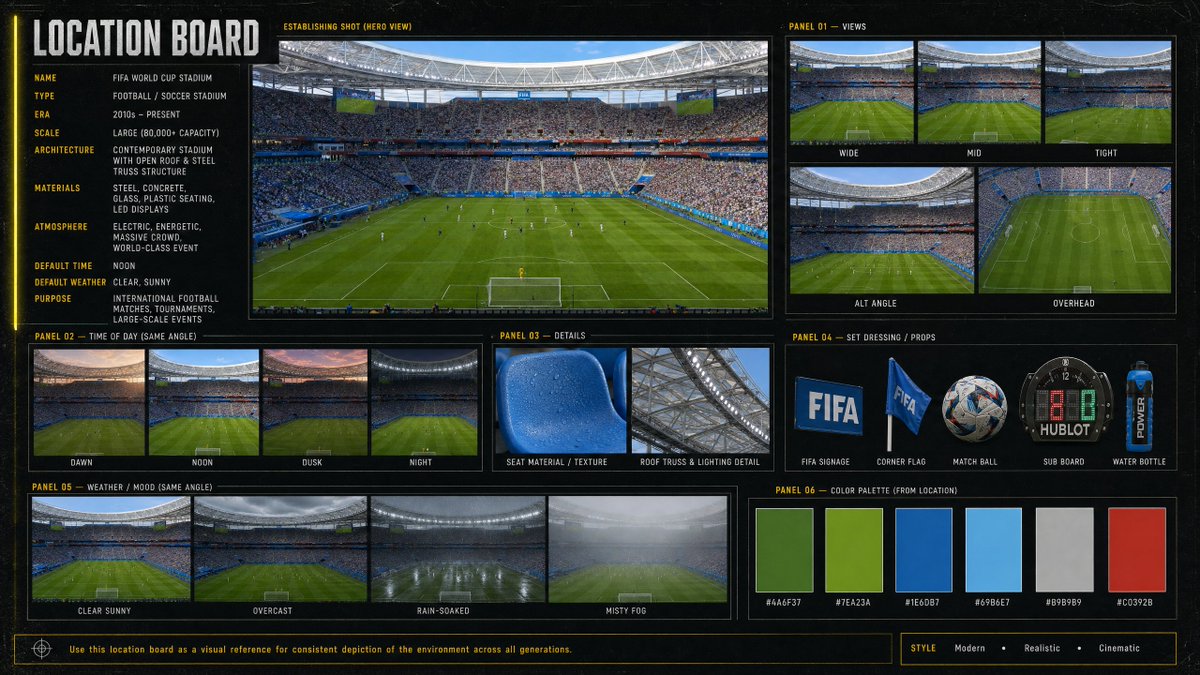
Generates a professional visual reference board for a modern World Cup soccer stadium with views, lighting, weather, props, details, and palette.
Ini adalah contoh kasus GPT Image 2 untuk Grafis & Poster . Gunakan contoh siap salin di bawah ini untuk menghasilkan visual serupa, dan tinjau atribusi Awesome GPT Image 2 Prompts serta hak penggunaan komersial sebelum digunakan kembali.
Butuh seluruh rangkaian prompt? Gunakan Grafis & Poster Untuk contoh terkait lainnya, kunjungi pusat topik, atau buka GPT Image 2 katalog cepat untuk indeks contoh lengkap, struktur yang dapat digunakan kembali, dan atribusi sumber.
Free 1K preview
Generate one preview image instantly, no sign-up required.
3379/4000
Mengingatkan
Prompt siap salin
Goal: Create a cinematic, information-dense location board for a {argument name="venue name" default="FIFA World Cup Stadium"}, designed as a professional film/game environment reference sheet.

Canvas: Wide 16:9 horizontal board with a dark charcoal/black textured background, thin yellow guide lines, subtle grid marks, and a modern sports-broadcast production design feel. Use crisp photo-realistic stadium imagery inside bordered panels, with condensed uppercase typography in white and yellow.

Main title: Large vertical-left header reading “LOCATION BOARD”.

Left information column: Include 10 labeled metadata rows: Name: {argument name="venue name" default="FIFA World Cup Stadium"}; Type: Football / Soccer Stadium; Era: 2010s – Present; Scale: Large (80,000+ capacity); Architecture: Contemporary stadium with open roof & steel truss structure; Materials: Steel, concrete, glass, plastic seating, LED displays; Atmosphere: Electric, energetic, massive crowd, world-class event; Default time: Noon; Default weather: Clear, sunny; Purpose: International football matches, tournaments, large-scale events.

Central hero panel: One large establishing shot labeled “ESTABLISHING SHOT (HERO VIEW)”, showing a packed modern soccer stadium from behind one goal, lush green pitch, players tiny on the field, bright daylight, steel roof ring, giant screens, blue seating accents, and a dense crowd.

Panel 01 — Views: Show exactly 5 view thumbnails labeled Wide, Mid, Tight, Alt Angle, and Overhead. Wide shows the full field and stands; Mid is closer to the pitch and crowd; Tight focuses more on field/crowd detail; Alt Angle is a diagonal stadium view; Overhead is a high top-down view of the pitch.

Panel 02 — Time of Day (Same Angle): Show exactly 4 thumbnails labeled Dawn, Noon, Dusk, and Night, each using the same stadium angle with different lighting conditions.

Panel 03 — Details: Show exactly 2 close-up detail images labeled Seat Material / Texture and Roof Truss & Lighting Detail. Seat material should be a blue plastic stadium seat with droplets/texture; roof detail should show steel trusses and stadium lighting.

Panel 04 — Set Dressing / Props: Show exactly 5 isolated prop images labeled FIFA Signage, Corner Flag, Match Ball, Sub Board, and Water Bottle. Include a blue FIFA sign, a blue corner flag, a patterned soccer ball, a digital substitution board, and a blue sports water bottle.

Panel 05 — Weather / Mood (Same Angle): Show exactly 4 thumbnails labeled Clear Sunny, Overcast, Rain-Soaked, and Misty Fog, all from the same stadium angle.

Panel 06 — Color Palette (From Location): Show exactly 6 rectangular color swatches with hex labels: #4A6F37 deep field green, #7EA23A bright grass green, #1E6DB7 stadium blue, #69B6E7 sky blue, #B9B9B9 concrete gray, and #C0392B red accent.

Footer: Add a thin boxed note reading “Use this location board as a visual reference for consistent depiction of the environment across all generations.” On the bottom right, add a style tag row reading “STYLE  Modern  •  Realistic  •  Cinematic”.

Visual style: Photorealistic sports venue imagery, high-detail architectural reference board, cinematic realism, clean grid layout, consistent panel borders, subtle grunge texture, yellow technical annotations, no people in close-up foreground except distant crowd and players. Keep all text legible and aligned.
Variabel perintah
Placeholder argumen yang dapat diedit ditemukan dalam prompt, beserta nilai defaultnya.
Variabel
venue name
Bawaan
FIFA World Cup Stadium
Best for
- - Grafis & Poster visual exploration
- - Image generation and reference-image edits
- - Reusable briefs that keep source attribution visible
Change these parts
- - Subject, product, character, or scene
- - Aspect ratio, camera, lighting, and background
- - Brand, text, color, and output constraints
Recommended model and settings
- - Model: gpt-image-2
- - Input mode: Teks ke Gambar
- - Aspect ratio: source
- - Commercial status: review original source
How to use this prompt
- 1. Copy the prompt and preserve its structure for the first test.
- 2. Replace the subject, context, and publishing channel.
- 3. Change one camera, lighting, or style variable per iteration.
- 4. Inspect the output, source, text, and rights before reuse.
Limitations, source, and reuse cautions
- - Generated output is an editable draft, not factual, legal, or rights evidence.
- - Review the linked source, people, brands, logos, text, and third-party media before commercial use.
Diimpor dari Awesome GPT Image 2 Prompts . Atribusi diperlukan. Status penggunaan komersial adalah allowed ; tinjau hak sumber sebelum penggunaan berbayar.
Lebih banyak kasus dalam kategori ini
Diprioritaskan berdasarkan kategori, kompatibilitas mode input, kualitas, dan risiko yang lebih rendah.

Female Clown Cyborg Portrait
Teks ke Gambar

Manga Desert Radio Telescope Road Trip
Teks ke Gambar

Imperial Research Bunker on Volcanic Planet
Teks ke Gambar

Android Quantum Lab Workstation
Teks ke Gambar

Fashion Studio Portrait with Blue Rim Lighting
Teks ke Gambar

Greyscale Puzzle Portrait with Color Accent
Teks ke Gambar
Catatan penggunaan kembali dan sumber
Gunakan perintah ini dengan aman setelah melihat pratinjau kasus.
- 1.Salin perintah tersebut atau buka langsung di Dovoo dengan tombol pembuatan.
- 2.Sesuaikan variabel, rasio aspek, dan gambar referensi untuk kebutuhan Anda sendiri.
- 3.Sebelum mempublikasikan atau menggunakan untuk tujuan berbayar, verifikasi hak sumber, persyaratan atribusi, dan risiko merek atau citra.