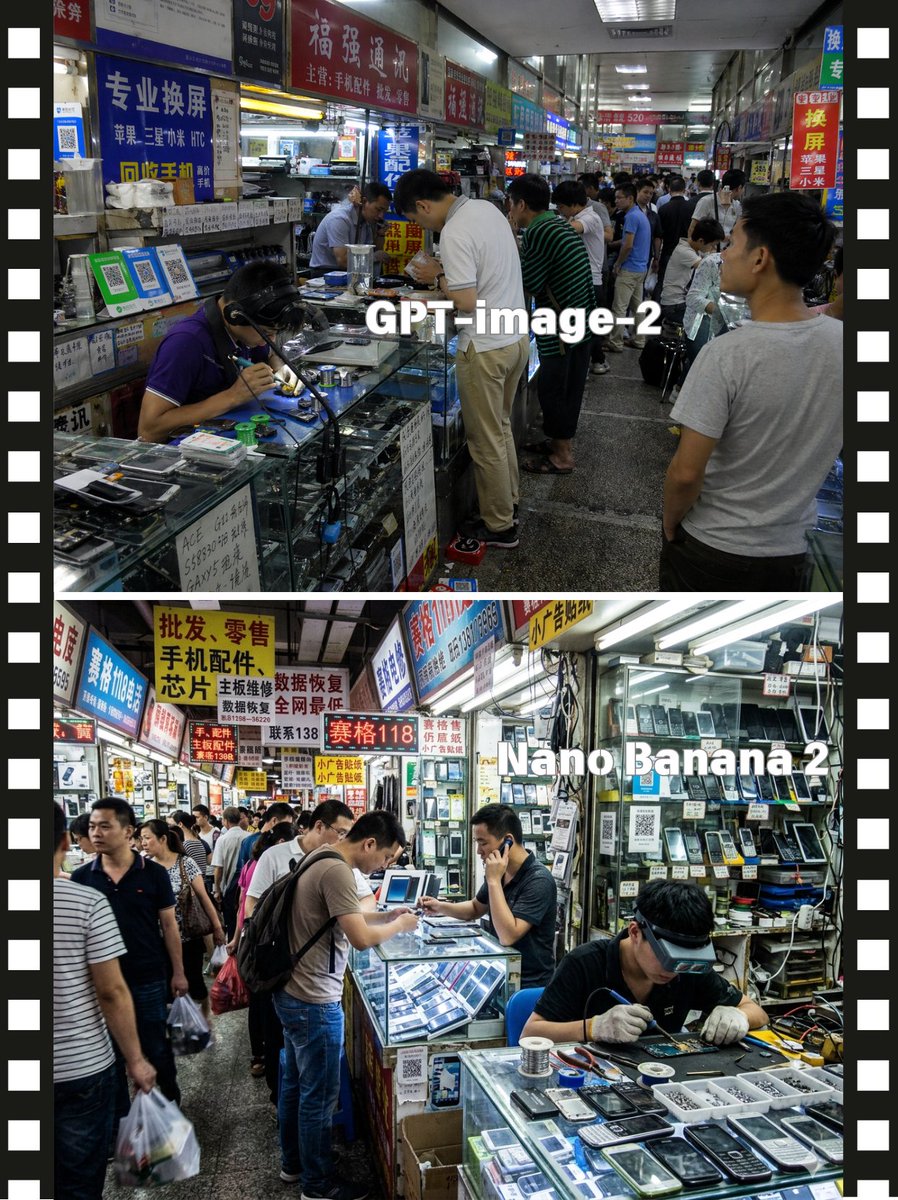
Perbandingan Pasar Ponsel China dengan Layar Terpisah
Poster perbandingan dua panel realistis yang menampilkan pemandangan pasar reparasi ponsel Tiongkok yang ramai, cocok untuk perbandingan model visual atau grafik editorial pasar teknologi.
Ini adalah contoh kasus GPT Image 2 untuk Grafis & Poster . Gunakan contoh siap salin di bawah ini untuk menghasilkan visual serupa, dan tinjau atribusi Awesome GPT Image 2 Prompts serta hak penggunaan komersial sebelum digunakan kembali.
Butuh seluruh rangkaian prompt? Gunakan Grafis & Poster Untuk contoh terkait lainnya, kunjungi pusat topik, atau buka GPT Image 2 katalog cepat untuk indeks contoh lengkap, struktur yang dapat digunakan kembali, dan atribusi sumber.
Free 1K preview
Generate one preview image instantly, no sign-up required.
3438/4000
Mengingatkan
Prompt siap salin
{
  "type": "split-screen market comparison poster",
  "style": "photo-realistic documentary photography",
  "subject": "busy indoor electronics repair and mobile phone parts market in China",
  "layout": {
    "format": "vertical poster with 2 stacked comparison panels",
    "divider": "thin white horizontal divider between panels",
    "side_borders": "black filmstrip-style borders on left and right edges with evenly spaced white perforation rectangles",
    "panels": [
      {
        "position": "top half",
        "overlay_text": "GPT-image-2",
        "scene": "narrow fluorescent-lit shopping corridor lined with glass display counters and densely packed Chinese shop signs",
        "crowd_count": "around 12 visible shoppers and vendors",
        "primary_action": "customers leaning over counters while technicians repair phones and sell parts",
        "details": [
          "one seated technician in a purple polo shirt soldering at the front left counter",
          "a tall customer in a white polo shirt bending over the central glass case",
          "another customer in a green striped shirt beside him",
          "a man in a light gray T-shirt standing in the right foreground with his back partly to camera",
          "glass counters filled with smartphone screens, tools, spare parts, and small electronics",
          "overhead signage in red, blue, yellow, and white with Chinese text about screen replacement, phone accessories, and repairs",
          "deep perspective down the corridor with many small stalls and ceiling strip lights"
        ],
        "text_style": "large bold white sans-serif text centered over the scene"
      },
      {
        "position": "bottom half",
        "overlay_text": "Nano Banana 2",
        "scene": "another crowded indoor mobile phone market aisle, brighter and more cluttered, with open repair stalls and walls full of phones and parts",
        "crowd_count": "around 11 visible shoppers and vendors",
        "primary_action": "technicians working at counters while customers browse and talk",
        "details": [
          "front-right technician seated at a glass counter, wearing dark clothes and white gloves, repairing a device with tools spread out",
          "center customer with a backpack leaning over a lit display case",
          "another vendor at center-right holding a phone to his ear",
          "left side aisle filled with walking shoppers carrying plastic bags",
          "glass showcases displaying old mobile phones, screens, batteries, and accessories",
          "shop walls densely stacked with hanging phones and packaged components",
          "many bright Chinese signboards overhead in yellow, red, blue, and white advertising wholesale, retail, mobile accessories, chip repair, and data recovery"
        ],
        "text_style": "large bold white sans-serif text placed across the upper-right center of the panel"
      }
    ]
  },
  "camera": {
    "angle": "eye level",
    "lens": "wide-angle documentary street photo lens",
    "composition": "deep corridor perspective with strong leading lines from counters and ceiling lights"
  },
  "lighting": "cool fluorescent indoor lighting, slightly harsh commercial mall illumination",
  "mood": "busy, crowded, practical, authentic tech-market atmosphere",
  "quality": "high-detail realistic photography, natural color, sharp storefront signage, reflective glass counters"
}
Best for
- - Grafis & Poster visual exploration
- - Image generation and reference-image edits
- - Reusable briefs that keep source attribution visible
Change these parts
- - Subject, product, character, or scene
- - Aspect ratio, camera, lighting, and background
- - Brand, text, color, and output constraints
Recommended model and settings
- - Model: gpt-image-2
- - Input mode: Teks ke Gambar
- - Aspect ratio: source
- - Commercial status: review original source
How to use this prompt
- 1. Copy the prompt and preserve its structure for the first test.
- 2. Replace the subject, context, and publishing channel.
- 3. Change one camera, lighting, or style variable per iteration.
- 4. Inspect the output, source, text, and rights before reuse.
Limitations, source, and reuse cautions
- - Generated output is an editable draft, not factual, legal, or rights evidence.
- - Review the linked source, people, brands, logos, text, and third-party media before commercial use.
Diimpor dari Awesome GPT Image 2 Prompts . Atribusi diperlukan. Status penggunaan komersial adalah allowed ; tinjau hak sumber sebelum penggunaan berbayar.
Lebih banyak kasus dalam kategori ini
Diprioritaskan berdasarkan kategori, kompatibilitas mode input, kualitas, dan risiko yang lebih rendah.

Android Quantum Lab Workstation
Teks ke Gambar

Pink Hijab Mirror Selfie Portrait
Teks ke Gambar

Manga Desert Radio Telescope Road Trip
Teks ke Gambar

Natural Face Realism Modifier
Teks ke Gambar

Fashion Studio Portrait with Blue Rim Lighting
Teks ke Gambar

Greyscale Puzzle Portrait with Color Accent
Teks ke Gambar
Catatan penggunaan kembali dan sumber
Gunakan perintah ini dengan aman setelah melihat pratinjau kasus.
- 1.Salin perintah tersebut atau buka langsung di Dovoo dengan tombol pembuatan.
- 2.Sesuaikan variabel, rasio aspek, dan gambar referensi untuk kebutuhan Anda sendiri.
- 3.Sebelum mempublikasikan atau menggunakan untuk tujuan berbayar, verifikasi hak sumber, persyaratan atribusi, dan risiko merek atau citra.