Sophisticated Style
Gambar prompt Nano Banana Pro yang bersumber dari repositori Awesome Nano Banana Pro Prompts, dengan pratinjau gambar dan catatan tinjauan penggunaan kembali.
Ini adalah contoh kasus Nano Banana Pro untuk Potret & Karakter . Gunakan contoh siap salin di bawah ini untuk menghasilkan visual serupa, dan tinjau atribusi Awesome Nano Banana Pro Prompts serta hak penggunaan komersial sebelum digunakan kembali.
Butuh seluruh rangkaian prompt? Gunakan Potret & Karakter Untuk contoh terkait lainnya, kunjungi pusat topik, atau buka Nano Banana Pro katalog cepat untuk indeks contoh lengkap, struktur yang dapat digunakan kembali, dan atribusi sumber.
Mengingatkan
Prompt siap salin
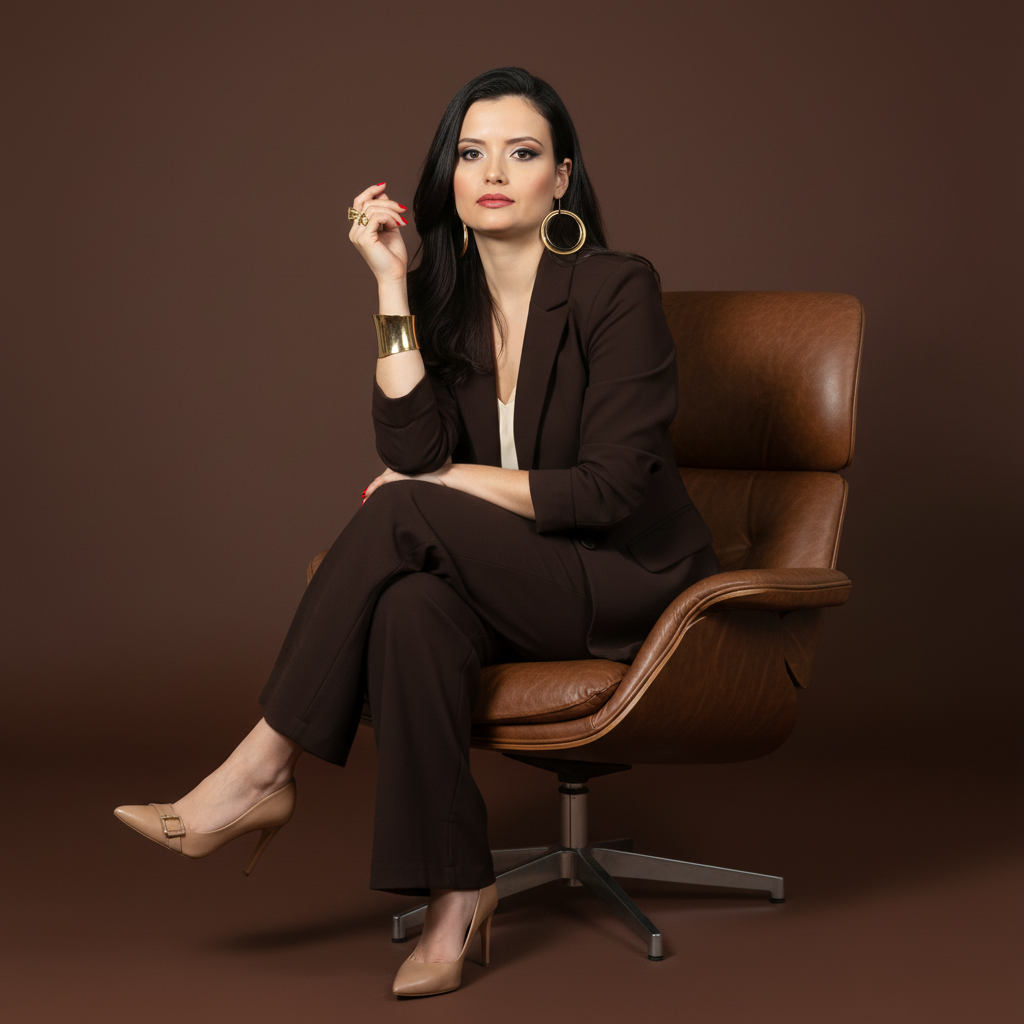
A full-length studio photograph with a sophisticated and professional aesthetic. It captures a female figure sitting elegantly in a modern brown leather armchair with a metal swivel base. The subject sits confidently, with her body at a slight angle, looking directly at the camera with a serene expression. One hand is resting on the knee or arm of the chair, while the other is close to her face. Her legs are crossed or elegantly positioned.

She wears a dark brown or chocolate suit (blazer and wide-leg pants) over a light (white or cream) top. On her feet are light-colored (nude or off-white) high-heeled shoes with buckle or jewel details. She wears several pieces of gold jewelry: earrings, rings, and a wide bracelet. Her nails are painted a vibrant red.

Her hair is dark, medium-length, with soft waves and swept to the side. Her makeup is polished and professional.

The background is a solid-colored studio backdrop in a shade of brown that complements the suit and armchair, creating a sophisticated, monochromatic color palette. The lighting is studio-grade, soft, and directional, coming from a front-to-side angle, shaping the face and body, highlighting the textures of the fabric and the shine of the jewelry.

Camera Settings: Captured with a prime portrait lens (e.g., 85mm or 100mm) on a full-frame camera for a flattering perspective and natural proportions. Aperture set between f/4.0 and f/5.6 to ensure sharpness across the subject. ISO 100-200 for maximum studio image quality. Shutter speed from 1/160s to 1/250s. Studio lighting with a large softbox or octabox as the main light and a reflector to fill in shadows.

Instructions for the "nano banana":

"Please use the user's reference image to capture and apply all of their facial features, facial structure, eye color, hairstyle, and skin tone with maximum fidelity. The goal is to create a professional version of the user in this portrait. The clothing (brown suit, light top, heels), jewelry, red nails, the pose sitting in the leather chair, the serene expression, the soft lighting, and the brown background should be created as described, creating a perfect fusion between the user's identity and the aesthetics of the image."
Best for
- - Potret & Karakter visual exploration
- - Image generation and reference-image edits
- - Reusable briefs that keep source attribution visible
Change these parts
- - Subject, product, character, or scene
- - Aspect ratio, camera, lighting, and background
- - Brand, text, color, and output constraints
Recommended model and settings
- - Model: nano-banana-pro
- - Input mode: Gambar ke Gambar
- - Aspect ratio: square
- - Commercial status: restricted
How to use this prompt
- 1. Copy the prompt and preserve its structure for the first test.
- 2. Replace the subject, context, and publishing channel.
- 3. Change one camera, lighting, or style variable per iteration.
- 4. Inspect the output, source, text, and rights before reuse.
Limitations, source, and reuse cautions
- - Generated output is an editable draft, not factual, legal, or rights evidence.
- - Review the linked source, people, brands, logos, text, and third-party media before commercial use.
Diimpor dari Awesome Nano Banana Pro Prompts . Atribusi diperlukan. Status penggunaan komersial adalah restricted ; tinjau hak sumber sebelum penggunaan berbayar.
Lebih banyak kasus dalam kategori ini
Diprioritaskan berdasarkan kategori, kompatibilitas mode input, kualitas, dan risiko yang lebih rendah.
Catatan penggunaan kembali dan sumber
Gunakan perintah ini dengan aman setelah melihat pratinjau kasus.
- 1.Salin perintah tersebut atau buka langsung di Dovoo dengan tombol pembuatan.
- 2.Sesuaikan variabel, rasio aspek, dan gambar referensi untuk kebutuhan Anda sendiri.
- 3.Sebelum mempublikasikan atau menggunakan untuk tujuan berbayar, verifikasi hak sumber, persyaratan atribusi, dan risiko merek atau citra.