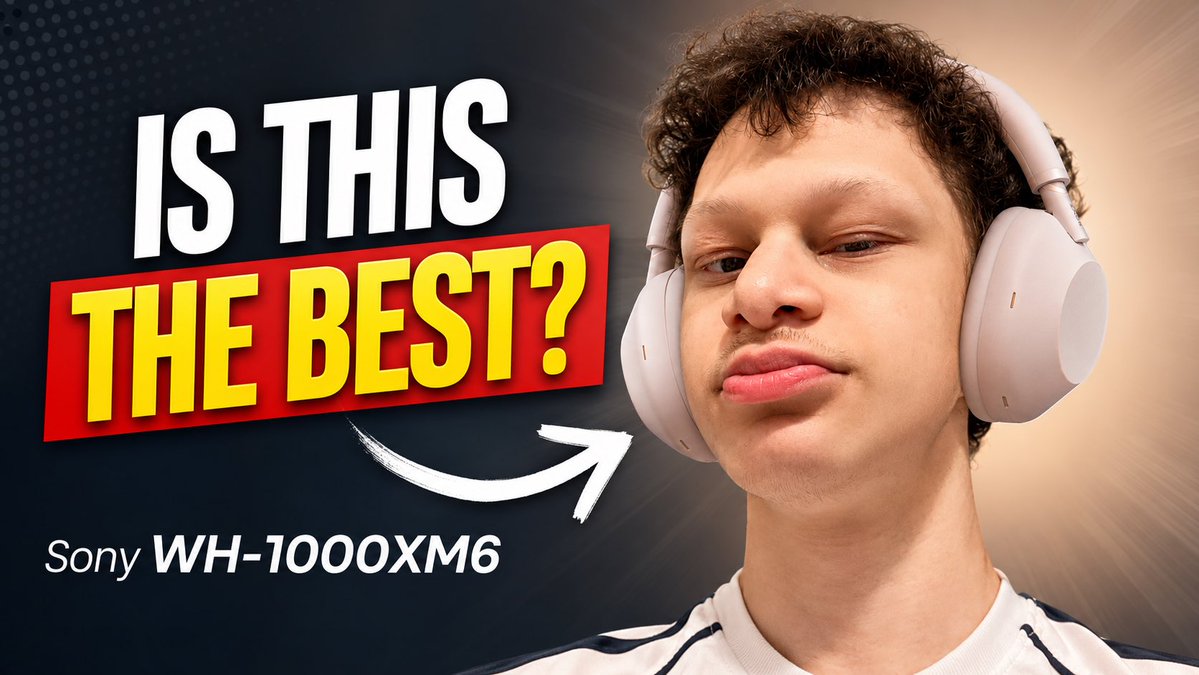
Sony Headphones Review Thumbnail
A bold YouTube thumbnail template for a tech review featuring a close-up headphone portrait, large question text, and a product label.
Ini adalah contoh kasus GPT Image 2 untuk Produk & Komersial . Gunakan contoh siap salin di bawah ini untuk menghasilkan visual serupa, dan tinjau atribusi Awesome GPT Image 2 Prompts serta hak penggunaan komersial sebelum digunakan kembali.
Butuh seluruh rangkaian prompt? Gunakan Produk & Komersial Untuk contoh terkait lainnya, kunjungi pusat topik, atau buka GPT Image 2 katalog cepat untuk indeks contoh lengkap, struktur yang dapat digunakan kembali, dan atribusi sumber.
Free 1K preview
Generate one preview image instantly, no sign-up required.
1251/4000
Mengingatkan
Prompt siap salin
Create a high-impact YouTube tech review thumbnail in a 16:9 landscape format. On the right half, show a close-up portrait of a young man with short curly dark hair wearing large light-gray over-ear headphones, looking confidently at the camera with a slightly raised chin and subtle smirk; crop him from the chest up, with the headphones clearly visible. On the left half, place huge bold thumbnail text reading {argument name="headline text" default="IS THIS"} in white uppercase at the top, and {argument name="main question text" default="THE BEST?"} in bright yellow uppercase inside a red rectangular banner beneath it, with strong drop shadows and a slightly tilted dynamic layout. Below the main text, add smaller white product text reading {argument name="product name" default="Sony WH-1000XM6"}. Add exactly one thick hand-drawn white curved arrow pointing from the text area toward the headphones. Use a dark navy-to-black background on the left with subtle dotted halftone texture, transitioning to a warm beige radial glow behind the person on the right. Make the design crisp, saturated, and clickable, with dramatic contrast, studio lighting, sharp facial detail, clean cutout edges, and no extra logos, watermarks, or additional text.Variabel perintah
Placeholder argumen yang dapat diedit ditemukan dalam prompt, beserta nilai defaultnya.
Variabel
headline text
Bawaan
IS THIS
Variabel
main question text
Bawaan
THE BEST?
Variabel
product name
Bawaan
Sony WH-1000XM6
Best for
- - Produk & Komersial visual exploration
- - Image generation and reference-image edits
- - Reusable briefs that keep source attribution visible
Change these parts
- - Subject, product, character, or scene
- - Aspect ratio, camera, lighting, and background
- - Brand, text, color, and output constraints
Recommended model and settings
- - Model: gpt-image-2
- - Input mode: Teks ke Gambar
- - Aspect ratio: source
- - Commercial status: review original source
How to use this prompt
- 1. Copy the prompt and preserve its structure for the first test.
- 2. Replace the subject, context, and publishing channel.
- 3. Change one camera, lighting, or style variable per iteration.
- 4. Inspect the output, source, text, and rights before reuse.
Limitations, source, and reuse cautions
- - Generated output is an editable draft, not factual, legal, or rights evidence.
- - Review the linked source, people, brands, logos, text, and third-party media before commercial use.
Diimpor dari Awesome GPT Image 2 Prompts . Atribusi diperlukan. Status penggunaan komersial adalah allowed ; tinjau hak sumber sebelum penggunaan berbayar.
Lebih banyak kasus dalam kategori ini
Diprioritaskan berdasarkan kategori, kompatibilitas mode input, kualitas, dan risiko yang lebih rendah.



Catatan penggunaan kembali dan sumber
Gunakan perintah ini dengan aman setelah melihat pratinjau kasus.
- 1.Salin perintah tersebut atau buka langsung di Dovoo dengan tombol pembuatan.
- 2.Sesuaikan variabel, rasio aspek, dan gambar referensi untuk kebutuhan Anda sendiri.
- 3.Sebelum mempublikasikan atau menggunakan untuk tujuan berbayar, verifikasi hak sumber, persyaratan atribusi, dan risiko merek atau citra.