Konsep Aplikasi Musik Perpustakaan Pintar
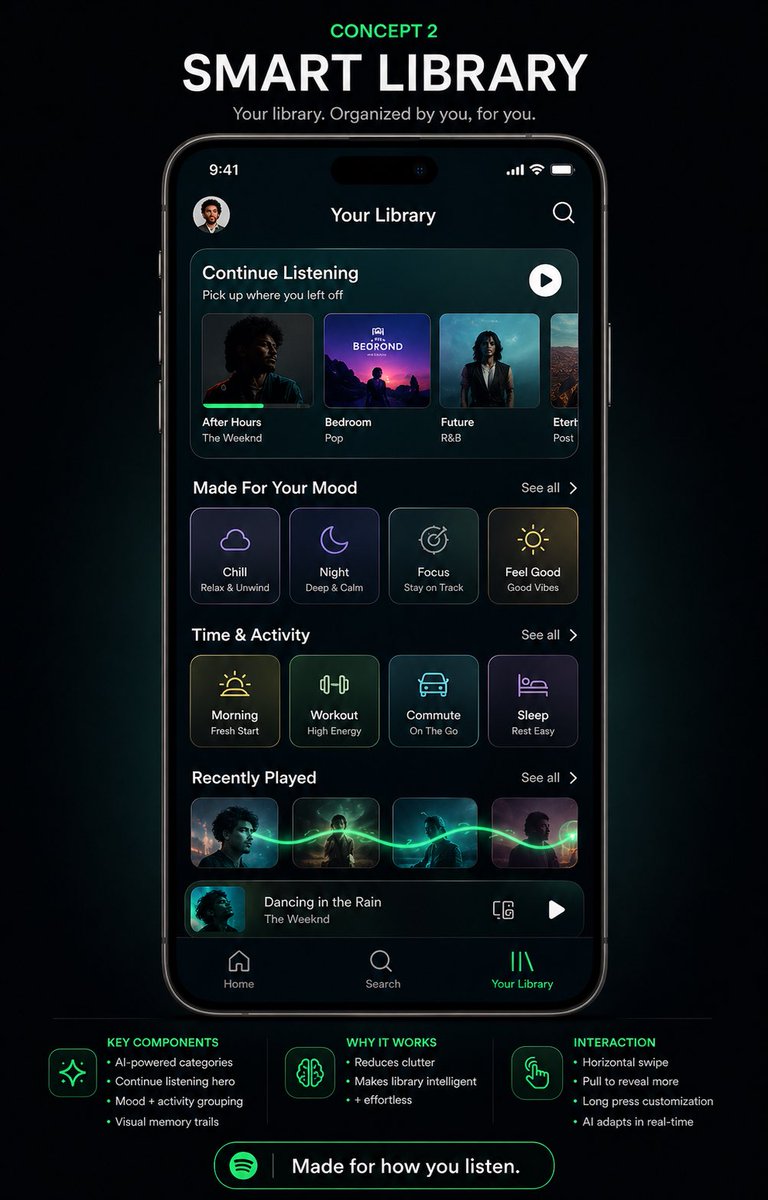
Poster desain ulang aplikasi musik mode gelap yang apik, menampilkan UI perpustakaan ponsel pintar futuristik, ideal untuk memamerkan konsep produk spekulatif atau presentasi desain media sosial.
Ini adalah contoh kasus GPT Image 2 untuk Produk & Komersial . Gunakan contoh siap salin di bawah ini untuk menghasilkan visual serupa, dan tinjau atribusi Awesome GPT Image 2 Prompts serta hak penggunaan komersial sebelum digunakan kembali.
Butuh seluruh rangkaian prompt? Gunakan Produk & Komersial Untuk contoh terkait lainnya, kunjungi pusat topik, atau buka GPT Image 2 katalog cepat untuk indeks contoh lengkap, struktur yang dapat digunakan kembali, dan atribusi sumber.
Free 1K preview
Generate one preview image instantly, no sign-up required.
4000/4000
Mengingatkan
Prompt siap salin
{
  "type": "mobile app UI concept poster",
  "brand": "Spotify-inspired music app redesign",
  "theme": "futuristic smart library, premium dark mode, neon green accents, sleek glassmorphism panels",
  "canvas": {
    "background": "deep black with subtle blue-green glow and soft vignette",
    "aspect_ratio": "portrait social media poster"
  },
  "headline_section": {
    "count": 3,
    "labels": [
      "CONCEPT 2",
      "SMART LIBRARY",
      "Your library. Organized by you, for you."
    ],
    "style": "centered at top, small neon green kicker above a large bold white uppercase headline, smaller light gray subtitle"
  },
  "centerpiece": {
    "device": "front-facing modern smartphone mockup with thin black bezels and dynamic-island style cutout",
    "screen_title": "Your Library",
    "status_bar": {
      "time": "9:41",
      "icons_count": 3,
      "icons": [
        "cellular signal",
        "Wi-Fi",
        "battery"
      ]
    },
    "top_row": {
      "count": 2,
      "items": [
        "small circular profile avatar at top left",
        "search icon at top right"
      ]
    },
    "screen_sections": [
      {
        "title": "Continue Listening",
        "count": 4,
        "labels": [
          "After Hours",
          "Bedroom",
          "Future",
          "Etern..."
        ],
        "details": "rounded rectangular hero carousel with 4 album cards, each showing cover art, title, and artist or genre text; subtitle reads 'Pick up where you left off'; white circular play button at upper right of the panel"
      },
      {
        "title": "Made For Your Mood",
        "count": 4,
        "labels": [
          "Chill",
          "Night",
          "Focus",
          "Feel Good"
        ],
        "details": "4 rounded square mood cards with thin glowing outlines, minimalist line icons, and small subtitles reading 'Relax & Unwind', 'Deep & Calm', 'Stay on Track', 'Good Vibes'; 'See all' on the right"
      },
      {
        "title": "Time & Activity",
        "count": 4,
        "labels": [
          "Morning",
          "Workout",
          "Commute",
          "Sleep"
        ],
        "details": "4 rounded square activity cards with neon line icons and subtitles 'Fresh Start', 'High Energy', 'On The Go', 'Rest Easy'; 'See all' on the right"
      },
      {
        "title": "Recently Played",
        "count": 4,
        "labels": [
          "album 1",
          "album 2",
          "album 3",
          "album 4"
        ],
        "details": "4 small rectangular album thumbnails connected by a glowing green waveform-like trail flowing horizontally across them; 'See all' on the right"
      },
      {
        "title": "Now playing bar",
        "count": 4,
        "labels": [
          "thumbnail",
          "track title",
          "device icon",
          "play button"
        ],
        "details": "bottom mini-player with album art thumbnail, title 'Dancing in the Rain', artist 'The Weeknd', a small device/connect icon, and a white play button"
      }
    ],
    "bottom_navigation": {
      "count": 3,
      "labels": [
        "Home",
        "Search",
        "Your Library"
      ],
      "active": "Your Library",
      "style": "simple icon-plus-label tab bar, active tab highlighted in neon green"
    }
  },
  "footer_info": {
    "sections": [
      {
        "title": "KEY COMPONENTS",
        "position": "bottom left",
        "count": 4,
        "labels": [
          "AI-powered categories",
          "Continue listening hero",
          "Mood + activity grouping",
          "Visual memory trails"
        ]
      },
      {
        "title": "WHY IT WORKS",
        "position": "bottom center",
        "count": 3,
        "labels": [
          "Reduces clutter",
          "Makes library intelligent",
          "+ effortless"
        ]
      },
      {
        "title": "INTERACTION",
        "position": "bottom right",
        "count": 4,
        "labels": [
          "Horizontal swipe",
          "Pull to reveal more",
          "Long press customization",
          "AI adapts in real-time"
        ]
      }
    ],
    "icons_count": 3,
    "icons": [
      "sparkles",
      "brain",
      "hand tap gesture"
    ]
  },
  "cta": {
    "count": 2,
    "labels": [
      "Spotify Logo",
      "Made for how you listen."
    ],
    "style": "large rounded neon green outlined button centered at the bottom"
  },
  "style_notes": "high-fidelity product design presentation, clean typography, realistic iPhone render, glossy screen reflections, subtle cyan and green ambient glow, modern UX case-study poster aesthetic, polished dribbble/behance presentation",
  "customization": {
    "headline": "{argument name=\"headline text\" default=\"SMART LIBRARY\"}",
    "concept_label": "{argument name=\"concept label\" default=\"CONCEPT 2\"}",
    "screen_title": "{argument name=\"screen title\" default=\"Your Library\"}",
    "brand_style": "{argument name=\"brand style\" default=\"Spotify-inspired\"}",
    "cta_text": "{argument name=\"cta text\" default=\"Made for how you listen.\"}"
  }
}
Variabel perintah
Placeholder argumen yang dapat diedit ditemukan dalam prompt, beserta nilai defaultnya.
Variabel
headline text
Bawaan
SMART LIBRARY
Variabel
concept label
Bawaan
CONCEPT 2
Variabel
screen title
Bawaan
Your Library
Variabel
brand style
Bawaan
Spotify-inspired
Variabel
cta text
Bawaan
Made for how you listen.
Best for
- - Produk & Komersial visual exploration
- - Image generation and reference-image edits
- - Reusable briefs that keep source attribution visible
Change these parts
- - Subject, product, character, or scene
- - Aspect ratio, camera, lighting, and background
- - Brand, text, color, and output constraints
Recommended model and settings
- - Model: gpt-image-2
- - Input mode: Teks ke Gambar
- - Aspect ratio: source
- - Commercial status: review original source
How to use this prompt
- 1. Copy the prompt and preserve its structure for the first test.
- 2. Replace the subject, context, and publishing channel.
- 3. Change one camera, lighting, or style variable per iteration.
- 4. Inspect the output, source, text, and rights before reuse.
Limitations, source, and reuse cautions
- - Generated output is an editable draft, not factual, legal, or rights evidence.
- - Review the linked source, people, brands, logos, text, and third-party media before commercial use.
Diimpor dari Awesome GPT Image 2 Prompts . Atribusi diperlukan. Status penggunaan komersial adalah allowed ; tinjau hak sumber sebelum penggunaan berbayar.
Lebih banyak kasus dalam kategori ini
Diprioritaskan berdasarkan kategori, kompatibilitas mode input, kualitas, dan risiko yang lebih rendah.






Catatan penggunaan kembali dan sumber
Gunakan perintah ini dengan aman setelah melihat pratinjau kasus.
- 1.Salin perintah tersebut atau buka langsung di Dovoo dengan tombol pembuatan.
- 2.Sesuaikan variabel, rasio aspek, dan gambar referensi untuk kebutuhan Anda sendiri.
- 3.Sebelum mempublikasikan atau menggunakan untuk tujuan berbayar, verifikasi hak sumber, persyaratan atribusi, dan risiko merek atau citra.