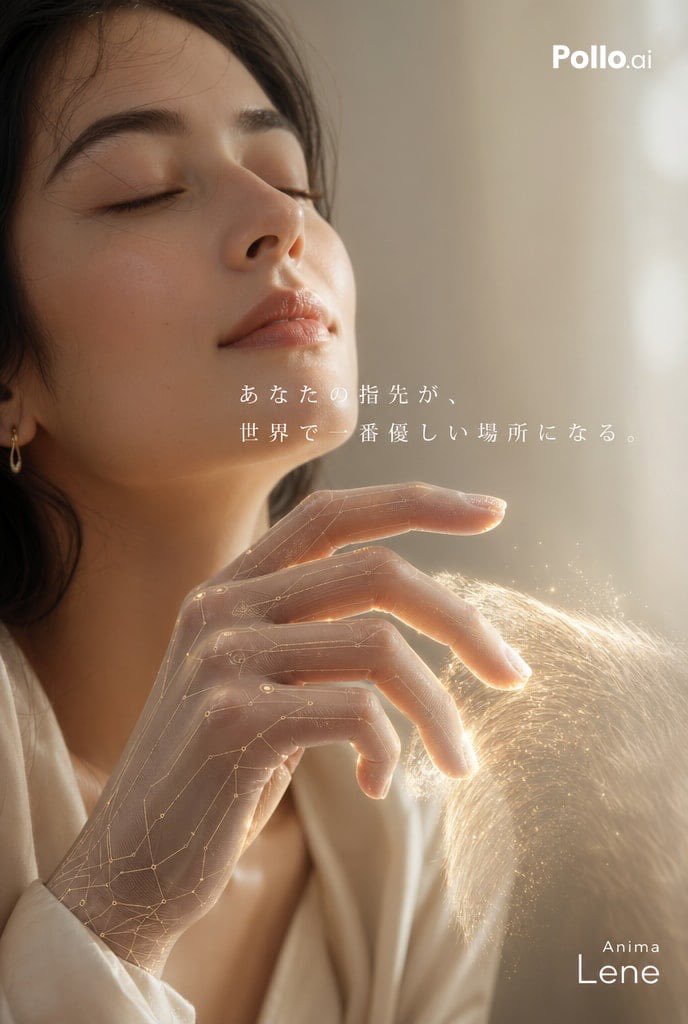
Poster Iklan Smart Glove (Petunjuk Penggunaan)
Sebuah panduan yang sangat detail untuk membuat iklan komersial untuk sarung tangan pintar berteknologi tinggi, yang berfokus pada umpan balik sensorik dan koneksi emosional.
Ini adalah contoh kasus GPT Image 2 untuk Produk & Komersial . Gunakan contoh siap salin di bawah ini untuk menghasilkan visual serupa, dan tinjau atribusi Awesome GPT Image 2 Prompts serta hak penggunaan komersial sebelum digunakan kembali.
Butuh seluruh rangkaian prompt? Gunakan Produk & Komersial Untuk contoh terkait lainnya, kunjungi pusat topik, atau buka GPT Image 2 katalog cepat untuk indeks contoh lengkap, struktur yang dapat digunakan kembali, dan atribusi sumber.
Free 1K preview
Generate one preview image instantly, no sign-up required.
1765/4000
Mengingatkan
Prompt siap salin
Please create a commercial advertising poster for an ultra-thin tactile simulator device. Brand Name: {argument name="brand name" default="Anima"} Product Name: {argument name="product name" default="Lene"} [Visual Concept] The model is reaching out into empty space, gesturing as if stroking the "soft fur of a cat." The model is an urban, sophisticated woman. Close up on her expression as she gently closes her eyes, feeling truly at peace from the warmth transmitted through her fingertips. [Device Design] The model's hand is equipped with an ultra-thin, translucent smart glove (smart skin) that integrates with the skin. The material is like matte silicone, with subtle gold circuits resembling a nervous system faintly visible inside. [Effects and Composition] Place the hand movements and expression in more than 60% of the screen so that the fingertips are the main focus. In the space the fingertips are touching, a hologram of "soft cat fur" drawn with light particles is faintly rising. Emphasize the contrast in texture as if there is a real entity there (inorganic device vs. soft light fur). [Lighting/Atmosphere] Soft, warm natural light like a Sunday morning. A clean, minimalist background. A quiet, emotional atmosphere like the cover of a high-end lifestyle magazine. [Text Placement] Japanese Catchphrase: "{argument name="catchphrase" default="Your fingertips become the gentlest place in the world."} " Elegantly placed at the top or center-left in a thin modern Mincho font. The brand name "Anima" and product name "Lene" are placed modestly but with a sense of luxury in a clean sans-serif font at the bottom right. Without using real brands or people, express a world where cutting-edge technology is put into practical use as 'kindness'.Variabel perintah
Placeholder argumen yang dapat diedit ditemukan dalam prompt, beserta nilai defaultnya.
Variabel
brand name
Bawaan
Anima
Variabel
product name
Bawaan
Lene
Variabel
catchphrase
Bawaan
Your fingertips become the gentlest place in the world.
Best for
- - Produk & Komersial visual exploration
- - Image generation and reference-image edits
- - Reusable briefs that keep source attribution visible
Change these parts
- - Subject, product, character, or scene
- - Aspect ratio, camera, lighting, and background
- - Brand, text, color, and output constraints
Recommended model and settings
- - Model: gpt-image-2
- - Input mode: Teks ke Gambar
- - Aspect ratio: source
- - Commercial status: review original source
How to use this prompt
- 1. Copy the prompt and preserve its structure for the first test.
- 2. Replace the subject, context, and publishing channel.
- 3. Change one camera, lighting, or style variable per iteration.
- 4. Inspect the output, source, text, and rights before reuse.
Limitations, source, and reuse cautions
- - Generated output is an editable draft, not factual, legal, or rights evidence.
- - Review the linked source, people, brands, logos, text, and third-party media before commercial use.
Diimpor dari Awesome GPT Image 2 Prompts . Atribusi diperlukan. Status penggunaan komersial adalah allowed ; tinjau hak sumber sebelum penggunaan berbayar.
Lebih banyak kasus dalam kategori ini
Diprioritaskan berdasarkan kategori, kompatibilitas mode input, kualitas, dan risiko yang lebih rendah.






Catatan penggunaan kembali dan sumber
Gunakan perintah ini dengan aman setelah melihat pratinjau kasus.
- 1.Salin perintah tersebut atau buka langsung di Dovoo dengan tombol pembuatan.
- 2.Sesuaikan variabel, rasio aspek, dan gambar referensi untuk kebutuhan Anda sendiri.
- 3.Sebelum mempublikasikan atau menggunakan untuk tujuan berbayar, verifikasi hak sumber, persyaratan atribusi, dan risiko merek atau citra.