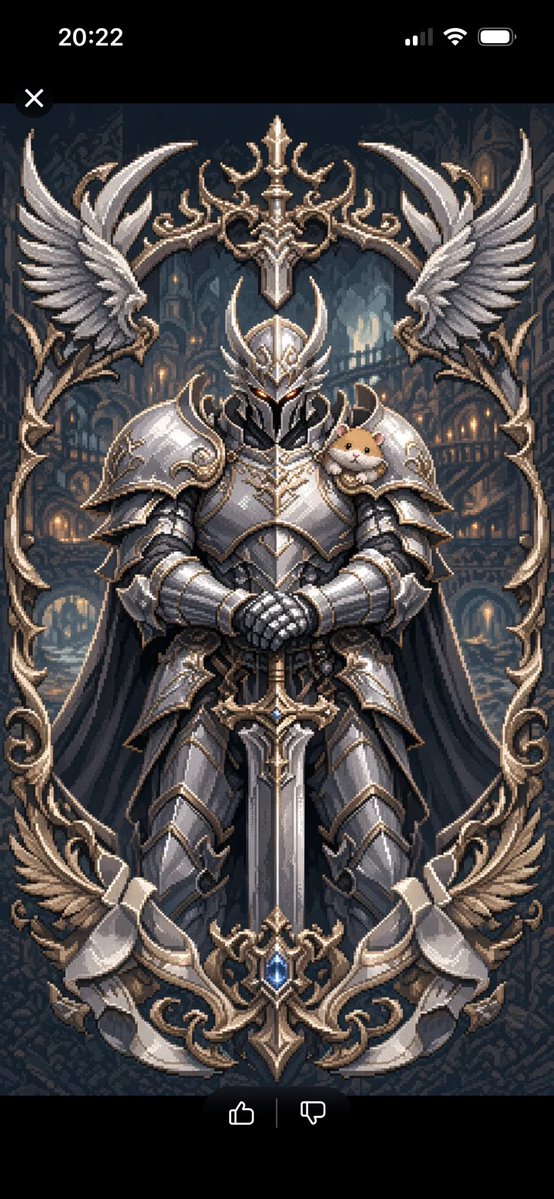
Prajurit Lapis Baja Semi-Piksel
Menghasilkan ilustrasi fantasi gelap semi-piksel vertikal berupa prajurit berbaju zirah berbingkai sayap yang berhias dengan pendamping bahu yang imut.
Ini adalah contoh kasus GPT Image 2 untuk Anime & Game . Gunakan contoh siap salin di bawah ini untuk menghasilkan visual serupa, dan tinjau atribusi Awesome GPT Image 2 Prompts serta hak penggunaan komersial sebelum digunakan kembali.
Butuh seluruh rangkaian prompt? Gunakan Anime & Game Untuk contoh terkait lainnya, kunjungi pusat topik, atau buka GPT Image 2 katalog cepat untuk indeks contoh lengkap, struktur yang dapat digunakan kembali, dan atribusi sumber.
Free 1K preview
Generate one preview image instantly, no sign-up required.
1642/4000
Mengingatkan
Prompt siap salin
Create a vertical semi-pixel-art fantasy character illustration of {argument name="character name" default="a mysterious armored warrior"} standing front-facing in the center, full body, imposing and symmetrical. The warrior wears ornate polished {argument name="armor color" default="silver and white"} plate armor with gold filigree trim, layered pauldrons, gauntlets, greaves, a dark cape, and a horned wing-like helmet with a black visor and small glowing amber eyes. The hands are clasped over the pommel of a huge vertical greatsword planted point-down in front of the body; the sword has an elaborate crossguard and a blue jewel near the lower ornament. Add exactly one small cute {argument name="shoulder companion" default="hamster"} perched on the warrior’s right shoulder, creating a humorous contrast with the intimidating armor. Surround the figure with a tall ornate gothic frame made of curling gold metalwork and exactly four large silver feathered wing ornaments: two at the upper left and upper right, and two at the lower left and lower right. Place a decorative crest at the top center and another at the bottom center aligned with the sword. Background: a dark gothic cathedral or fantasy city interior with arched windows, towers, balconies, warm lantern lights, misty blue shadows, and deep navy-gray tones. Style: detailed 16-bit / semi-pixel challenge aesthetic, crisp pixel edges, high-detail sprite shading, dramatic metallic highlights, symmetrical composition, dark fantasy mood with elegant beauty, no text, no watermark. Use a vertical smartphone-like composition, {argument name="aspect ratio" default="9:16"}.Variabel perintah
Placeholder argumen yang dapat diedit ditemukan dalam prompt, beserta nilai defaultnya.
Variabel
character name
Bawaan
a mysterious armored warrior
Variabel
armor color
Bawaan
silver and white
Variabel
shoulder companion
Bawaan
hamster
Variabel
aspect ratio
Bawaan
9:16
Best for
- - Anime & Game visual exploration
- - Image generation and reference-image edits
- - Reusable briefs that keep source attribution visible
Change these parts
- - Subject, product, character, or scene
- - Aspect ratio, camera, lighting, and background
- - Brand, text, color, and output constraints
Recommended model and settings
- - Model: gpt-image-2
- - Input mode: Teks ke Gambar
- - Aspect ratio: source
- - Commercial status: review original source
How to use this prompt
- 1. Copy the prompt and preserve its structure for the first test.
- 2. Replace the subject, context, and publishing channel.
- 3. Change one camera, lighting, or style variable per iteration.
- 4. Inspect the output, source, text, and rights before reuse.
Limitations, source, and reuse cautions
- - Generated output is an editable draft, not factual, legal, or rights evidence.
- - Review the linked source, people, brands, logos, text, and third-party media before commercial use.
Diimpor dari Awesome GPT Image 2 Prompts . Atribusi diperlukan. Status penggunaan komersial adalah allowed ; tinjau hak sumber sebelum penggunaan berbayar.
Lebih banyak kasus dalam kategori ini
Diprioritaskan berdasarkan kategori, kompatibilitas mode input, kualitas, dan risiko yang lebih rendah.






Catatan penggunaan kembali dan sumber
Gunakan perintah ini dengan aman setelah melihat pratinjau kasus.
- 1.Salin perintah tersebut atau buka langsung di Dovoo dengan tombol pembuatan.
- 2.Sesuaikan variabel, rasio aspek, dan gambar referensi untuk kebutuhan Anda sendiri.
- 3.Sebelum mempublikasikan atau menggunakan untuk tujuan berbayar, verifikasi hak sumber, persyaratan atribusi, dan risiko merek atau citra.