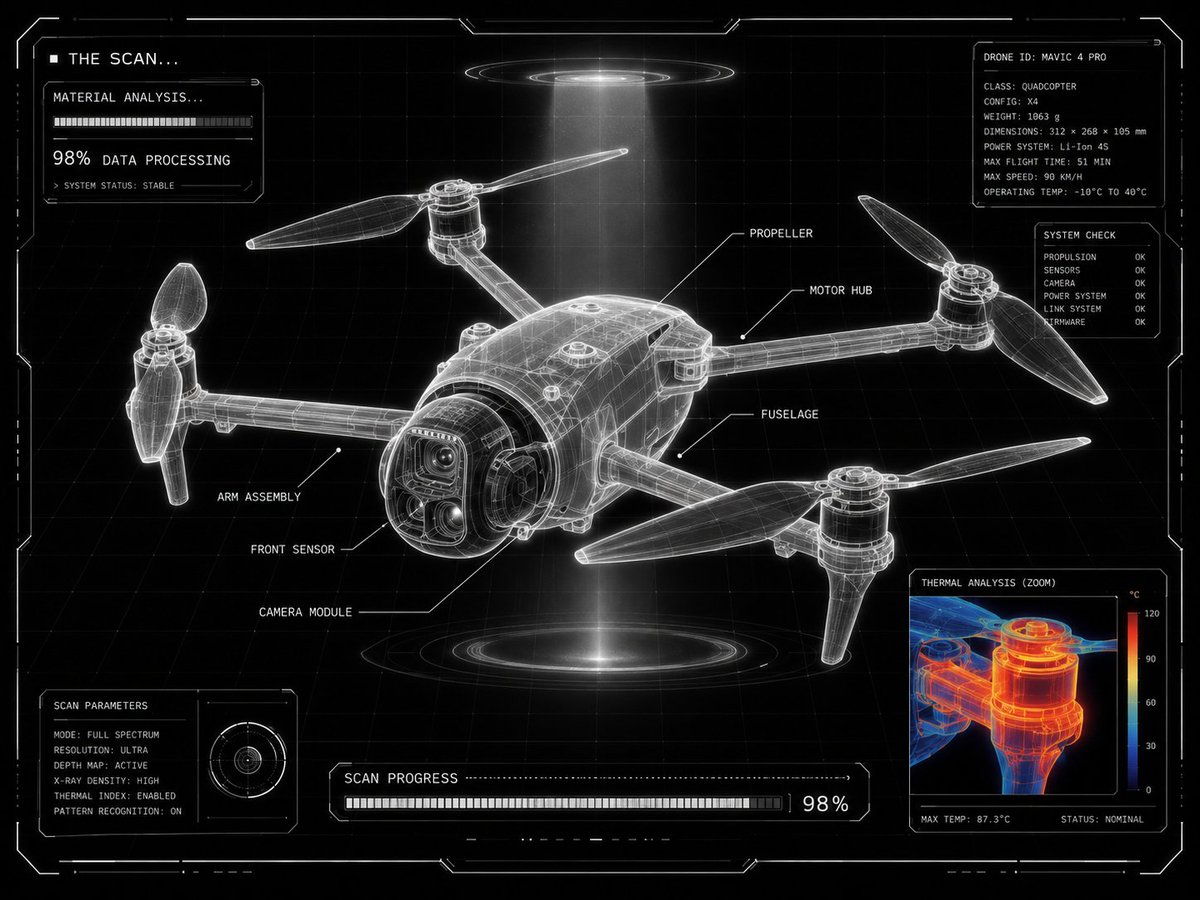
Antarmuka Pengguna Pemindaian Laboratorium Fiksi Ilmiah Futuristik
Sebuah panduan komprehensif berbasis JSON yang dirancang untuk GPT Image 2 untuk mengubah gambar produk menjadi hasil pemindaian laboratorium fiksi ilmiah teknis. Panduan ini mencakup instruksi terperinci untuk elemen HUD, tampilan analisis termal, dan estetika antarmuka monokrom kontras tinggi.
Ini adalah contoh kasus GPT Image 2 untuk Produk & Komersial . Gunakan contoh siap salin di bawah ini untuk menghasilkan visual serupa, dan tinjau atribusi Awesome GPT Image 2 Prompts serta hak penggunaan komersial sebelum digunakan kembali.
Free 1K preview
Generate one preview image instantly, no sign-up required.
Free text preview doesn’t preserve reference-image consistency.
Mengingatkan
Prompt siap salin
{
  "intent": "Transform a user-provided product image into a {argument name="visual theme" default="futuristic laboratory scan display"} with the same final visual result.",
  "source_asset": "uploaded product image",
  "presentation": {
    "frame": "centered product",
    "layout": "grid-locked interface composition",
    "density": "minimal yet highly technical",
    "panel": "one corner reserved for a scalable analysis window"
  },
  "surface_treatment": {
    "base": "black backdrop",
    "grid": "clean white drafting grid",
    "form": "luminous translucent X-ray frame model",
    "edges": "ultra-sharp white outlines",
    "ui": "minimal sci-fi HUD styling"
  },
  "scan_graphics": {
    "labels": "thin white callouts with leader lines naming product parts",
    "detail_view": "zoomed inspection window showing a close product fragment",
    "thermal_layer": "red, orange, and blue heat-map overlay inside the zoom view",
    "status_text": [
      "THE SCAN...",
      "MATERIAL ANALYSIS...",
      "98% DATA PROCESSING"
    ],
    "modules": "small loading panels and diagnostic UI blocks",
    "markers": "angular glowing frame markers around the image"
  },
  "design_language": {
    "engineering": "advanced technical drawing aesthetics",
    "environment": "futuristic lab scanning interface",
    "benchmark": "Apple-level product visualization",
    "purity": "ultra-clean composition",
    "contrast": "high-contrast monochrome interface"
  },
  "illumination": {
    "halo": "subtle white glow around the frame",
    "beam": "volumetric scanning light beam",
    "feel": "technical sci-fi visualization"
  },
  "deliverable": {
    "theme": "{argument name="interface theme" default="futuristic product scanning interface"}",
    "result": "technical diagnostics visualization screen",
    "finish": "{argument name="quality finish" default="ultra clean, ultra clear, 8K"}"
  }
}
Variabel perintah
Placeholder argumen yang dapat diedit ditemukan dalam prompt, beserta nilai defaultnya.
Best for
- - Produk & Komersial visual exploration
- - Image generation and reference-image edits
- - Reusable briefs that keep source attribution visible
Change these parts
- - Subject, product, character, or scene
- - Aspect ratio, camera, lighting, and background
- - Brand, text, color, and output constraints
Recommended model and settings
- - Model: gpt-image-2
- - Input mode: Gambar ke Gambar
- - Aspect ratio: source
- - Commercial status: review original source
How to use this prompt
- 1. Copy the prompt and preserve its structure for the first test.
- 2. Replace the subject, context, and publishing channel.
- 3. Change one camera, lighting, or style variable per iteration.
- 4. Inspect the output, source, text, and rights before reuse.
Limitations, source, and reuse cautions
- - Generated output is an editable draft, not factual, legal, or rights evidence.
- - Review the linked source, people, brands, logos, text, and third-party media before commercial use.
Lebih banyak kasus dalam kategori ini
Diprioritaskan berdasarkan kategori, kompatibilitas mode input, kualitas, dan risiko yang lebih rendah.






Catatan penggunaan kembali dan sumber
Gunakan perintah ini dengan aman setelah melihat pratinjau kasus.
- 1.Salin perintah tersebut atau buka langsung di Dovoo dengan tombol pembuatan.
- 2.Sesuaikan variabel, rasio aspek, dan gambar referensi untuk kebutuhan Anda sendiri.
- 3.Sebelum mempublikasikan atau menggunakan untuk tujuan berbayar, verifikasi hak sumber, persyaratan atribusi, dan risiko merek atau citra.