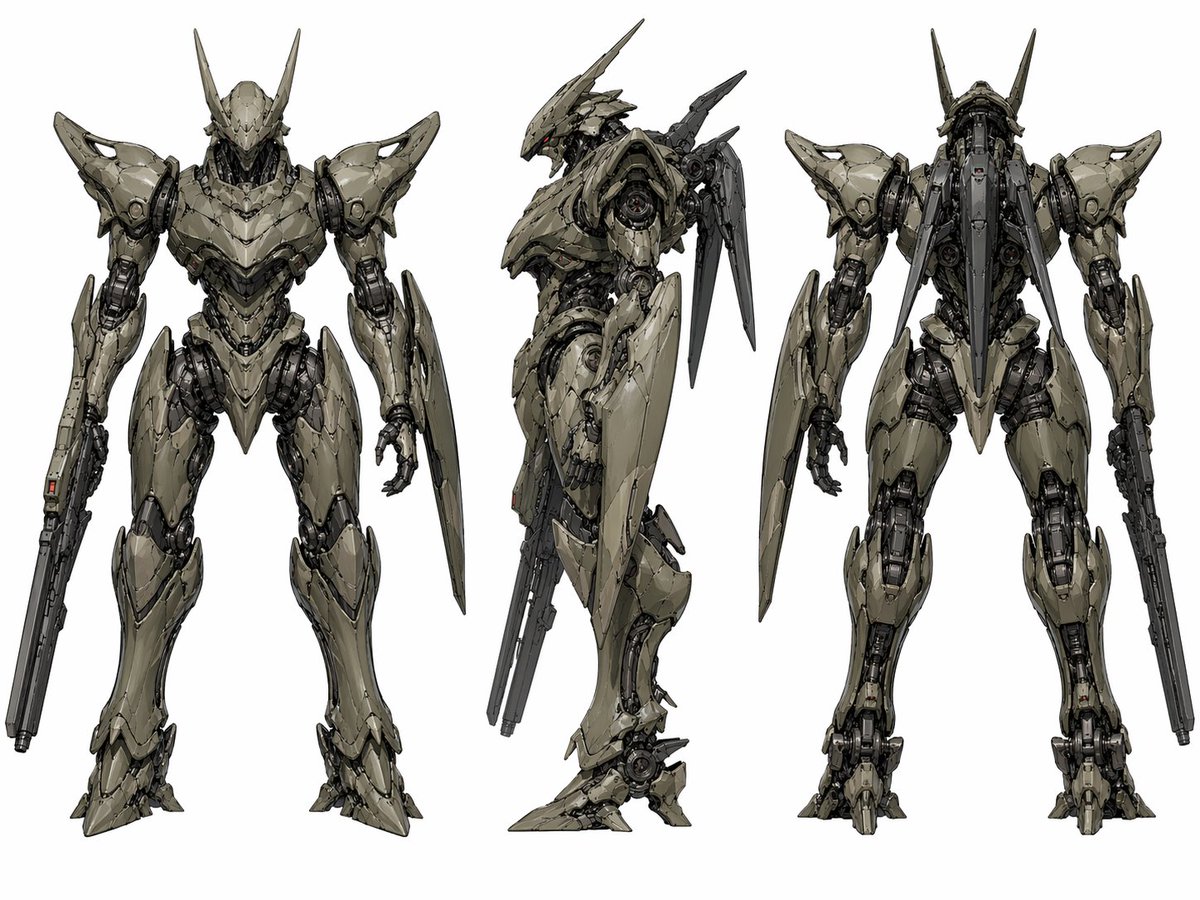
Lembar Tampilan Mecha Fiksi Ilmiah
Lembar konsep tiga tampilan detail dari robot tempur humanoid, berguna untuk desain mecha, seni konsep game, dan pengembangan karakter fiksi ilmiah industri.
Ini adalah contoh kasus GPT Image 2 untuk Potret & Karakter . Gunakan contoh siap salin di bawah ini untuk menghasilkan visual serupa, dan tinjau atribusi Awesome GPT Image 2 Prompts serta hak penggunaan komersial sebelum digunakan kembali.
Butuh seluruh rangkaian prompt? Gunakan Potret & Karakter Untuk contoh terkait lainnya, kunjungi pusat topik, atau buka GPT Image 2 katalog cepat untuk indeks contoh lengkap, struktur yang dapat digunakan kembali, dan atribusi sumber.
Free 1K preview
Generate one preview image instantly, no sign-up required.
2058/4000
Mengingatkan
Prompt siap salin
{
  "type": "mecha character turnaround sheet",
  "subject": {
    "category": "humanoid combat robot",
    "design": "sleek biomechanical sci-fi exosuit with sharp angular armor plating and exposed mechanical joints",
    "primary color": "{argument name=\"armor color\" default=\"pale olive gray\"}",
    "secondary color": "dark graphite metal",
    "accent color": "tiny red sensor lights",
    "head": {
      "shape": "narrow armored helmet with a pointed faceplate and 2 long upward horn-like antennae",
      "eyes": "small glowing red visor-like sensors"
    },
    "torso": {
      "build": "broad armored chest with layered segmented plates and a tapered waist",
      "details": "dense pistons, cables, vents, and internal machinery visible between armor gaps"
    },
    "arms": {
      "right arm": "integrated long rifle-like weapon running along the forearm",
      "left arm": "hand plus a large elongated shield blade mounted along the forearm"
    },
    "legs": {
      "style": "digitigrade mechanical legs with heavy thigh armor, exposed knee mechanisms, and pointed armored feet"
    },
    "back": {
      "attachments": "2 long rear-mounted blade or fin appendages and a central spine-like backpack assembly"
    }
  },
  "layout": {
    "background": "plain light gray studio backdrop",
    "presentation": "clean concept art sheet",
    "views": [
      {
        "position": "left",
        "view": "front view",
        "count": 1
      },
      {
        "position": "center",
        "view": "left side profile",
        "count": 1
      },
      {
        "position": "right",
        "view": "back view",
        "count": 1
      }
    ],
    "total_views": 3
  },
  "style": {
    "rendering": "high-detail industrial concept art",
    "linework": "precise hard-surface mechanical drawing with crisp edges",
    "surface": "worn matte armor with subtle scratches and panel seams",
    "lighting": "soft neutral even lighting",
    "composition": "full-body figures centered vertically with ample spacing between views"
  }
}
Variabel perintah
Placeholder argumen yang dapat diedit ditemukan dalam prompt, beserta nilai defaultnya.
Variabel
armor color
Bawaan
pale olive gray
Best for
- - Potret & Karakter visual exploration
- - Image generation and reference-image edits
- - Reusable briefs that keep source attribution visible
Change these parts
- - Subject, product, character, or scene
- - Aspect ratio, camera, lighting, and background
- - Brand, text, color, and output constraints
Recommended model and settings
- - Model: gpt-image-2
- - Input mode: Teks ke Gambar
- - Aspect ratio: source
- - Commercial status: review original source
How to use this prompt
- 1. Copy the prompt and preserve its structure for the first test.
- 2. Replace the subject, context, and publishing channel.
- 3. Change one camera, lighting, or style variable per iteration.
- 4. Inspect the output, source, text, and rights before reuse.
Limitations, source, and reuse cautions
- - Generated output is an editable draft, not factual, legal, or rights evidence.
- - Review the linked source, people, brands, logos, text, and third-party media before commercial use.
Diimpor dari Awesome GPT Image 2 Prompts . Atribusi diperlukan. Status penggunaan komersial adalah allowed ; tinjau hak sumber sebelum penggunaan berbayar.
Lebih banyak kasus dalam kategori ini
Diprioritaskan berdasarkan kategori, kompatibilitas mode input, kualitas, dan risiko yang lebih rendah.






Catatan penggunaan kembali dan sumber
Gunakan perintah ini dengan aman setelah melihat pratinjau kasus.
- 1.Salin perintah tersebut atau buka langsung di Dovoo dengan tombol pembuatan.
- 2.Sesuaikan variabel, rasio aspek, dan gambar referensi untuk kebutuhan Anda sendiri.
- 3.Sebelum mempublikasikan atau menggunakan untuk tujuan berbayar, verifikasi hak sumber, persyaratan atribusi, dan risiko merek atau citra.