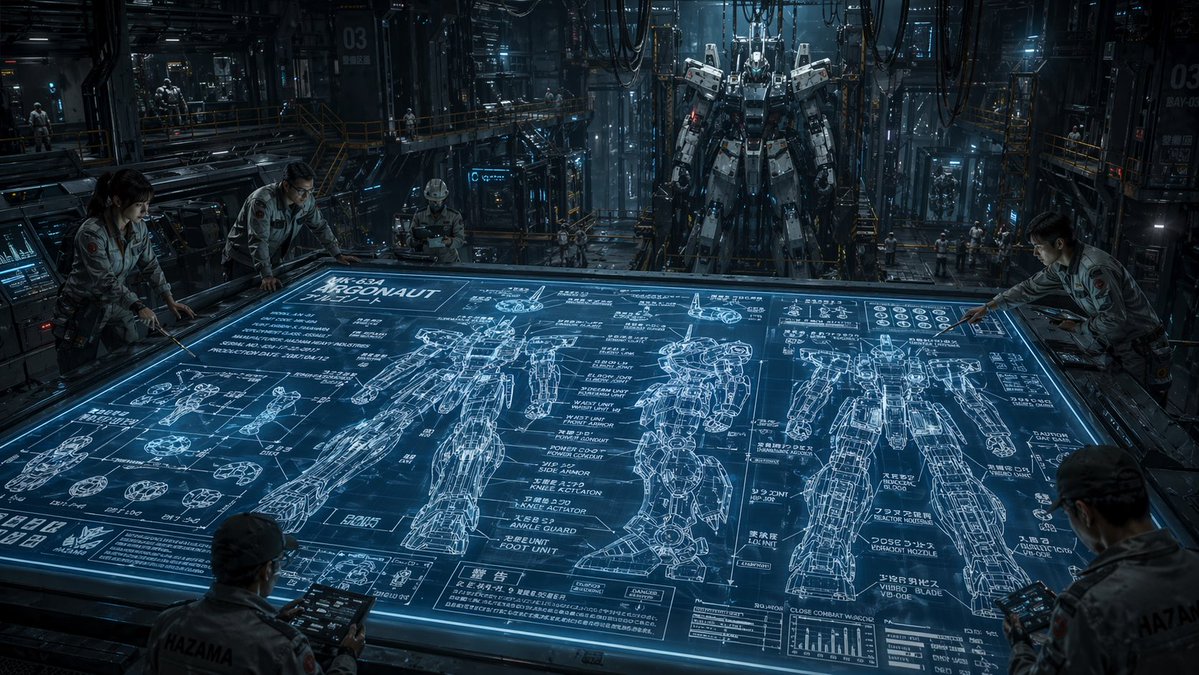
Hangar Cetak Biru Mech Fiksi Ilmiah
Prompt ini menghasilkan adegan sinematik fotorealistik yang menampilkan para insinyur sedang mempelajari cetak biru mecha holografik raksasa di dalam hanggar robotika industri, ideal untuk seni konsep dan pembangunan dunia fiksi ilmiah.
Ini adalah contoh kasus GPT Image 2 untuk Ilustrasi & Seni . Gunakan contoh siap salin di bawah ini untuk menghasilkan visual serupa, dan tinjau atribusi Awesome GPT Image 2 Prompts serta hak penggunaan komersial sebelum digunakan kembali.
Free 1K preview
Generate one preview image instantly, no sign-up required.
Mengingatkan
Prompt siap salin
A cinematic ultra-detailed sci-fi mech hangar interior at night, shown in a wide-angle view from slightly above a massive horizontal holographic planning table. The glowing blue tabletop dominates the foreground and center, displaying an intricate engineering blueprint for a humanoid combat robot labeled {argument name="mech name" default="ARGONAUT"}. The blueprint includes exactly 3 large full-body orthographic mech drawings across the table, one front view, one side view, and one rear view, plus many smaller component diagrams for hands, joints, feet, armor segments, and circular mechanical parts, dense technical callouts, graphs, measurement lines, and blocks of Japanese annotation text mixed with alphanumeric labels. Around the table are exactly 5 engineers in light gray industrial jumpsuits studying the design, leaning over the edges and holding rugged tablets; their faces are intentionally indistinct and partially obscured. In the deep background, exactly 1 towering real humanoid mech stands upright in a maintenance gantry, suspended or docked in a cavernous factory bay filled with catwalks, scaffolding, pipes, heavy cables hanging from the ceiling, illuminated control panels, glass partitions, and a few tiny distant workers for scale. Use a cold steel-and-cyan color palette, dramatic volumetric lighting, reflective metallic surfaces, subtle mist, high contrast shadows, and a serious military-industrial mood. The environment should feel dense, realistic, and operational, like a secret advanced robotics facility. Emphasize scale, technical complexity, and the contrast between the flat luminous blueprint and the massive constructed mech behind it. Render in photorealistic concept-art style with crisp linework on the holographic display, cinematic depth, and extreme detail.Variabel perintah
Placeholder argumen yang dapat diedit ditemukan dalam prompt, beserta nilai defaultnya.
Best for
- - Ilustrasi & Seni visual exploration
- - Image generation and reference-image edits
- - Reusable briefs that keep source attribution visible
Change these parts
- - Subject, product, character, or scene
- - Aspect ratio, camera, lighting, and background
- - Brand, text, color, and output constraints
Recommended model and settings
- - Model: gpt-image-2
- - Input mode: Teks ke Gambar
- - Aspect ratio: source
- - Commercial status: review original source
How to use this prompt
- 1. Copy the prompt and preserve its structure for the first test.
- 2. Replace the subject, context, and publishing channel.
- 3. Change one camera, lighting, or style variable per iteration.
- 4. Inspect the output, source, text, and rights before reuse.
Limitations, source, and reuse cautions
- - Generated output is an editable draft, not factual, legal, or rights evidence.
- - Review the linked source, people, brands, logos, text, and third-party media before commercial use.
Lebih banyak kasus dalam kategori ini
Diprioritaskan berdasarkan kategori, kompatibilitas mode input, kualitas, dan risiko yang lebih rendah.






Catatan penggunaan kembali dan sumber
Gunakan perintah ini dengan aman setelah melihat pratinjau kasus.
- 1.Salin perintah tersebut atau buka langsung di Dovoo dengan tombol pembuatan.
- 2.Sesuaikan variabel, rasio aspek, dan gambar referensi untuk kebutuhan Anda sendiri.
- 3.Sebelum mempublikasikan atau menggunakan untuk tujuan berbayar, verifikasi hak sumber, persyaratan atribusi, dan risiko merek atau citra.