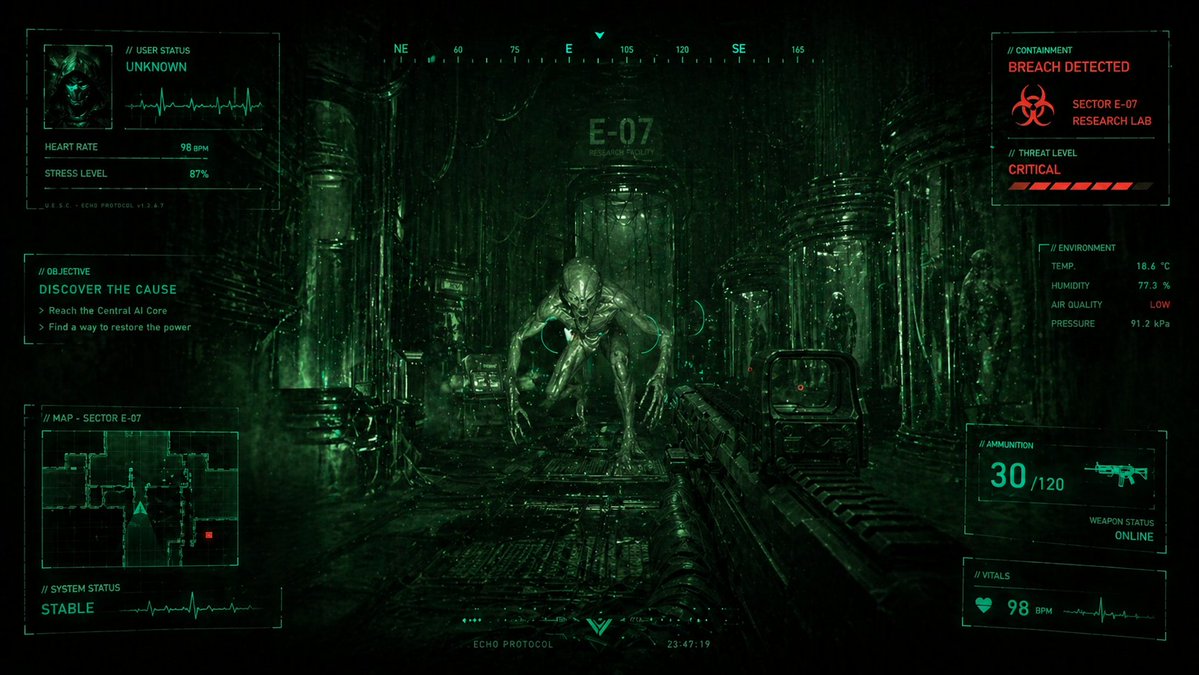
Fiksi Ilmiah Horor FPS HUD Lab Breach
Prompt ini menghasilkan adegan horor fiksi ilmiah sinematik sudut pandang orang pertama dengan alien bermusuhan di koridor penelitian yang jebol dan HUD taktis yang padat, ideal untuk key art game atau visual konsep.
Ini adalah contoh kasus GPT Image 2 untuk Anime & Game . Gunakan contoh siap salin di bawah ini untuk menghasilkan visual serupa, dan tinjau atribusi Awesome GPT Image 2 Prompts serta hak penggunaan komersial sebelum digunakan kembali.
Butuh seluruh rangkaian prompt? Gunakan Anime & Game Untuk contoh terkait lainnya, kunjungi pusat topik, atau buka GPT Image 2 katalog cepat untuk indeks contoh lengkap, struktur yang dapat digunakan kembali, dan atribusi sumber.
Free 1K preview
Generate one preview image instantly, no sign-up required.
4000/4000
Mengingatkan
Prompt siap salin
{
  "type": "cinematic sci-fi horror FPS HUD screen",
  "style": "dark, gritty, photorealistic, high-contrast, green night-vision interface, surveillance-monitor aesthetic, dense atmospheric fog, wet metallic reflections, ominous biotech lab",
  "scene": {
    "setting": "a narrow industrial corridor inside a futuristic research facility",
    "location_marking": "E-07 research facility",
    "lighting": "very low-key lighting with neon green HUD glow, faint backlight from the corridor, reflective moisture on floor and walls",
    "color_palette": [
      "deep black",
      "toxic green",
      "cyan-green",
      "small alert accents in red"
    ],
    "camera": "first-person perspective at human eye level, centered down the corridor",
    "mood": "claustrophobic, hostile, urgent, survival horror"
  },
  "subject": {
    "primary": "a humanoid alien creature crouching and advancing in the center of the corridor",
    "creature_design": "hairless pale biomechanical-looking body, elongated limbs, oversized head, smooth sinewy musculature, predatory posture, long fingers, glossy wet skin, menacing expression",
    "secondary_elements_count": 4,
    "secondary_elements": [
      "1 player assault rifle in the lower-right foreground with holographic sight",
      "1 silhouetted human or specimen figure standing in the distant center background",
      "2 visible humanoid specimens contained in tall glass cylinders along the right side of the corridor"
    ]
  },
  "environment": {
    "architecture": "tall cylindrical columns, ribbed pipes, cables, glass containment tubes, grated metal floor, industrial wall panels, heavy sci-fi laboratory detailing",
    "atmospherics": "floating particles, mist, screen noise, subtle scanlines, vignette, digital distortion"
  },
  "hud": {
    "overlay_style": "full-screen tactical HUD with thin geometric frames, small labels, waveform monitors, reticle marks, compass, and telemetry",
    "sections": [
      {
        "title": "// USER STATUS",
        "position": "top-left",
        "count": 4,
        "labels": [
          "UNKNOWN",
          "HEART RATE",
          "STRESS LEVEL",
          "U.S.C. + ECHO PROTOCOL v1.2.9"
        ]
      },
      {
        "title": "// OBJECTIVE",
        "position": "left-center",
        "count": 3,
        "labels": [
          "DISCOVER THE CAUSE",
          "Reach the Central AI Core",
          "Find a way to restore the power"
        ]
      },
      {
        "title": "// MAP - SECTOR E-07",
        "position": "bottom-left",
        "count": 2,
        "labels": [
          "MAP - SECTOR E-07",
          "SYSTEM STATUS"
        ]
      },
      {
        "title": "// CONTAINMENT",
        "position": "top-right",
        "count": 4,
        "labels": [
          "BREACH DETECTED",
          "SECTOR E-07",
          "RESEARCH LAB",
          "// THREAT LEVEL"
        ]
      },
      {
        "title": "// ENVIRONMENT",
        "position": "right-center",
        "count": 4,
        "labels": [
          "TEMP.",
          "HUMIDITY",
          "AIR QUALITY",
          "PRESSURE"
        ]
      },
      {
        "title": "// AMMUNITION",
        "position": "lower-right",
        "count": 4,
        "labels": [
          "30 /120",
          "WEAPON STATUS",
          "ONLINE",
          "rifle icon"
        ]
      },
      {
        "title": "// VITALS",
        "position": "lower-right",
        "count": 2,
        "labels": [
          "98 BPM",
          "heartbeat waveform"
        ]
      },
      {
        "title": "compass bar",
        "position": "top-center",
        "count": 6,
        "labels": [
          "NE",
          "60",
          "75",
          "E",
          "105",
          "SE"
        ]
      },
      {
        "title": "bottom status strip",
        "position": "bottom-center",
        "count": 3,
        "labels": [
          "....",
          "ECHO PROTOCOL",
          "23:47:19"
        ]
      }
    ],
    "numeric_readouts": {
      "heart_rate": "98 BPM",
      "stress_level": "87%",
      "temperature": "18.6 °C",
      "humidity": "77.3 %",
      "air_quality": "LOW",
      "pressure": "91.2 kPa",
      "ammo": "30 /120",
      "vitals": "98 BPM"
    }
  },
  "composition": {
    "center_focus": "alien creature framed by the corridor",
    "foreground": "weapon occupying the right lower quadrant",
    "midground": "wet floor reflections and lab machinery",
    "background": "facility doorway with E-07 sign and distant silhouette",
    "symmetry": "near-symmetrical corridor composition with offset weapon for dynamic tension"
  },
  "text_treatment": "all interface text in compact futuristic sans-serif, mostly cyan-green with red warning text for danger states",
  "quality": "ultra-detailed, cinematic, game key art quality, realistic textures, dramatic depth, sharp HUD graphics"
}
Best for
- - Anime & Game visual exploration
- - Image generation and reference-image edits
- - Reusable briefs that keep source attribution visible
Change these parts
- - Subject, product, character, or scene
- - Aspect ratio, camera, lighting, and background
- - Brand, text, color, and output constraints
Recommended model and settings
- - Model: gpt-image-2
- - Input mode: Teks ke Gambar
- - Aspect ratio: source
- - Commercial status: review original source
How to use this prompt
- 1. Copy the prompt and preserve its structure for the first test.
- 2. Replace the subject, context, and publishing channel.
- 3. Change one camera, lighting, or style variable per iteration.
- 4. Inspect the output, source, text, and rights before reuse.
Limitations, source, and reuse cautions
- - Generated output is an editable draft, not factual, legal, or rights evidence.
- - Review the linked source, people, brands, logos, text, and third-party media before commercial use.
Diimpor dari Awesome GPT Image 2 Prompts . Atribusi diperlukan. Status penggunaan komersial adalah allowed ; tinjau hak sumber sebelum penggunaan berbayar.
Lebih banyak kasus dalam kategori ini
Diprioritaskan berdasarkan kategori, kompatibilitas mode input, kualitas, dan risiko yang lebih rendah.






Catatan penggunaan kembali dan sumber
Gunakan perintah ini dengan aman setelah melihat pratinjau kasus.
- 1.Salin perintah tersebut atau buka langsung di Dovoo dengan tombol pembuatan.
- 2.Sesuaikan variabel, rasio aspek, dan gambar referensi untuk kebutuhan Anda sendiri.
- 3.Sebelum mempublikasikan atau menggunakan untuk tujuan berbayar, verifikasi hak sumber, persyaratan atribusi, dan risiko merek atau citra.