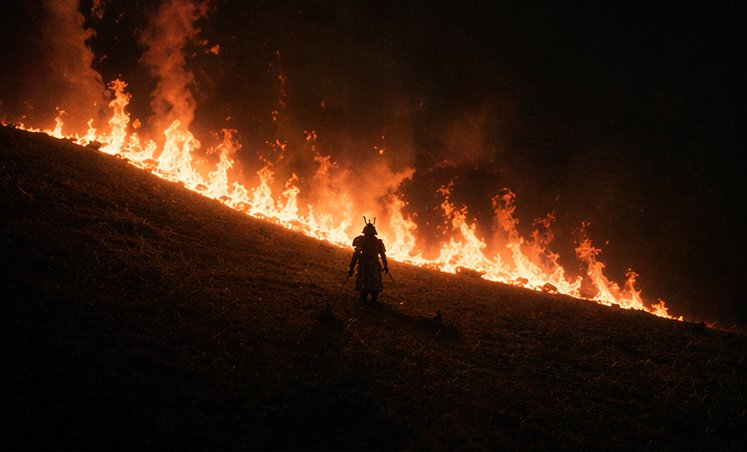
Samurai di Depan Api Lereng Bukit
Sebuah petunjuk sinematik dramatis untuk menghasilkan siluet seorang samurai sendirian di depan garis diagonal api liar di lereng bukit yang gelap pada malam hari.
Ini adalah contoh kasus GPT Image 2 untuk Pemandangan & Alam . Gunakan contoh siap salin di bawah ini untuk menghasilkan visual serupa, dan tinjau atribusi Awesome GPT Image 2 Prompts serta hak penggunaan komersial sebelum digunakan kembali.
Butuh seluruh rangkaian prompt? Gunakan Pemandangan & Alam Untuk contoh terkait lainnya, kunjungi pusat topik, atau buka GPT Image 2 katalog cepat untuk indeks contoh lengkap, struktur yang dapat digunakan kembali, dan atribusi sumber.
Free 1K preview
Generate one preview image instantly, no sign-up required.
971/4000
Mengingatkan
Prompt siap salin
A cinematic night scene on a steep grassy hillside during a wildfire burn line, with one lone samurai standing near the center-lower part of the frame in dark silhouette. The hill runs diagonally from upper left down to lower right, and a continuous line of bright orange flames stretches across the slope behind the figure, forming a glowing border between the dark ground and the black smoky sky. The samurai wears traditional armor and a horned kabuto helmet, holding two swords at his sides, facing uphill toward the fire. Keep the figure small compared to the landscape to emphasize scale and isolation. Use extremely low-key lighting, strong backlighting from the flames, deep blacks, heavy smoke, drifting embers, and a moody high-contrast palette of black, ember red, and fiery orange. The image should feel like an epic historical Japanese war film, wide composition, minimalist framing, dramatic negative space, realistic texture, and intense atmospheric smoke.
Best for
- - Pemandangan & Alam visual exploration
- - Image generation and reference-image edits
- - Reusable briefs that keep source attribution visible
Change these parts
- - Subject, product, character, or scene
- - Aspect ratio, camera, lighting, and background
- - Brand, text, color, and output constraints
Recommended model and settings
- - Model: gpt-image-2
- - Input mode: Teks ke Gambar
- - Aspect ratio: source
- - Commercial status: review original source
How to use this prompt
- 1. Copy the prompt and preserve its structure for the first test.
- 2. Replace the subject, context, and publishing channel.
- 3. Change one camera, lighting, or style variable per iteration.
- 4. Inspect the output, source, text, and rights before reuse.
Limitations, source, and reuse cautions
- - Generated output is an editable draft, not factual, legal, or rights evidence.
- - Review the linked source, people, brands, logos, text, and third-party media before commercial use.
Diimpor dari Awesome GPT Image 2 Prompts . Atribusi diperlukan. Status penggunaan komersial adalah allowed ; tinjau hak sumber sebelum penggunaan berbayar.
Lebih banyak kasus dalam kategori ini
Diprioritaskan berdasarkan kategori, kompatibilitas mode input, kualitas, dan risiko yang lebih rendah.






Catatan penggunaan kembali dan sumber
Gunakan perintah ini dengan aman setelah melihat pratinjau kasus.
- 1.Salin perintah tersebut atau buka langsung di Dovoo dengan tombol pembuatan.
- 2.Sesuaikan variabel, rasio aspek, dan gambar referensi untuk kebutuhan Anda sendiri.
- 3.Sebelum mempublikasikan atau menggunakan untuk tujuan berbayar, verifikasi hak sumber, persyaratan atribusi, dan risiko merek atau citra.