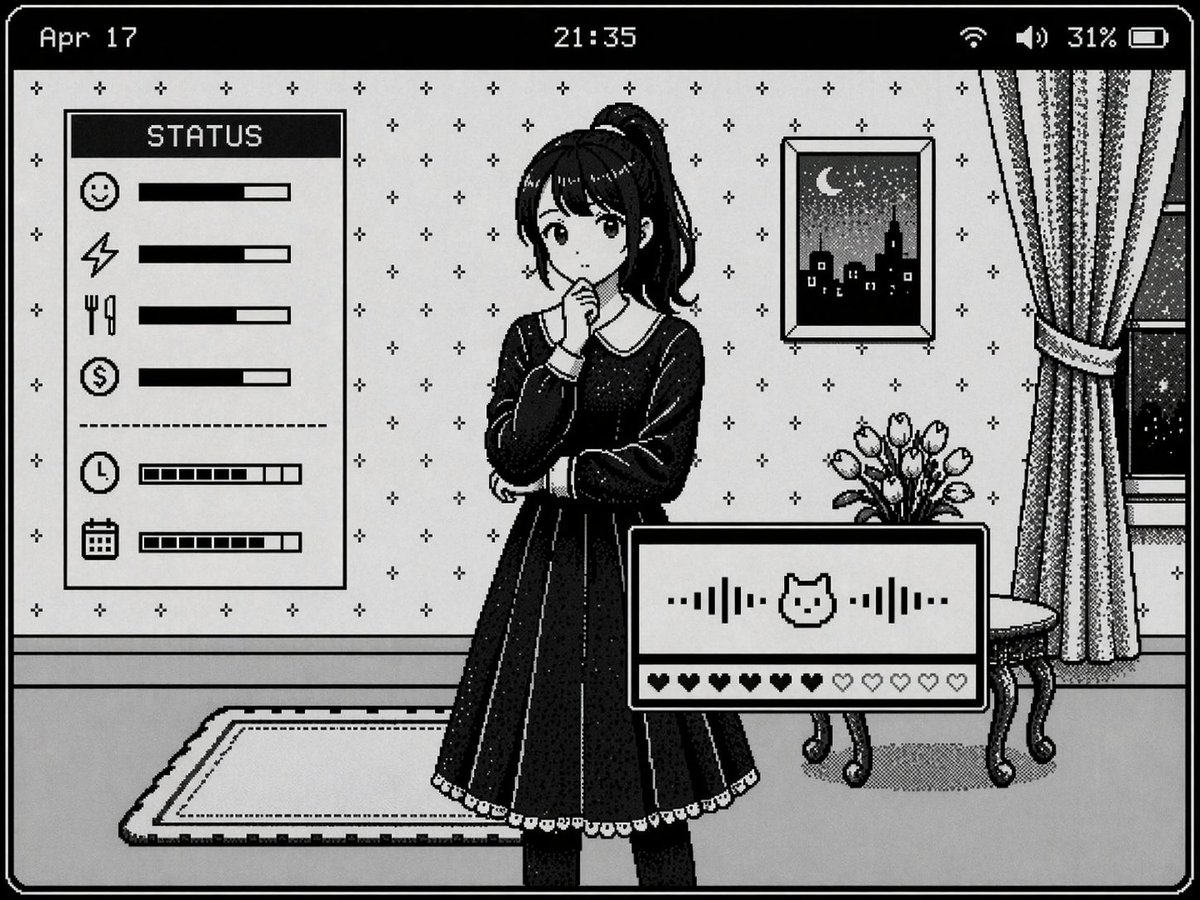
Maket UI Seni Piksel Retro
Menghasilkan antarmuka novel visual seni piksel monokrom 1-bit yang menampilkan karakter, detail latar belakang, dan beberapa panel status.
Ini adalah contoh kasus GPT Image 2 untuk Anime & Game . Gunakan contoh siap salin di bawah ini untuk menghasilkan visual serupa, dan tinjau atribusi Awesome GPT Image 2 Prompts serta hak penggunaan komersial sebelum digunakan kembali.
Butuh seluruh rangkaian prompt? Gunakan Anime & Game Untuk contoh terkait lainnya, kunjungi pusat topik, atau buka GPT Image 2 katalog cepat untuk indeks contoh lengkap, struktur yang dapat digunakan kembali, dan atribusi sumber.
Free 1K preview
Generate one preview image instantly, no sign-up required.
1687/4000
Mengingatkan
Prompt siap salin
{
  "type": "retro monochrome pixel art visual novel interface",
  "style": "1-bit pixel art, black and white, dithered shading, classic Macintosh aesthetic",
  "character": {
    "description": "{argument name=\"character appearance\" default=\"anime girl with a high ponytail wearing a dark dress with a white collar\"}",
    "pose": "standing, hand near chin, thoughtful expression"
  },
  "background": {
    "setting": "room interior",
    "details": [
      "patterned wallpaper with small crosses",
      "framed picture of a night city skyline with a crescent moon",
      "window with curtains",
      "small table with a vase of tulips",
      "rug on the floor"
    ]
  },
  "layout": {
    "top_bar": {
      "left": "{argument name=\"date text\" default=\"Apr 17\"}",
      "center": "{argument name=\"time text\" default=\"21:35\"}",
      "right": "Wi-Fi icon, speaker icon, 31%, battery icon"
    },
    "panels": [
      {
        "position": "mid-left",
        "title": "{argument name=\"status panel title\" default=\"STATUS\"}",
        "count": 6,
        "rows": [
          "smiley face icon with solid progress bar",
          "lightning bolt icon with solid progress bar",
          "fork and knife icon with solid progress bar",
          "dollar sign icon with solid progress bar",
          "clock icon with segmented progress bar",
          "calendar icon with segmented progress bar"
        ]
      },
      {
        "position": "bottom-right",
        "elements": [
          "audio waveform with a central {argument name=\"interaction icon\" default=\"cat face\"} icon",
          "row of 10 hearts, 6 filled and 4 empty"
        ]
      }
    ]
  }
}
Variabel perintah
Placeholder argumen yang dapat diedit ditemukan dalam prompt, beserta nilai defaultnya.
Variabel
character appearance
Bawaan
anime girl with a high ponytail wearing a dark dress with a white collar
Variabel
date text
Bawaan
Apr 17
Variabel
time text
Bawaan
21:35
Variabel
status panel title
Bawaan
STATUS
Variabel
interaction icon
Bawaan
cat face
Best for
- - Anime & Game visual exploration
- - Image generation and reference-image edits
- - Reusable briefs that keep source attribution visible
Change these parts
- - Subject, product, character, or scene
- - Aspect ratio, camera, lighting, and background
- - Brand, text, color, and output constraints
Recommended model and settings
- - Model: gpt-image-2
- - Input mode: Teks ke Gambar
- - Aspect ratio: source
- - Commercial status: review original source
How to use this prompt
- 1. Copy the prompt and preserve its structure for the first test.
- 2. Replace the subject, context, and publishing channel.
- 3. Change one camera, lighting, or style variable per iteration.
- 4. Inspect the output, source, text, and rights before reuse.
Limitations, source, and reuse cautions
- - Generated output is an editable draft, not factual, legal, or rights evidence.
- - Review the linked source, people, brands, logos, text, and third-party media before commercial use.
Diimpor dari Awesome GPT Image 2 Prompts . Atribusi diperlukan. Status penggunaan komersial adalah allowed ; tinjau hak sumber sebelum penggunaan berbayar.
Lebih banyak kasus dalam kategori ini
Diprioritaskan berdasarkan kategori, kompatibilitas mode input, kualitas, dan risiko yang lebih rendah.

Anime Girl Heterochromia Portrait
Teks ke Gambar

Cute Speech Bubble Mascot Profile Icon
Teks ke Gambar

Autumn Cozy Casual Outfit Prompt
Teks ke Gambar

Matte Black B.AI Keyboard Keycap
Teks ke Gambar

Morning Bed Stretching Legs Prompt
Teks ke Gambar
GPT Image 2 Prompt for Mirror Selfie with Flowers
Teks ke Gambar
Catatan penggunaan kembali dan sumber
Gunakan perintah ini dengan aman setelah melihat pratinjau kasus.
- 1.Salin perintah tersebut atau buka langsung di Dovoo dengan tombol pembuatan.
- 2.Sesuaikan variabel, rasio aspek, dan gambar referensi untuk kebutuhan Anda sendiri.
- 3.Sebelum mempublikasikan atau menggunakan untuk tujuan berbayar, verifikasi hak sumber, persyaratan atribusi, dan risiko merek atau citra.