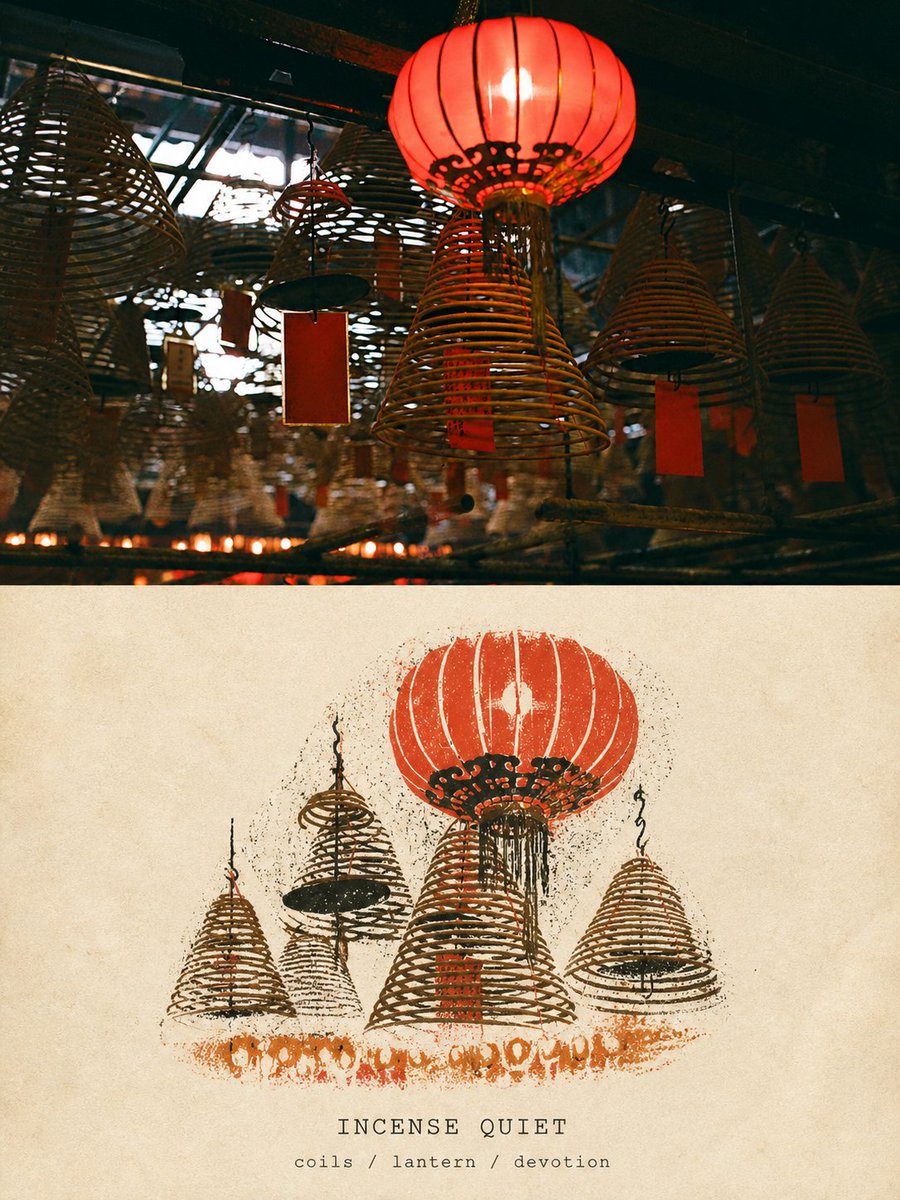
Travel Relief Print Poster
A design-centric prompt that splits a poster into a high-fidelity photo and a matching limited-color relief print version of the same travel scene.
Ini adalah contoh kasus GPT Image 2 untuk Grafis & Poster . Gunakan contoh siap salin di bawah ini untuk menghasilkan visual serupa, dan tinjau atribusi Awesome GPT Image 2 Prompts serta hak penggunaan komersial sebelum digunakan kembali.
Butuh seluruh rangkaian prompt? Gunakan Grafis & Poster Untuk contoh terkait lainnya, kunjungi pusat topik, atau buka GPT Image 2 katalog cepat untuk indeks contoh lengkap, struktur yang dapat digunakan kembali, dan atribusi sumber.
Free 1K preview
Generate one preview image instantly, no sign-up required.
Free text preview doesn’t preserve reference-image consistency.
3724/4000
Mengingatkan
Prompt siap salin
Please use the currently uploaded photo as the sole reference to create a complete, independent, high-end travel design poster in a single image editing generation. Do not add other reference photos, do not use multi-image stitching, grids, or generate poster mockups. Output only the front side of the poster itself. I. Overall Layout: Use an exact 3:4 vertical composition. The frame is divided into two horizontal areas of nearly 1:1 height, each occupying about 50% of the total. The boundary is clear, horizontal, and restrained; do not allow the content of the upper and lower sections to encroach on each other. The upper part is a high-fidelity real photography area. The lower part is a limited-color 'TRAVEL RELIEF PRINT' area based on the same photo. Both must represent the same location, subject, and travel memory. II. Upper Part: High-Fidelity Retention of Original Photo. The upper part must faithfully preserve the uploaded original photo. Accurately maintain: - Subject identity and quantity - Posture, movement, and direction of people or animals - Architectural structure, terrain, and street orientation - Vehicles and core objects - Original observation angle and spatial perspective - Relative positions of important objects - Real materials - Natural lighting and shadows - Original color atmosphere. The upper part must clearly look like a real photograph and cannot become a relief print, illustration, painting, or AI-reconstructed photo. Only very slight, restrained high-end photography color grading, dynamic range adjustment, and ultra-thin film grain are allowed to give the photo the texture of an independent travel magazine, architectural photography, art publication, or photography exhibition. To adapt to the upper area, the sky, ground, or surrounding environment can be naturally extended, but the extended content must match the original photo's perspective, texture, light, and spatial direction. Do not stretch, squeeze, distort, mirror, duplicate subjects, change people, move objects, reshape buildings, replace the sky, or use blurred photo copies to fill edges. If natural extension is unreasonable, prefer using clean ivory paper margins consistent with the entire poster rather than damaging the original photo. III. Lower Part: TRAVEL RELIEF PRINT. The lower part uses a warm cream or ivory natural relief print paper background. The paper should have: visible paper grain, subtle paper fibers, slightly rough matte surface, warm archival paper, natural pigment absorption. Select the most recognizable subject or a scene that represents the photo's meaning from the upper photo and remake it into an independent 'travel relief print mark' floating on the paper. Retain identifying features: - Subject's outer contour - Posture or direction of movement - Main light and shadow divisions - Perspective direction - Key structures - Texture and rhythm - Signature colors - Most important spatial relationships. Actively delete: - Complex backgrounds - Repetitive architectural structures - Numerous windows - Dense crowds - Irrelevant vehicles - Tiny signs - Miscellaneous items - Fine textures - Secondary objects - Text that cannot be accurately generated. The lower part must exhibit: Relief print texture, woodcut style, linocut aesthetics, ink stamp texture, hand-pressed feel, slightly irregular edges, high-contrast, bold blocks of color, artisanal craftsmanship, screen print overlap. The background color of the entire screen should be uniform, without strong plastic reflections. Prohibited: Any modern UI, text, or typography elements (such as titles, dates, coordinates, prices, logos, etc.). Keep the poster absolutely pure, retaining only the visual image itself.
Best for
- - Grafis & Poster visual exploration
- - Image generation and reference-image edits
- - Reusable briefs that keep source attribution visible
Change these parts
- - Subject, product, character, or scene
- - Aspect ratio, camera, lighting, and background
- - Brand, text, color, and output constraints
Recommended model and settings
- - Model: gpt-image-2
- - Input mode: Gambar ke Gambar
- - Aspect ratio: source
- - Commercial status: review original source
How to use this prompt
- 1. Copy the prompt and preserve its structure for the first test.
- 2. Replace the subject, context, and publishing channel.
- 3. Change one camera, lighting, or style variable per iteration.
- 4. Inspect the output, source, text, and rights before reuse.
Limitations, source, and reuse cautions
- - Generated output is an editable draft, not factual, legal, or rights evidence.
- - Review the linked source, people, brands, logos, text, and third-party media before commercial use.
Diimpor dari Awesome GPT Image 2 Prompts . Atribusi diperlukan. Status penggunaan komersial adalah allowed ; tinjau hak sumber sebelum penggunaan berbayar.
Lebih banyak kasus dalam kategori ini
Diprioritaskan berdasarkan kategori, kompatibilitas mode input, kualitas, dan risiko yang lebih rendah.

Stylish Man Street Lamp Portrait
Gambar ke Gambar

Sci-Fi Cyan Lighting Effect
Gambar ke Gambar

Oversized Head Cartoon Caricature Prompt
Gambar ke GambarRisiko sedang

Tuxedo Cat Photo and Line Art Diptych
Teks ke Gambar

Luxury Travel Fashion Portrait Prompt
Teks ke Gambar

Cute Focus Desk Flat Lay and Kawaii Illustration
Teks ke Gambar
Catatan penggunaan kembali dan sumber
Gunakan perintah ini dengan aman setelah melihat pratinjau kasus.
- 1.Salin perintah tersebut atau buka langsung di Dovoo dengan tombol pembuatan.
- 2.Sesuaikan variabel, rasio aspek, dan gambar referensi untuk kebutuhan Anda sendiri.
- 3.Sebelum mempublikasikan atau menggunakan untuk tujuan berbayar, verifikasi hak sumber, persyaratan atribusi, dan risiko merek atau citra.