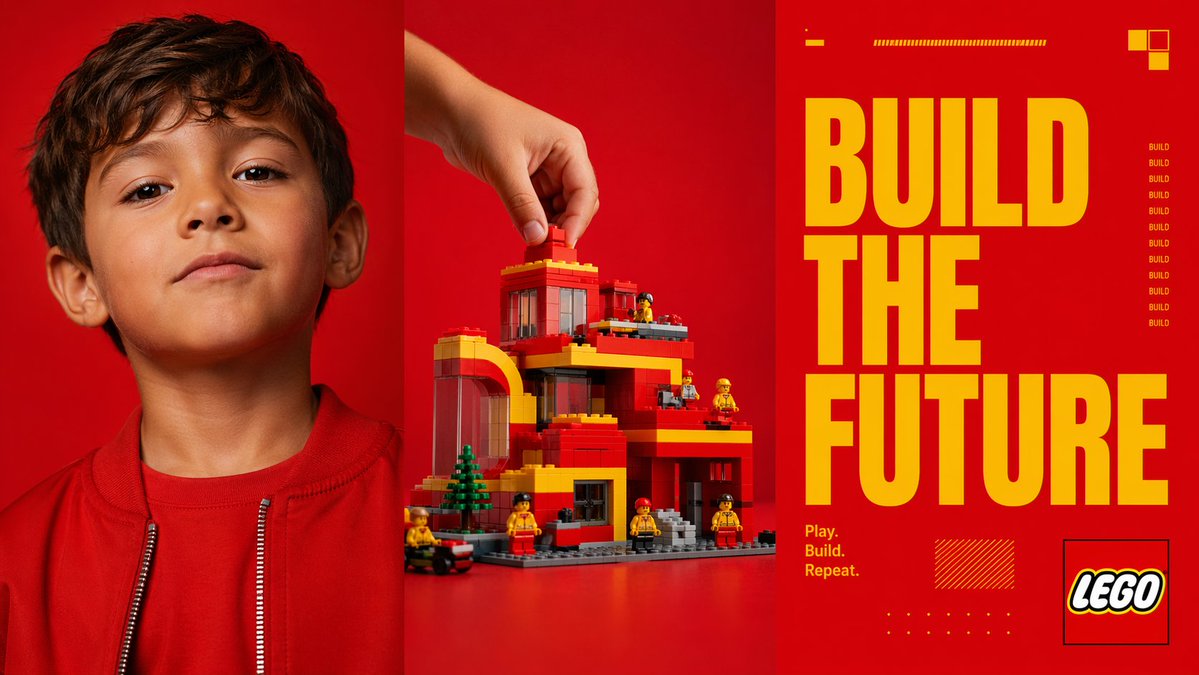
Poster Triptych Merah Membangun Masa Depan
Instruksi ini menghasilkan iklan bergaya merek mainan tiga panel yang berani, menggabungkan potret anak, struktur bata buatan tangan, dan tipografi slogan berukuran besar untuk maket kampanye atau poster editorial.
Ini adalah contoh kasus GPT Image 2 untuk Produk & Komersial . Gunakan contoh siap salin di bawah ini untuk menghasilkan visual serupa, dan tinjau atribusi Awesome GPT Image 2 Prompts serta hak penggunaan komersial sebelum digunakan kembali.
Free 1K preview
Generate one preview image instantly, no sign-up required.
Mengingatkan
Prompt siap salin
{
  "type": "triptych advertising poster",
  "style": "bold modern toy-brand campaign, high-contrast studio photography mixed with graphic editorial design",
  "format": "three equal vertical panels side by side",
  "color_palette": {
    "dominant_background": "vivid saturated red",
    "accent": "bright yellow",
    "secondary": "orange-red, black, white, gray"
  },
  "subject": {
    "theme": "creative building and imagination",
    "brand_style": "construction toy aesthetic",
    "headline": "{argument name=\"headline text\" default=\"BUILD THE FUTURE\"}",
    "tagline": "{argument name=\"tagline\" default=\"Play. Build. Repeat.\"}"
  },
  "layout": {
    "sections": [
      {
        "title": "left portrait panel",
        "position": "left third",
        "count": 1,
        "labels": [
          "child portrait"
        ]
      },
      {
        "title": "center build panel",
        "position": "middle third",
        "count": 1,
        "labels": [
          "hand placing brick on toy building"
        ]
      },
      {
        "title": "right typography panel",
        "position": "right third",
        "count": 1,
        "labels": [
          "headline and brand graphics"
        ]
      }
    ],
    "panel_dividers": "thin dark vertical separations between all 3 panels"
  },
  "left_panel": {
    "subject": "close-cropped portrait of a child from chest up",
    "counted_elements": {
      "people": 1,
      "garments": 2,
      "visible_facial_features": 2
    },
    "appearance": {
      "age": "young child",
      "hair": "short dark brown hair",
      "clothing": [
        "red crew-neck shirt",
        "red zip-front jacket with silver zipper teeth"
      ],
      "visible_features": [
        "left ear visible",
        "neck and lower face visible"
      ]
    },
    "framing": "top of head slightly cropped, centered in panel",
    "background": "solid vivid red seamless studio backdrop"
  },
  "center_panel": {
    "subject": "toy architecture scene being assembled",
    "counted_elements": {
      "hands": 1,
      "main_building": 1,
      "mini_figures": 6,
      "trees": 1,
      "vehicles": 1,
      "loose_bricks_being_placed": 1
    },
    "action": "a human hand enters from the upper left and places a single red brick on the roof",
    "building": {
      "style": "block-built modern multi-level house or civic building",
      "colors": [
        "red",
        "yellow",
        "gray",
        "transparent dark window panels"
      ],
      "features": [
        "arched left-side structure",
        "flat roof levels",
        "multiple balconies or terraces",
        "large windows",
        "gray baseplate",
        "front steps"
      ]
    },
    "surroundings": {
      "mini_figures": "6 small construction-worker-like toy figures in yellow and red distributed around the structure",
      "trees": "1 small green conifer-like tree near front left",
      "vehicle": "1 small black and red wheeled vehicle at the lower left edge"
    },
    "background": "solid vivid red seamless studio backdrop",
    "surface": "red tabletop continuous with backdrop"
  },
  "right_panel": {
    "subject": "graphic poster typography",
    "counted_elements": {
      "headline_words": 3,
      "small_repeated_word_instances": 9,
      "decorative_blocks_top_right": 3,
      "small_horizontal_bar_groups_top": 2,
      "tagline_lines": 3,
      "logo_boxes": 1,
      "decorative_hatched_boxes": 1,
      "decorative_dot_grids": 1
    },
    "typography": {
      "main_text": "{argument name=\"headline text\" default=\"BUILD THE FUTURE\"}",
      "arrangement": "three stacked lines, one word per line, very large condensed bold sans-serif in yellow occupying most of panel height",
      "tagline": "{argument name=\"tagline\" default=\"Play. Build. Repeat.\"}",
      "tagline_position": "lower left of right panel in small yellow text on 3 lines",
      "repeated_side_text": "the word BUILD repeated vertically 9 times in small yellow text along the mid-right side"
    },
    "graphics": {
      "top_details": [
        "1 short yellow dash near upper left",
        "1 long thin yellow striped bar near top center"
      ],
      "top_right": [
        "cluster of 3 small square blocks in yellow and orange"
      ],
      "bottom_details": [
        "1 yellow hatched rectangle near lower center-left",
        "1 small yellow dot grid near bottom center"
      ],
      "logo": "{argument name=\"brand name\" default=\"LEGO\"} logo inside a thin black outlined square at lower right"
    },
    "background": "solid vivid red"
  },
  "lighting": "clean commercial studio lighting, crisp and saturated, minimal shadow, polished ad-campaign finish",
  "composition": "striking triptych composition with photographic portrait on left, product build action in center, and oversized typographic slogan panel on right"
}
Variabel perintah
Placeholder argumen yang dapat diedit ditemukan dalam prompt, beserta nilai defaultnya.
Best for
- - Produk & Komersial visual exploration
- - Image generation and reference-image edits
- - Reusable briefs that keep source attribution visible
Change these parts
- - Subject, product, character, or scene
- - Aspect ratio, camera, lighting, and background
- - Brand, text, color, and output constraints
Recommended model and settings
- - Model: gpt-image-2
- - Input mode: Teks ke Gambar
- - Aspect ratio: source
- - Commercial status: review original source
How to use this prompt
- 1. Copy the prompt and preserve its structure for the first test.
- 2. Replace the subject, context, and publishing channel.
- 3. Change one camera, lighting, or style variable per iteration.
- 4. Inspect the output, source, text, and rights before reuse.
Limitations, source, and reuse cautions
- - Generated output is an editable draft, not factual, legal, or rights evidence.
- - Review the linked source, people, brands, logos, text, and third-party media before commercial use.
Lebih banyak kasus dalam kategori ini
Diprioritaskan berdasarkan kategori, kompatibilitas mode input, kualitas, dan risiko yang lebih rendah.






Catatan penggunaan kembali dan sumber
Gunakan perintah ini dengan aman setelah melihat pratinjau kasus.
- 1.Salin perintah tersebut atau buka langsung di Dovoo dengan tombol pembuatan.
- 2.Sesuaikan variabel, rasio aspek, dan gambar referensi untuk kebutuhan Anda sendiri.
- 3.Sebelum mempublikasikan atau menggunakan untuk tujuan berbayar, verifikasi hak sumber, persyaratan atribusi, dan risiko merek atau citra.