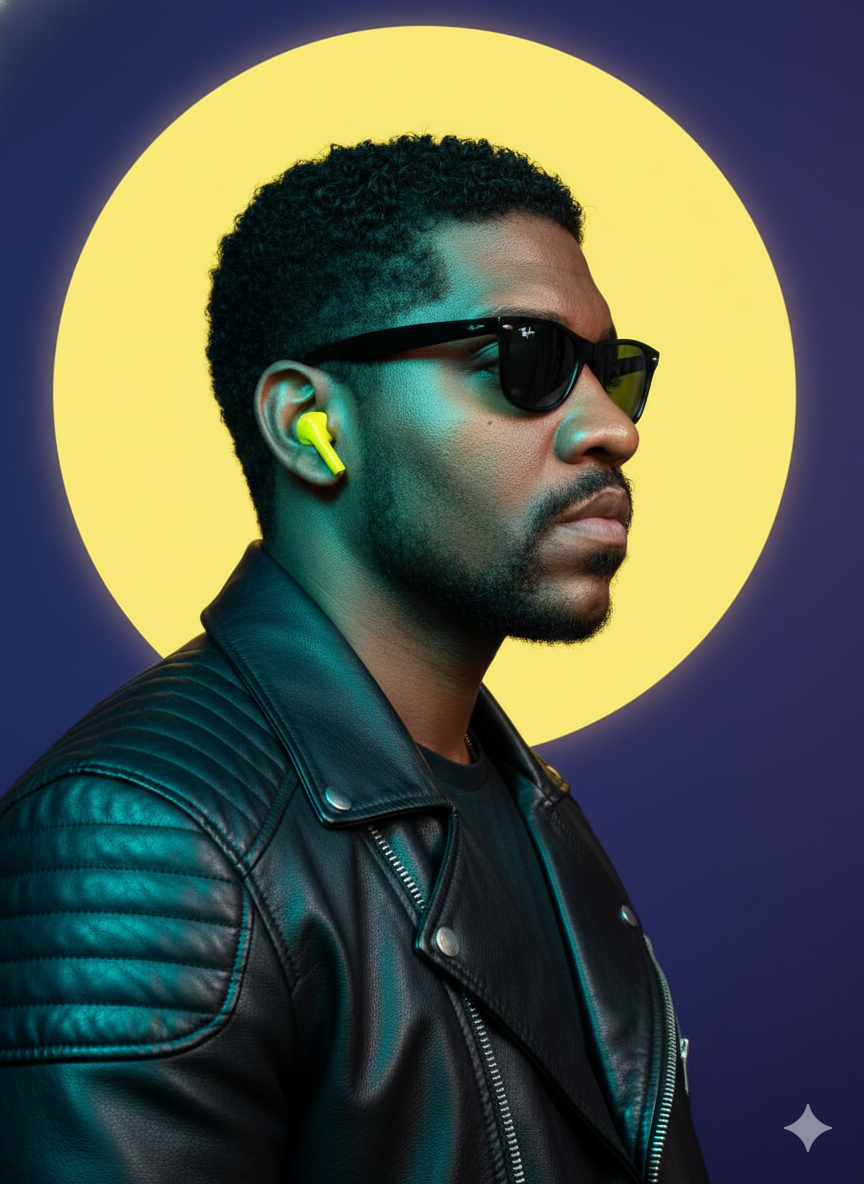
Ray-Ban Wayfare
Source-attributed Nano Banana Pro image prompt from the Awesome Nano Banana Pro Prompts repository with preview image and reuse review notes.
Ini adalah contoh kasus Nano Banana Pro untuk Portrait Photography . Gunakan contoh siap salin di bawah ini untuk menghasilkan visual serupa, dan tinjau atribusi Awesome Nano Banana Pro Prompts serta hak penggunaan komersial sebelum digunakan kembali.
Butuh seluruh rangkaian prompt? Gunakan Portrait Photography Untuk contoh terkait lainnya, kunjungi pusat topik, atau buka Nano Banana Pro katalog cepat untuk indeks contoh lengkap, struktur yang dapat digunakan kembali, dan atribusi sumber.
Mengingatkan
Prompt siap salin
A hyper-realistic 8K portrait, medium shot, profile of a person looking to the right side of the frame, captured with a 50mm equivalent lens, emphasizing sharp details and depth. The subject has a heavily made-up face as a reference. He wears black Ray-Ban Wayfarer sunglasses and a bright yellow wireless earphone in his right ear. The subject wears a highly detailed black leather motorcycle jacket, with subtle quilted patterns on the shoulders and a visible zipper. The lighting is cinematic and high-contrast, characterized by a strong cool contour light in shades of teal and cyan coming from the left, illuminating the contours of the jacket, the beard, and the side of the face, while warmer yellow reflections highlight the hair and the opposite side of the face. Behind the subject's head, slightly off-center, is a large, perfectly circular, vibrant yellow graphic disc, creating a distinct halo effect. This stylized element stands out against a deep, solid blue-purple background, highlighting the dramatic color contrast and modern aesthetic of the studio.
Lebih banyak kasus dalam kategori ini
Diprioritaskan berdasarkan kategori, kompatibilitas mode input, kualitas, dan risiko yang lebih rendah.
Catatan penggunaan kembali dan sumber
Gunakan perintah ini dengan aman setelah melihat pratinjau kasus.
- 1.Salin perintah tersebut atau buka langsung di Dovoo dengan tombol pembuatan.
- 2.Sesuaikan variabel, rasio aspek, dan gambar referensi untuk kebutuhan Anda sendiri.
- 3.Sebelum mempublikasikan atau menggunakan untuk tujuan berbayar, verifikasi hak sumber, persyaratan atribusi, dan risiko merek atau citra.