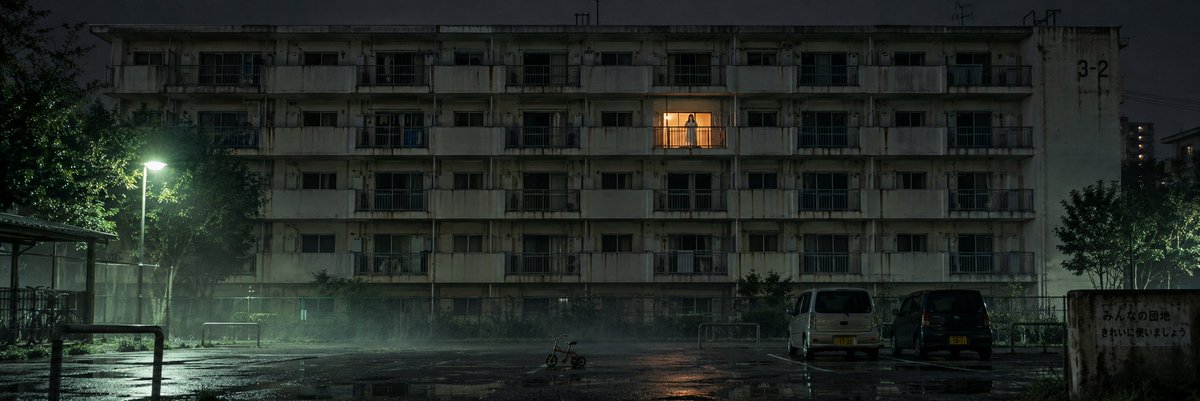
Rainy Japanese Apartment at Night
A cinematic night scene of an old Japanese apartment complex with one warmly lit balcony and a lonely figure, ideal for eerie film-still visuals.
Ini adalah contoh kasus GPT Image 2 untuk Interior & Arsitektur . Gunakan contoh siap salin di bawah ini untuk menghasilkan visual serupa, dan tinjau atribusi Awesome GPT Image 2 Prompts serta hak penggunaan komersial sebelum digunakan kembali.
Butuh seluruh rangkaian prompt? Gunakan Interior & Arsitektur Untuk contoh terkait lainnya, kunjungi pusat topik, atau buka GPT Image 2 katalog cepat untuk indeks contoh lengkap, struktur yang dapat digunakan kembali, dan atribusi sumber.
Free 1K preview
Generate one preview image instantly, no sign-up required.
1740/4000
Mengingatkan
Prompt siap salin
Create a cinematic ultra-wide nighttime exterior shot of an old Japanese public housing apartment block, labeled faintly with “3-2” on the upper right wall. The scene is dark, rainy, and atmospheric, with a wet asphalt courtyard in the foreground reflecting lights and puddles. The building is a long, weathered concrete structure with 5 visible residential floors, rows of small balconies, dark windows, stains, pipes, railings, and aged facade details. Only one apartment near the upper center is warmly lit with an orange glow; on that balcony stands a small solitary figure, {argument name="person action" default="quietly waving one hand"}, silhouetted against the light. In the foreground include exactly 4 main objects: one glowing streetlamp on the left casting greenish-white light through mist, one small child’s tricycle near the center of the empty courtyard, two parked kei vans on the right. Add dark trees on both sides, a bicycle shelter barely visible at far left, low metal railings, and a worn signboard on the far right with Japanese neighborhood notice text. Use a realistic film still style, moody horror-drama atmosphere, low-key lighting, damp haze, subtle fog, high detail, deep shadows, muted green-gray color grading, anamorphic widescreen composition, quiet unsettling emptiness. Customize the setting as {argument name="location" default="a Japanese apartment complex courtyard"}, time as {argument name="time of day" default="late night after rain"}, building mood as {argument name="building condition" default="old, stained, and neglected"}, and balcony light color as {argument name="balcony light color" default="warm amber"}. No people other than the single balcony figure, no text overlays, no watermark.Variabel perintah
Placeholder argumen yang dapat diedit ditemukan dalam prompt, beserta nilai defaultnya.
Variabel
person action
Bawaan
quietly waving one hand
Variabel
location
Bawaan
a Japanese apartment complex courtyard
Variabel
time of day
Bawaan
late night after rain
Variabel
building condition
Bawaan
old, stained, and neglected
Variabel
balcony light color
Bawaan
warm amber
Best for
- - Interior & Arsitektur visual exploration
- - Image generation and reference-image edits
- - Reusable briefs that keep source attribution visible
Change these parts
- - Subject, product, character, or scene
- - Aspect ratio, camera, lighting, and background
- - Brand, text, color, and output constraints
Recommended model and settings
- - Model: gpt-image-2
- - Input mode: Teks ke Gambar
- - Aspect ratio: source
- - Commercial status: review original source
How to use this prompt
- 1. Copy the prompt and preserve its structure for the first test.
- 2. Replace the subject, context, and publishing channel.
- 3. Change one camera, lighting, or style variable per iteration.
- 4. Inspect the output, source, text, and rights before reuse.
Limitations, source, and reuse cautions
- - Generated output is an editable draft, not factual, legal, or rights evidence.
- - Review the linked source, people, brands, logos, text, and third-party media before commercial use.
Diimpor dari Awesome GPT Image 2 Prompts . Atribusi diperlukan. Status penggunaan komersial adalah allowed ; tinjau hak sumber sebelum penggunaan berbayar.
Lebih banyak kasus dalam kategori ini
Diprioritaskan berdasarkan kategori, kompatibilitas mode input, kualitas, dan risiko yang lebih rendah.






Catatan penggunaan kembali dan sumber
Gunakan perintah ini dengan aman setelah melihat pratinjau kasus.
- 1.Salin perintah tersebut atau buka langsung di Dovoo dengan tombol pembuatan.
- 2.Sesuaikan variabel, rasio aspek, dan gambar referensi untuk kebutuhan Anda sendiri.
- 3.Sebelum mempublikasikan atau menggunakan untuk tujuan berbayar, verifikasi hak sumber, persyaratan atribusi, dan risiko merek atau citra.