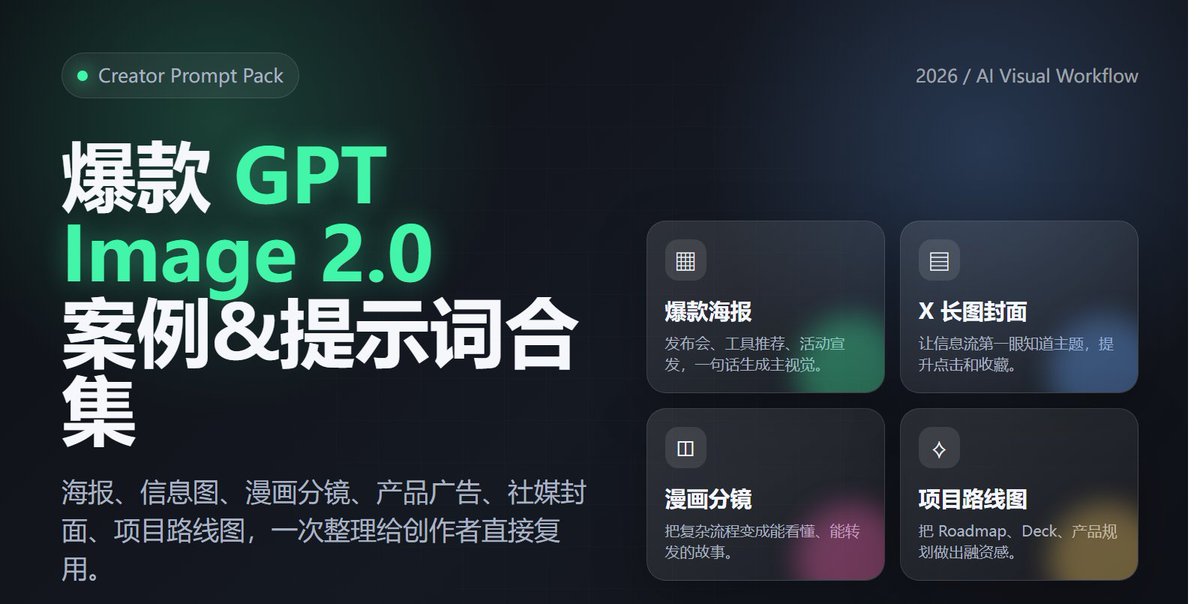
Poster Peluncuran Alat Profesional
Sebuah contoh desain poster bergaya SaaS profesional untuk mengumumkan sebuah perangkat lunak, dengan menekankan teks yang mudah dibaca dan estetika teknologi modern.
Ini adalah contoh kasus GPT Image 2 untuk Grafis & Poster . Gunakan contoh siap salin di bawah ini untuk menghasilkan visual serupa, dan tinjau atribusi Awesome GPT Image 2 Prompts serta hak penggunaan komersial sebelum digunakan kembali.
Butuh seluruh rangkaian prompt? Gunakan Grafis & Poster Untuk contoh terkait lainnya, kunjungi pusat topik, atau buka GPT Image 2 katalog cepat untuk indeks contoh lengkap, struktur yang dapat digunakan kembali, dan atribusi sumber.
Free 1K preview
Generate one preview image instantly, no sign-up required.
2055/4000
Mengingatkan
Prompt siap salin
1. Design a modern tech-style poster for an "AI Agent tool launch," vertical 4:5 aspect ratio, with a clear and eye-catching main title and a subtitle explaining product value. Use a black, white, and gray color palette with fluorescent green accents. Include abstract networks, code windows, and agent nodes. The overall look should resemble a high-end SaaS launch poster, and text must be accurate and readable. 2. Generate a cover image suitable for an X/Twitter long-form post titled "2026 AI Tool Trends," horizontal 16:9 aspect ratio, with a clean and sophisticated style. Include the title and 3 keywords: Agent / Workflow / Automation. The background should be a combination of desktop workflows, browsers, terminals, and data panels, with a layout like a tech media header. 3. Generate an advertisement for a Web3 wallet security tool. The center of the image shows a phone displaying the wallet interface, surrounded by on-chain addresses, risk alerts, shield icons, and transaction path visualizations. The style should be professional and trustworthy, with the Chinese title: "Making every on-chain operation safer." 4. Create a Chinese infographic titled "The 5 Layers of AI Agent Capabilities," including: understanding tasks, calling tools, reading data, executing operations, and reviewing/optimizing. Show this in a clear hierarchical structure, each layer with a small icon, white background, and tech-blue accents. 5. Generate a one-page 4-panel comic strip about a creator going from manually searching for info, writing copy, and making images to completing the workflow automatically with an AI Agent. The style should be lighthearted and humorous, with consistent characters and short, clear Chinese dialogue. The last panel should highlight "double the efficiency." 6. Generate a roadmap visual for an AI x Crypto project, including three phases: Q2, Q3, and Q4: MVP, Agent Marketplace, and Onchain Automation. The style should look like a product page in a funding deck—clean, credible, futuristic, and with clearly readable text.
Best for
- - Grafis & Poster visual exploration
- - Image generation and reference-image edits
- - Reusable briefs that keep source attribution visible
Change these parts
- - Subject, product, character, or scene
- - Aspect ratio, camera, lighting, and background
- - Brand, text, color, and output constraints
Recommended model and settings
- - Model: gpt-image-2
- - Input mode: Teks ke Gambar
- - Aspect ratio: source
- - Commercial status: review original source
How to use this prompt
- 1. Copy the prompt and preserve its structure for the first test.
- 2. Replace the subject, context, and publishing channel.
- 3. Change one camera, lighting, or style variable per iteration.
- 4. Inspect the output, source, text, and rights before reuse.
Limitations, source, and reuse cautions
- - Generated output is an editable draft, not factual, legal, or rights evidence.
- - Review the linked source, people, brands, logos, text, and third-party media before commercial use.
Diimpor dari Awesome GPT Image 2 Prompts . Atribusi diperlukan. Status penggunaan komersial adalah allowed ; tinjau hak sumber sebelum penggunaan berbayar.
Lebih banyak kasus dalam kategori ini
Diprioritaskan berdasarkan kategori, kompatibilitas mode input, kualitas, dan risiko yang lebih rendah.






Catatan penggunaan kembali dan sumber
Gunakan perintah ini dengan aman setelah melihat pratinjau kasus.
- 1.Salin perintah tersebut atau buka langsung di Dovoo dengan tombol pembuatan.
- 2.Sesuaikan variabel, rasio aspek, dan gambar referensi untuk kebutuhan Anda sendiri.
- 3.Sebelum mempublikasikan atau menggunakan untuk tujuan berbayar, verifikasi hak sumber, persyaratan atribusi, dan risiko merek atau citra.