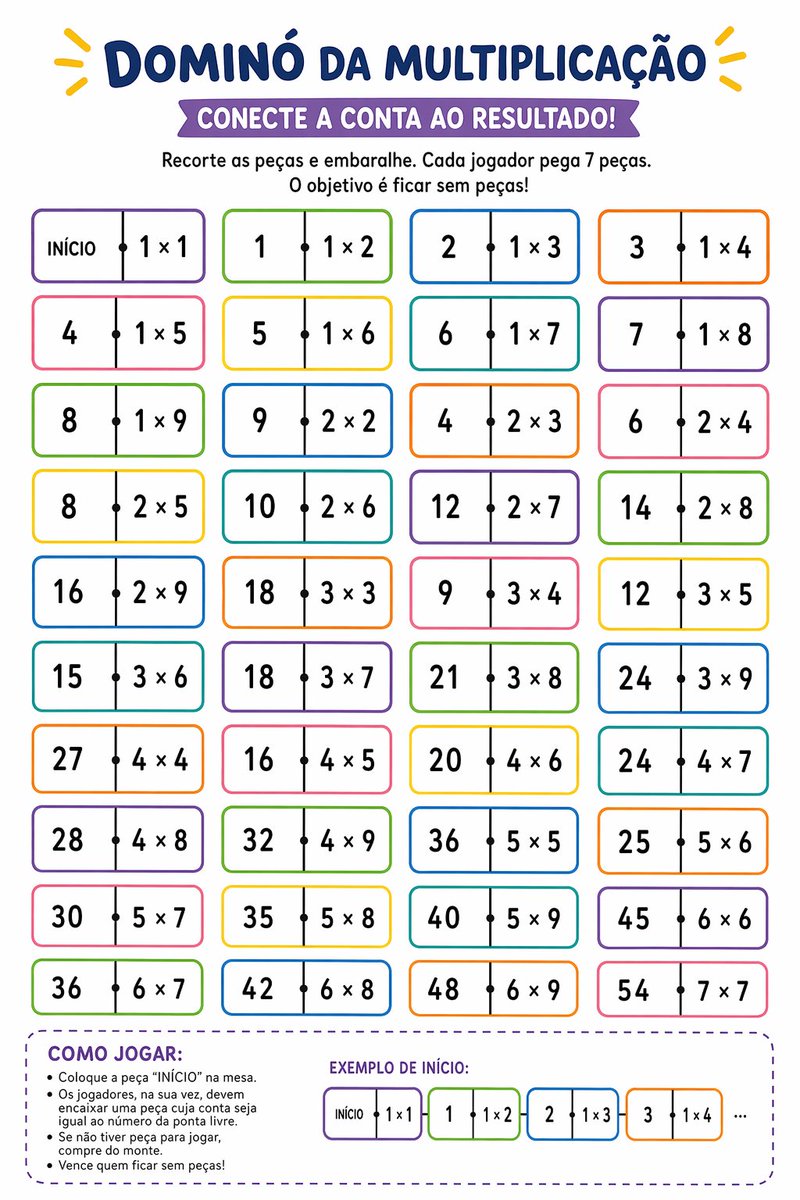
Lembar Kerja Domino Perkalian yang Dapat Dicetak
Lembar kerja kelas bahasa Portugis Brasil yang penuh warna untuk berlatih perkalian melalui permainan mencocokkan domino, ideal untuk guru, homeschooling, dan aktivitas matematika yang dapat dicetak.
Ini adalah contoh kasus GPT Image 2 untuk Grafis & Poster . Gunakan contoh siap salin di bawah ini untuk menghasilkan visual serupa, dan tinjau atribusi Awesome GPT Image 2 Prompts serta hak penggunaan komersial sebelum digunakan kembali.
Butuh seluruh rangkaian prompt? Gunakan Grafis & Poster Untuk contoh terkait lainnya, kunjungi pusat topik, atau buka GPT Image 2 katalog cepat untuk indeks contoh lengkap, struktur yang dapat digunakan kembali, dan atribusi sumber.
Free 1K preview
Generate one preview image instantly, no sign-up required.
2750/4000
Mengingatkan
Prompt siap salin
Create a vertical printable educational worksheet in Brazilian Portuguese, clean white background, playful classroom design, centered composition, bold rounded typography, bright kid-friendly colors. At the very top, a large navy-blue headline reading {argument name="headline text" default="DOMINÓ DA MULTIPLICAÇÃO"}, with small yellow decorative rays on both sides. Below it, a purple ribbon banner with white uppercase text reading {argument name="subtitle text" default="CONECTE A CONTA AO RESULTADO!"}. Under the banner, add two centered instruction lines in black: "Recorte as peças e embaralhe. Cada jogador pega 7 peças." and "O objetivo é ficar sem peças!". The main area shows 40 domino-style tiles arranged in a 4-column by 10-row grid, evenly spaced. Each tile is a horizontal rounded rectangle with a thin colorful outline, white fill, a vertical divider at the center, and a small black dot on the divider. The left half contains either a number result or the word "INÍCIO" on the first tile, and the right half contains a multiplication expression. Use alternating border colors across the grid such as purple, green, blue, orange, pink, and yellow. The 40 tiles, in row order from left to right, top to bottom, are: 1) "INÍCIO | 1 × 1", 2) "1 | 1 × 2", 3) "2 | 1 × 3", 4) "3 | 1 × 4", 5) "4 | 1 × 5", 6) "5 | 1 × 6", 7) "6 | 1 × 7", 8) "7 | 1 × 8", 9) "8 | 1 × 9", 10) "9 | 2 × 2", 11) "4 | 2 × 3", 12) "6 | 2 × 4", 13) "8 | 2 × 5", 14) "10 | 2 × 6", 15) "12 | 2 × 7", 16) "14 | 2 × 8", 17) "16 | 2 × 9", 18) "18 | 3 × 3", 19) "9 | 3 × 4", 20) "12 | 3 × 5", 21) "15 | 3 × 6", 22) "18 | 3 × 7", 23) "21 | 3 × 8", 24) "24 | 3 × 9", 25) "27 | 4 × 4", 26) "16 | 4 × 5", 27) "20 | 4 × 6", 28) "24 | 4 × 7", 29) "28 | 4 × 8", 30) "32 | 4 × 9", 31) "36 | 5 × 5", 32) "25 | 5 × 6", 33) "30 | 5 × 7", 34) "35 | 5 × 8", 35) "40 | 5 × 9", 36) "45 | 6 × 6", 37) "36 | 6 × 7", 38) "42 | 6 × 8", 39) "48 | 6 × 9", 40) "54 | 7 × 7". At the bottom, add a large rounded dashed purple box spanning most of the width. Inside the left side of this box, place the section title "COMO JOGAR:" in bold purple uppercase, followed by 5 bullet points in black: "Coloque a peça “INÍCIO” na mesa.", "Os jogadores, na sua vez, devem encaixar uma peça cuja conta seja igual ao número da ponta livre.", "Se não tiver peça para jogar, compre do monte.", and "Vence quem ficar sem peças!". On the right side of the same box, add the title "EXEMPLO DE INÍCIO:" in purple uppercase and show 4 small domino tiles in sequence plus ellipsis: "INÍCIO | 1 × 1", then "1 | 1 × 2", then "2 | 1 × 3", then "3 | 1 × 4", followed by "...". Keep the overall style crisp, vector-like, printable, friendly for elementary math practice, with balanced spacing and highly legible text.Variabel perintah
Placeholder argumen yang dapat diedit ditemukan dalam prompt, beserta nilai defaultnya.
Variabel
headline text
Bawaan
DOMINÓ DA MULTIPLICAÇÃO
Variabel
subtitle text
Bawaan
CONECTE A CONTA AO RESULTADO!
Best for
- - Grafis & Poster visual exploration
- - Image generation and reference-image edits
- - Reusable briefs that keep source attribution visible
Change these parts
- - Subject, product, character, or scene
- - Aspect ratio, camera, lighting, and background
- - Brand, text, color, and output constraints
Recommended model and settings
- - Model: gpt-image-2
- - Input mode: Teks ke Gambar
- - Aspect ratio: source
- - Commercial status: review original source
How to use this prompt
- 1. Copy the prompt and preserve its structure for the first test.
- 2. Replace the subject, context, and publishing channel.
- 3. Change one camera, lighting, or style variable per iteration.
- 4. Inspect the output, source, text, and rights before reuse.
Limitations, source, and reuse cautions
- - Generated output is an editable draft, not factual, legal, or rights evidence.
- - Review the linked source, people, brands, logos, text, and third-party media before commercial use.
Diimpor dari Awesome GPT Image 2 Prompts . Atribusi diperlukan. Status penggunaan komersial adalah allowed ; tinjau hak sumber sebelum penggunaan berbayar.
Lebih banyak kasus dalam kategori ini
Diprioritaskan berdasarkan kategori, kompatibilitas mode input, kualitas, dan risiko yang lebih rendah.






Catatan penggunaan kembali dan sumber
Gunakan perintah ini dengan aman setelah melihat pratinjau kasus.
- 1.Salin perintah tersebut atau buka langsung di Dovoo dengan tombol pembuatan.
- 2.Sesuaikan variabel, rasio aspek, dan gambar referensi untuk kebutuhan Anda sendiri.
- 3.Sebelum mempublikasikan atau menggunakan untuk tujuan berbayar, verifikasi hak sumber, persyaratan atribusi, dan risiko merek atau citra.