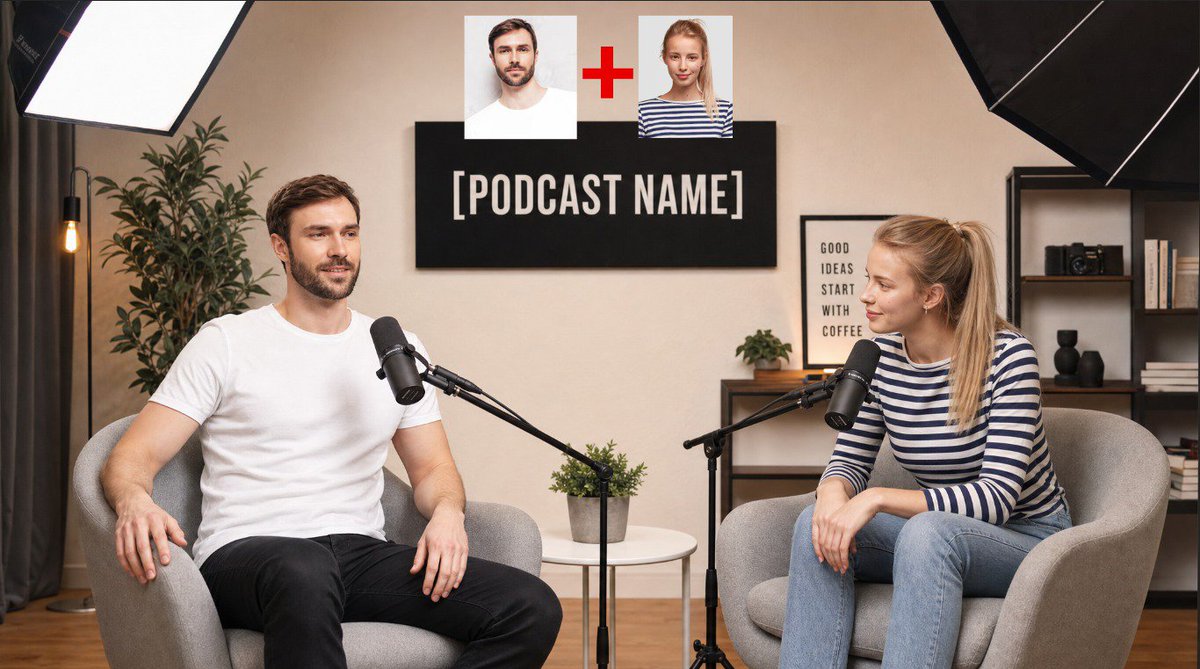
Podcast Studio Interview Shot
Generates a professional podcast studio scene featuring two specific people from reference images seated in a cozy studio setting with realistic lighting.
Ini adalah contoh kasus GPT Image 2 untuk Potret & Karakter . Gunakan contoh siap salin di bawah ini untuk menghasilkan visual serupa, dan tinjau atribusi Awesome GPT Image 2 Prompts serta hak penggunaan komersial sebelum digunakan kembali.
Perintah ini dirancang untuk beberapa gambar referensi. Kita akan membuka Dovoo dengan perintah dan gambar pratinjau yang tersedia; tambahkan referensi yang tersisa di Dovoo sebelum menghasilkan gambar.
Free 1K preview
Generate one preview image instantly, no sign-up required.
Free text preview doesn’t preserve reference-image consistency.
Mengingatkan
Prompt siap salin
Photorealistic editorial photograph of a real podcast interview inside a small, cozy home studio. Two people are seated and talking to each other on a podcast set.

The person from Image 1 sits on the LEFT in a curved light-grey fabric armchair, body angled about 30 degrees toward the right, one hand resting naturally on the armrest, relaxed posture, mid-conversation with a genuine easy smile, eyes on the other person. The person from Image 2 sits on the RIGHT in a matching curved light-grey fabric armchair, body angled about 30 degrees toward the left, leaning slightly forward with elbows on knees, listening attentively with a warm expression, eyes on the person from Image 1.

Keep the exact same faces, skin tone, hairstyle, facial hair, glasses if present, body build and age as in Image 1 and Image 2. Do not alter or idealize either face. Clothing: keep each person's real outfit from their photo, clean and simple.

Between them stands a low white round side table with a small potted green plant. In front of each person a black professional broadcast microphone on a matte-black articulated boom arm, positioned near their mouth but not covering the face, cables tidy.

Background: a warm off-white plaster wall. Centered above and behind the two chairs, a black rectangular wall sign with the podcast name "{argument name="podcast name" default="PODCAST NAME"}" in clean white bold sans-serif capitals. To the right of the sign, a framed black-and-white typographic poster leaning on a small dark wood shelf; a dark wooden shelving unit on the far right with a few books, a small camera and a decorative object. On the far left a tall green indoor plant and a slim floor lamp. Dark grey curtains hang softly on the far left edge of the wall. Light wood floor.

Lighting: one large white softbox key light on a stand in the upper-left corner, softly illuminating both people at about a 2:1 ratio with smooth falloff; a large black-backed softbox visible in the upper-right corner as fill; warm practical glow from the floor lamp. Soft shadows, gentle wraparound skin light, natural skin texture with pores and subtle specular highlights, no harsh hotspots.

Camera: shot on a full-frame digital cinema camera
Variabel perintah
Placeholder argumen yang dapat diedit ditemukan dalam prompt, beserta nilai defaultnya.
Best for
- - Potret & Karakter visual exploration
- - Image generation and reference-image edits
- - Reusable briefs that keep source attribution visible
Change these parts
- - Subject, product, character, or scene
- - Aspect ratio, camera, lighting, and background
- - Brand, text, color, and output constraints
Recommended model and settings
- - Model: gpt-image-2
- - Input mode: Konversi Gambar Berganda ke Gambar
- - Aspect ratio: source
- - Commercial status: review original source
How to use this prompt
- 1. Copy the prompt and preserve its structure for the first test.
- 2. Replace the subject, context, and publishing channel.
- 3. Change one camera, lighting, or style variable per iteration.
- 4. Inspect the output, source, text, and rights before reuse.
Limitations, source, and reuse cautions
- - Generated output is an editable draft, not factual, legal, or rights evidence.
- - Review the linked source, people, brands, logos, text, and third-party media before commercial use.
Lebih banyak kasus dalam kategori ini
Diprioritaskan berdasarkan kategori, kompatibilitas mode input, kualitas, dan risiko yang lebih rendah.





Catatan penggunaan kembali dan sumber
Gunakan perintah ini dengan aman setelah melihat pratinjau kasus.
- 1.Salin perintah tersebut atau buka langsung di Dovoo dengan tombol pembuatan.
- 2.Sesuaikan variabel, rasio aspek, dan gambar referensi untuk kebutuhan Anda sendiri.
- 3.Sebelum mempublikasikan atau menggunakan untuk tujuan berbayar, verifikasi hak sumber, persyaratan atribusi, dan risiko merek atau citra.