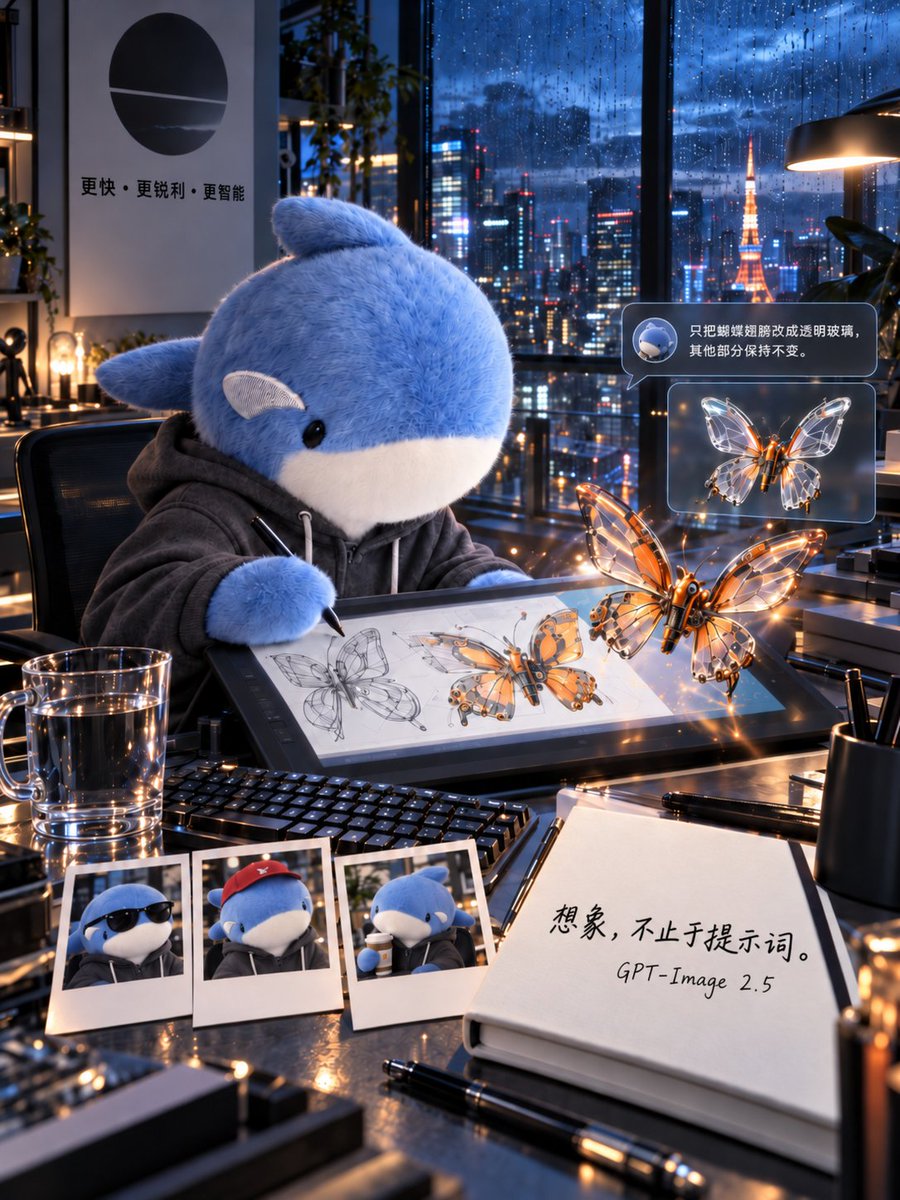
Plush Whale Tokyo Design Studio
A cinematic vertical poster prompt showing a plush whale in a rainy Tokyo high-rise studio designing glowing glass-wing mechanical butterflies.
Ini adalah contoh kasus GPT Image 2 untuk Produk & Komersial . Gunakan contoh siap salin di bawah ini untuk menghasilkan visual serupa, dan tinjau atribusi Awesome GPT Image 2 Prompts serta hak penggunaan komersial sebelum digunakan kembali.
Butuh seluruh rangkaian prompt? Gunakan Produk & Komersial Untuk contoh terkait lainnya, kunjungi pusat topik, atau buka GPT Image 2 katalog cepat untuk indeks contoh lengkap, struktur yang dapat digunakan kembali, dan atribusi sumber.
Free 1K preview
Generate one preview image instantly, no sign-up required.
3296/4000
Mengingatkan
Prompt siap salin
Goal: Create a 3:4 vertical cinematic visual poster of a futuristic design studio on the top floor of a Tokyo high-rise during blue hour after heavy rain, featuring a plush whale character designing a mechanical butterfly.

Canvas: Vertical 3:4 composition, ultra-detailed cinematic realism, shallow depth of field, glossy reflections, warm desk lights contrasted with cool rainy blue city light. The camera looks slightly downward across a cluttered designer’s desk toward floor-to-ceiling windows.

Main subject: A large cute plush {argument name="character name" default="blue whale"} mascot sits in a black office chair at the desk, wearing a dark gray hoodie with white drawstrings. It has soft fuzzy blue fur, a white belly and muzzle, small black glossy eyes, side fins, and a small rounded fin on top. The character holds a stylus and draws on a large pen-display tablet.

Scene and environment: Behind the character, huge rain-covered windows show a vivid Tokyo night skyline with wet glass, bokeh neon reflections, skyscrapers, and Tokyo Tower glowing orange in the distance. Realistic raindrops streak down the glass. Add indoor plants, shelves, desk lamps, and metallic studio equipment. On the left wall, place a minimalist poster with a black circular logo and Chinese text reading 「更快・更锐利・更智能」.

Desk contents: Include exactly 9 distinct desk items: 1 large pen-display tablet showing butterfly concept sketches, 1 black keyboard, 1 transparent glass mug of water, 3 Polaroid photos of the whale character, 1 open notebook, 1 black pen lying in front of the notebook, and 1 black cylindrical pen cup. The three Polaroids should show: the whale wearing sunglasses, the whale wearing a red cap, and the whale drinking from a cup.

Butterfly design: Show exactly 2 prominent mechanical butterflies: one larger glowing orange-and-glass butterfly floating in front of the tablet, and one smaller transparent glass-wing butterfly shown in a floating UI card. The larger butterfly should have a metallic orange body, delicate transparent wings with mechanical vein structures, warm LED highlights, and sparkling reflections. The tablet screen should also show multiple drawn stages of the butterfly design, including pencil line sketches and colored mechanical renderings.

Interface overlay: Add exactly 2 floating translucent UI bubbles on the right side. The top bubble contains a small round icon of the whale and Chinese text: 「只把蝴蝶翅膀改成透明玻璃,其他部分保持不变。」 The lower bubble contains the smaller glass-wing butterfly preview. Use rounded rectangles, subtle blue-gray glassmorphism, and soft glow.

Notebook text: On the open notebook in the lower right foreground, write large handwritten Chinese text: 「想象,不止于提示词。」 and below it write “GPT-Image 2.5”.

Visual style: Hyperrealistic 3D cinematic advertising poster, immaculate material rendering, wet glass, polished black tabletop, metal edges, water droplets, soft plush fur, transparent glass wings, orange neon glints, blue ambient city light, volumetric lamp glow, high contrast but clean, almost no noise.

Constraints: Preserve the exact counted items and text placements, keep all text legible, do not add extra characters, avoid cartoon flatness, avoid watermark or logo overlays beyond the described wall poster and notebook text.
Variabel perintah
Placeholder argumen yang dapat diedit ditemukan dalam prompt, beserta nilai defaultnya.
Variabel
character name
Bawaan
blue whale
Best for
- - Produk & Komersial visual exploration
- - Image generation and reference-image edits
- - Reusable briefs that keep source attribution visible
Change these parts
- - Subject, product, character, or scene
- - Aspect ratio, camera, lighting, and background
- - Brand, text, color, and output constraints
Recommended model and settings
- - Model: gpt-image-2
- - Input mode: Teks ke Gambar
- - Aspect ratio: source
- - Commercial status: review original source
How to use this prompt
- 1. Copy the prompt and preserve its structure for the first test.
- 2. Replace the subject, context, and publishing channel.
- 3. Change one camera, lighting, or style variable per iteration.
- 4. Inspect the output, source, text, and rights before reuse.
Limitations, source, and reuse cautions
- - Generated output is an editable draft, not factual, legal, or rights evidence.
- - Review the linked source, people, brands, logos, text, and third-party media before commercial use.
Diimpor dari Awesome GPT Image 2 Prompts . Atribusi diperlukan. Status penggunaan komersial adalah allowed ; tinjau hak sumber sebelum penggunaan berbayar.
Lebih banyak kasus dalam kategori ini
Diprioritaskan berdasarkan kategori, kompatibilitas mode input, kualitas, dan risiko yang lebih rendah.

Matte Black B.AI Keyboard Keycap
Teks ke Gambar

Luxury Travel Fashion Portrait Prompt
Teks ke Gambar

Orange Rooftop Fashion Photo Prompt
Teks ke Gambar

Cute Focus Desk Flat Lay and Kawaii Illustration
Teks ke Gambar

Street Selfie with Cat in Matching Cap
Teks ke Gambar

Gray Denim Lace-Up Top Prompt for GPT Image 2
Teks ke Gambar
Catatan penggunaan kembali dan sumber
Gunakan perintah ini dengan aman setelah melihat pratinjau kasus.
- 1.Salin perintah tersebut atau buka langsung di Dovoo dengan tombol pembuatan.
- 2.Sesuaikan variabel, rasio aspek, dan gambar referensi untuk kebutuhan Anda sendiri.
- 3.Sebelum mempublikasikan atau menggunakan untuk tujuan berbayar, verifikasi hak sumber, persyaratan atribusi, dan risiko merek atau citra.