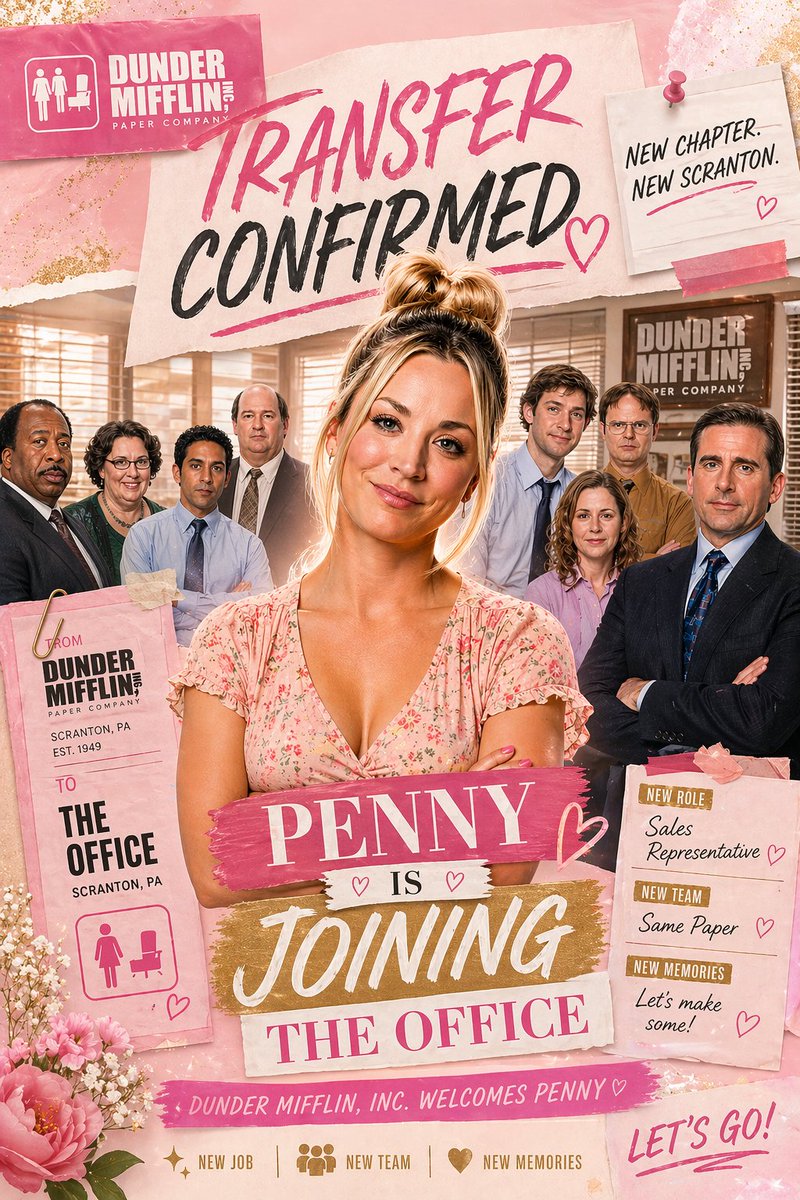
Poster Pengumuman Pindah Kantor Berwarna Merah Muda
Poster pengumuman tempat kerja berwarna merah muda bergaya buku tempel yang menampilkan seorang karyawan wanita sebagai tokoh utama dan tim kantornya, ideal untuk promosi parodi, pengeditan karakter, atau pengumuman transfer yang meriah.
Ini adalah contoh kasus GPT Image 2 untuk Grafis & Poster . Gunakan contoh siap salin di bawah ini untuk menghasilkan visual serupa, dan tinjau atribusi Awesome GPT Image 2 Prompts serta hak penggunaan komersial sebelum digunakan kembali.
Free 1K preview
Generate one preview image instantly, no sign-up required.
Mengingatkan
Prompt siap salin
A glossy, feminine scrapbook-style office announcement poster inspired by a sitcom workplace promo, in a vertical 2:3 composition. The scene shows 1 central woman standing in front of a group of 7 office coworkers inside a warm beige office with venetian blinds, desks, and a visible Dunder Mifflin-style wall sign in the background. The central woman has blonde hair in a messy high bun, a light pink floral V-neck dress, folded arms, and a confident, celebratory pose. Behind her, the 7 coworkers are arranged in a loose semicircle, wearing office attire in muted blues, browns, black, and lavender. Build the image as a mixed-media collage with torn paper, taped notes, brush-lettered headlines, glitter textures, flowers, and pink-and-gold accents. At the top left, place a pink rectangular company card with a white office icon and the text “DUNDER MIFFLIN, INC” and “PAPER COMPANY”. Across the upper center, place a large torn-paper headline reading “TRANSFER CONFIRMED” in expressive brush lettering, with “TRANSFER” in hot pink and “CONFIRMED” in black, plus pink underline strokes and a hand-drawn heart. At the top right, pin a small off-white note card with a pink pushpin and pink tape reading “NEW CHAPTER. NEW SCRANTON.” Near the lower center, layer a bold title made of 4 stacked text strips: “{argument name="character name" default="PENNY"}” on a pink paint-stroke banner, “IS” on a small white strip with 2 tiny hearts, “JOINING” on a gold brush-stroke banner, and “THE OFFICE” on a pale pink strip. On the lower left, hang a tall pink transfer tag clipped with a gold paperclip, reading “FROM DUNDER MIFFLIN, INC PAPER COMPANY / SCRANTON, PA / EST. 1949” and below that “TO THE OFFICE / SCRANTON, PA”, with a pink women-and-desk restroom-style icon at the bottom. On the lower right, place a pink note card with 3 labeled sections: “NEW ROLE” with “{argument name="job title" default="Sales Representative"}”, “NEW TEAM” with “{argument name="team text" default="Same Paper"}”, and “NEW MEMORIES” with “{argument name="memories text" default="Let’s make some!"}”, each accented with small pink hearts. Along the bottom center, add a pink ribbon strip reading “DUNDER MIFFLIN, INC. WELCOMES {argument name="character name" default="PENNY"}♡”. Beneath that, include 3 small icon-and-text items in one row: sparkle icon with “NEW JOB”, group icon with “NEW TEAM”, and heart icon with “NEW MEMORIES”. At the bottom right, add large handwritten pink script saying “LET’S GO!”. Decorate the corners with pink peonies, tiny white filler flowers, torn paper edges, soft glitter dust, and subtle gold foil flecks. Use a warm rosy palette with blush pink, cream, gold, and black, with polished poster compositing, soft glam lighting, and a cheerful celebratory mood.Variabel perintah
Placeholder argumen yang dapat diedit ditemukan dalam prompt, beserta nilai defaultnya.
Best for
- - Grafis & Poster visual exploration
- - Image generation and reference-image edits
- - Reusable briefs that keep source attribution visible
Change these parts
- - Subject, product, character, or scene
- - Aspect ratio, camera, lighting, and background
- - Brand, text, color, and output constraints
Recommended model and settings
- - Model: gpt-image-2
- - Input mode: Teks ke Gambar
- - Aspect ratio: source
- - Commercial status: review original source
How to use this prompt
- 1. Copy the prompt and preserve its structure for the first test.
- 2. Replace the subject, context, and publishing channel.
- 3. Change one camera, lighting, or style variable per iteration.
- 4. Inspect the output, source, text, and rights before reuse.
Limitations, source, and reuse cautions
- - Generated output is an editable draft, not factual, legal, or rights evidence.
- - Review the linked source, people, brands, logos, text, and third-party media before commercial use.
Lebih banyak kasus dalam kategori ini
Diprioritaskan berdasarkan kategori, kompatibilitas mode input, kualitas, dan risiko yang lebih rendah.






Catatan penggunaan kembali dan sumber
Gunakan perintah ini dengan aman setelah melihat pratinjau kasus.
- 1.Salin perintah tersebut atau buka langsung di Dovoo dengan tombol pembuatan.
- 2.Sesuaikan variabel, rasio aspek, dan gambar referensi untuk kebutuhan Anda sendiri.
- 3.Sebelum mempublikasikan atau menggunakan untuk tujuan berbayar, verifikasi hak sumber, persyaratan atribusi, dan risiko merek atau citra.