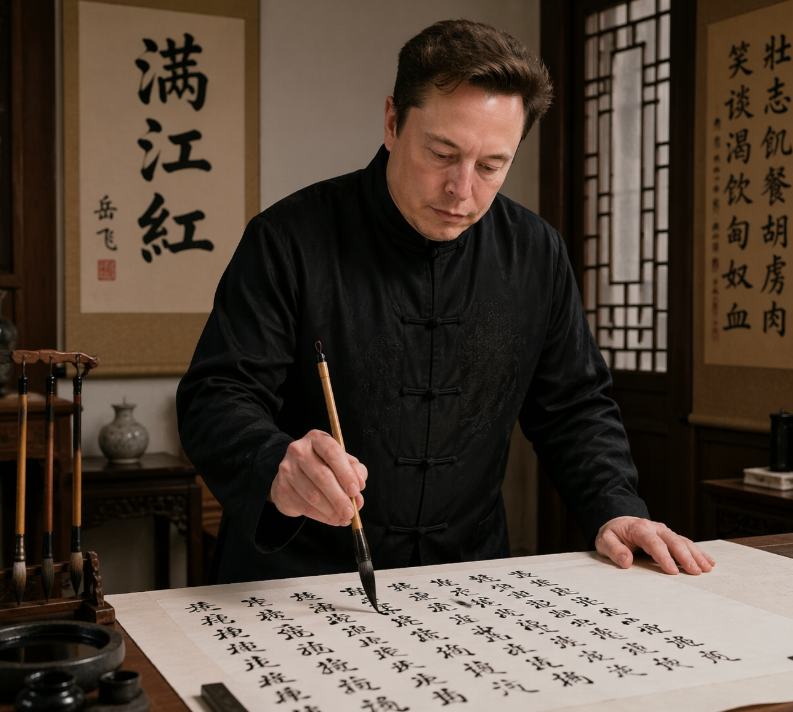
Adegan Cendekiawan Kaligrafi Fotorealistik
Prompt ini menghasilkan potret realistis seorang tokoh teknologi terkenal yang sedang menulis kaligrafi Tiongkok di ruang belajar tradisional, cocok untuk satir editorial, perpaduan budaya, atau unggahan perbandingan di media sosial.
Ini adalah contoh kasus GPT Image 2 untuk Potret & Karakter . Gunakan contoh siap salin di bawah ini untuk menghasilkan visual serupa, dan tinjau atribusi Awesome GPT Image 2 Prompts serta hak penggunaan komersial sebelum digunakan kembali.
Free 1K preview
Generate one preview image instantly, no sign-up required.
Mengingatkan
Prompt siap salin
A realistic indoor portrait of {argument name="subject" default="Elon Musk"} standing at a traditional Chinese writing desk, practicing brush calligraphy on a large sheet of rice paper. He wears a black Tang-style Chinese jacket with frog-button closures and subtle embroidered texture, leaning slightly forward with one hand resting on the table and the other holding a calligraphy brush vertically over the paper. The scene is a warm, elegant scholar's studio with dark wooden furniture, a carved brush stand holding exactly 4 hanging calligraphy brushes on the left, an ink stone and small ink containers in the lower-left foreground, and a small ceramic vase on a side table in the back. Behind him are exactly 2 vertical hanging scrolls: the left scroll prominently displays the large characters {argument name="left scroll text" default="Full River Red"}, and the right scroll contains a longer column of Chinese calligraphy. A wooden lattice window appears on the right side, letting in soft ambient light. The paper on the desk is filled with many lines of black Chinese calligraphy in flowing semi-cursive script, suggesting he is writing {argument name="written poem" default="《Full River Red》"}. Use a documentary-style, photorealistic aesthetic with cinematic warm lighting, rich wood tones, authentic calligraphy tools, shallow depth of field, waist-up composition, and a serious, focused atmosphere.Variabel perintah
Placeholder argumen yang dapat diedit ditemukan dalam prompt, beserta nilai defaultnya.
Best for
- - Potret & Karakter visual exploration
- - Image generation and reference-image edits
- - Reusable briefs that keep source attribution visible
Change these parts
- - Subject, product, character, or scene
- - Aspect ratio, camera, lighting, and background
- - Brand, text, color, and output constraints
Recommended model and settings
- - Model: gpt-image-2
- - Input mode: Teks ke Gambar
- - Aspect ratio: source
- - Commercial status: review original source
How to use this prompt
- 1. Copy the prompt and preserve its structure for the first test.
- 2. Replace the subject, context, and publishing channel.
- 3. Change one camera, lighting, or style variable per iteration.
- 4. Inspect the output, source, text, and rights before reuse.
Limitations, source, and reuse cautions
- - Generated output is an editable draft, not factual, legal, or rights evidence.
- - Review the linked source, people, brands, logos, text, and third-party media before commercial use.
Lebih banyak kasus dalam kategori ini
Diprioritaskan berdasarkan kategori, kompatibilitas mode input, kualitas, dan risiko yang lebih rendah.






Catatan penggunaan kembali dan sumber
Gunakan perintah ini dengan aman setelah melihat pratinjau kasus.
- 1.Salin perintah tersebut atau buka langsung di Dovoo dengan tombol pembuatan.
- 2.Sesuaikan variabel, rasio aspek, dan gambar referensi untuk kebutuhan Anda sendiri.
- 3.Sebelum mempublikasikan atau menggunakan untuk tujuan berbayar, verifikasi hak sumber, persyaratan atribusi, dan risiko merek atau citra.