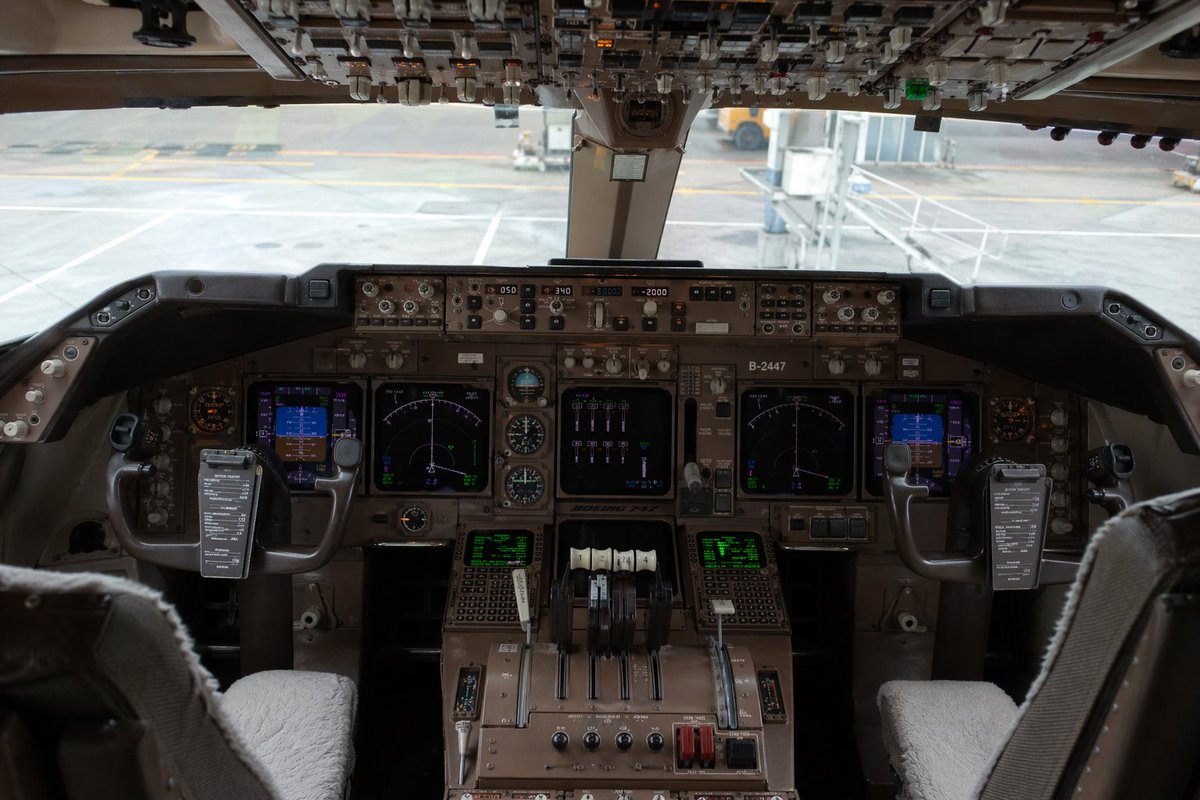
Kokpit Boeing 747 Fotorealistik
Perintah ini menghasilkan gambar interior kokpit pesawat terbang tampak depan yang sangat realistis, cocok untuk visualisasi penerbangan, seni simulasi, atau citra pesawat bergaya editorial.
Ini adalah contoh kasus GPT Image 2 untuk Interior & Arsitektur . Gunakan contoh siap salin di bawah ini untuk menghasilkan visual serupa, dan tinjau atribusi Awesome GPT Image 2 Prompts serta hak penggunaan komersial sebelum digunakan kembali.
Butuh seluruh rangkaian prompt? Gunakan Interior & Arsitektur Untuk contoh terkait lainnya, kunjungi pusat topik, atau buka GPT Image 2 katalog cepat untuk indeks contoh lengkap, struktur yang dapat digunakan kembali, dan atribusi sumber.
Free 1K preview
Generate one preview image instantly, no sign-up required.
1934/4000
Mengingatkan
Prompt siap salin
Ultra-realistic interior photograph of a {argument name="aircraft model" default="Boeing 747"} cockpit viewed from slightly behind and between the two pilot seats, centered and perfectly symmetrical, showing the full main instrument panel, center pedestal, dual control yokes, and the overhead switch panel across the top edge of the frame. The cockpit is unoccupied, with 2 pilot seats visible in the foreground, each with light gray or off-white sheepskin seat covers, and 2 control yokes each holding a dark rectangular checklist or electronic note board clipped to the center. The main panel is densely packed with authentic-looking avionics, analog dials, autopilot controls, radio panels, and 6 illuminated display screens total: 2 large central navigation displays, 2 smaller blue-toned flight displays near the left and right sides, and 2 green text/data screens on the lower center pedestal. Include 4 throttle levers in the center, plus additional flap and systems levers, rotary knobs, guarded switches, and weathered brown-gray metal surfaces typical of a widebody airliner cockpit. The overhead panel should be crowded with rows of switches, toggles, and indicator lights, partially shadowed but sharply detailed. Through the front cockpit windows, show an airport gate scene in soft focus with pale concrete tarmac, painted ground markings, and a passenger jet bridge connected or positioned near the aircraft. Lighting is natural daylight from outside, subdued inside the cockpit, with realistic shadows, mild reflections on glass screens, and documentary-style photographic color grading. Emphasize extreme detail, realism, authentic aviation engineering complexity, and a near indistinguishable-from-real photo quality. Shot with a full-frame camera, eye-level perspective, wide lens around 24–28mm, deep focus across the instrument panel, high dynamic range, no people, no dramatic stylization, no illustration look.Variabel perintah
Placeholder argumen yang dapat diedit ditemukan dalam prompt, beserta nilai defaultnya.
Variabel
aircraft model
Bawaan
Boeing 747
Best for
- - Interior & Arsitektur visual exploration
- - Image generation and reference-image edits
- - Reusable briefs that keep source attribution visible
Change these parts
- - Subject, product, character, or scene
- - Aspect ratio, camera, lighting, and background
- - Brand, text, color, and output constraints
Recommended model and settings
- - Model: gpt-image-2
- - Input mode: Teks ke Gambar
- - Aspect ratio: source
- - Commercial status: review original source
How to use this prompt
- 1. Copy the prompt and preserve its structure for the first test.
- 2. Replace the subject, context, and publishing channel.
- 3. Change one camera, lighting, or style variable per iteration.
- 4. Inspect the output, source, text, and rights before reuse.
Limitations, source, and reuse cautions
- - Generated output is an editable draft, not factual, legal, or rights evidence.
- - Review the linked source, people, brands, logos, text, and third-party media before commercial use.
Diimpor dari Awesome GPT Image 2 Prompts . Atribusi diperlukan. Status penggunaan komersial adalah allowed ; tinjau hak sumber sebelum penggunaan berbayar.
Lebih banyak kasus dalam kategori ini
Diprioritaskan berdasarkan kategori, kompatibilitas mode input, kualitas, dan risiko yang lebih rendah.

MotoGP POV Cornering Shot
Teks ke Gambar

GPT Image 2 Real-Life Character Street Snap
Teks ke Gambar

Cute Focus Desk Flat Lay and Kawaii Illustration
Teks ke Gambar

Street Selfie with Cat in Matching Cap
Teks ke Gambar

Gray Denim Lace-Up Top Prompt for GPT Image 2
Teks ke Gambar

Morning Bed Stretching Legs Prompt
Teks ke Gambar
Catatan penggunaan kembali dan sumber
Gunakan perintah ini dengan aman setelah melihat pratinjau kasus.
- 1.Salin perintah tersebut atau buka langsung di Dovoo dengan tombol pembuatan.
- 2.Sesuaikan variabel, rasio aspek, dan gambar referensi untuk kebutuhan Anda sendiri.
- 3.Sebelum mempublikasikan atau menggunakan untuk tujuan berbayar, verifikasi hak sumber, persyaratan atribusi, dan risiko merek atau citra.