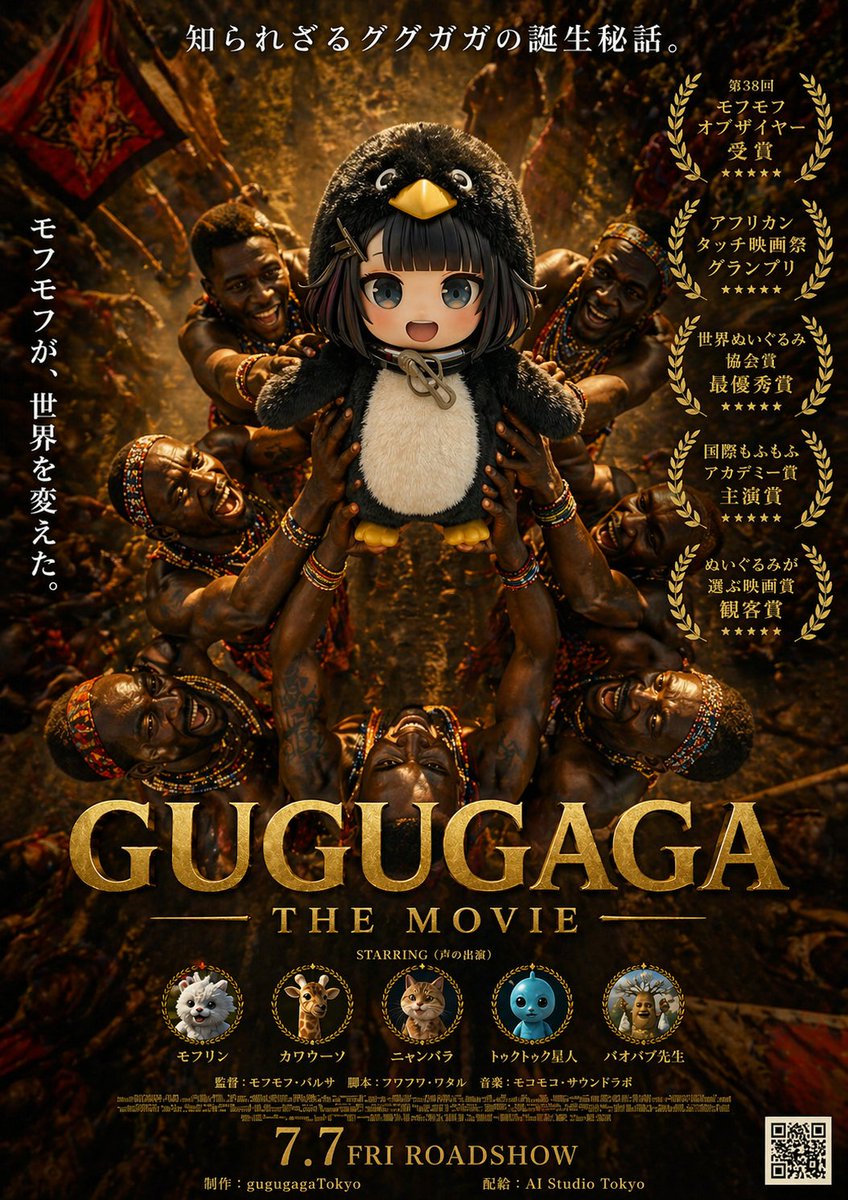
Poster Film Epic Gugugaga
Instruksi ini menghasilkan poster film parodi dramatis yang menampilkan seekor penguin boneka yang dipuja oleh tokoh-tokoh suku, dengan gaya seperti poster rilis film pemenang penghargaan untuk unggahan media sosial atau pemasaran film tiruan.
Ini adalah contoh kasus GPT Image 2 untuk Grafis & Poster . Gunakan contoh siap salin di bawah ini untuk menghasilkan visual serupa, dan tinjau atribusi Awesome GPT Image 2 Prompts serta hak penggunaan komersial sebelum digunakan kembali.
Free 1K preview
Generate one preview image instantly, no sign-up required.
Mengingatkan
Prompt siap salin
A dramatic fictional movie poster for {argument name="movie title" default="GUGUGAGA"}, designed like an epic prestige film one-sheet with dark golden-brown cinematic lighting and a serious award-winning tone. The composition is vertical and symmetrical. In the center, a plush black-and-white penguin mascot with a round body, big glossy eyes, a yellow beak, and small yellow feet is held aloft in a ritual-like presentation by multiple African tribal warriors surrounding it from all sides. Exactly 6 visible warriors are arranged around the penguin, with muscular arms reaching inward and upward to support the mascot, creating a radial halo of hands and bodies. Their skin is richly lit with warm highlights, and they wear colorful beaded necklaces, bracelets, headbands, and traditional adornments. The background is a dense, dimly lit ceremonial setting with warm firelight, earthy shadows, fabric banners, and a textured amber glow, giving the scene an ancient, mythic atmosphere. At the very top, centered Japanese copy reads: 「知られざるググガガの誕生秘話。」 On the left side, a vertical Japanese tagline reads: 「モフモフが、世界を変えた。」 On the right side, place exactly 5 stacked gold laurel award blocks with Japanese text, each framed by laurel wreaths. The 5 award texts are: 「第38回 モフモフ オブザイヤー 受賞」, 「アフリカン タッチ映画祭 グランプリ」, 「世界ぬいぐるみ 協会賞 最優秀賞」, 「国際もふもふ アカデミー賞 主演賞」, and 「ぬいぐるみが 選ぶ映画賞 観客賞」. Across the lower middle, place the huge metallic gold serif title {argument name="movie title" default="GUGUGAGA"}, with smaller gold serif subtitle beneath it reading {argument name="subtitle text" default="THE MOVIE"}. Below that, add a small centered line reading: STARRING (声の出演). Along the lower section, include exactly 5 circular cast medallions with tiny laurel-like frames and labels beneath them. The 5 cast items are: a fluffy white pomeranian-like dog labeled 「モフリン」, a giraffe labeled 「カワウーソン」, an orange tabby cat labeled 「ニャンバラ」, a blue round toy-like character labeled 「トゥクトゥク星人」, and a scholarly baboon or monkey figure labeled 「バオバブ先生」. Beneath the cast row, add small Japanese-style credit lines including director, screenplay, and music in a fine poster-credit style. At the bottom center, display a large gold release date line reading {argument name="release date" default="7.7 FRI ROADSHOW"}. Along the bottom edge, include small production and distribution credits reading 「制作:gugugagaTokyo」 and 「配給:AI Studio Tokyo」. Put a black-and-white QR code in the bottom-right corner. Use ultra-detailed photorealistic poster rendering, dramatic contrast, gilded typography, luxurious texture, prestige cinema marketing design, and a tongue-in-cheek parody of an Oscar-bait adventure drama.Variabel perintah
Placeholder argumen yang dapat diedit ditemukan dalam prompt, beserta nilai defaultnya.
Best for
- - Grafis & Poster visual exploration
- - Image generation and reference-image edits
- - Reusable briefs that keep source attribution visible
Change these parts
- - Subject, product, character, or scene
- - Aspect ratio, camera, lighting, and background
- - Brand, text, color, and output constraints
Recommended model and settings
- - Model: gpt-image-2
- - Input mode: Teks ke Gambar
- - Aspect ratio: source
- - Commercial status: review original source
How to use this prompt
- 1. Copy the prompt and preserve its structure for the first test.
- 2. Replace the subject, context, and publishing channel.
- 3. Change one camera, lighting, or style variable per iteration.
- 4. Inspect the output, source, text, and rights before reuse.
Limitations, source, and reuse cautions
- - Generated output is an editable draft, not factual, legal, or rights evidence.
- - Review the linked source, people, brands, logos, text, and third-party media before commercial use.
Lebih banyak kasus dalam kategori ini
Diprioritaskan berdasarkan kategori, kompatibilitas mode input, kualitas, dan risiko yang lebih rendah.






Catatan penggunaan kembali dan sumber
Gunakan perintah ini dengan aman setelah melihat pratinjau kasus.
- 1.Salin perintah tersebut atau buka langsung di Dovoo dengan tombol pembuatan.
- 2.Sesuaikan variabel, rasio aspek, dan gambar referensi untuk kebutuhan Anda sendiri.
- 3.Sebelum mempublikasikan atau menggunakan untuk tujuan berbayar, verifikasi hak sumber, persyaratan atribusi, dan risiko merek atau citra.