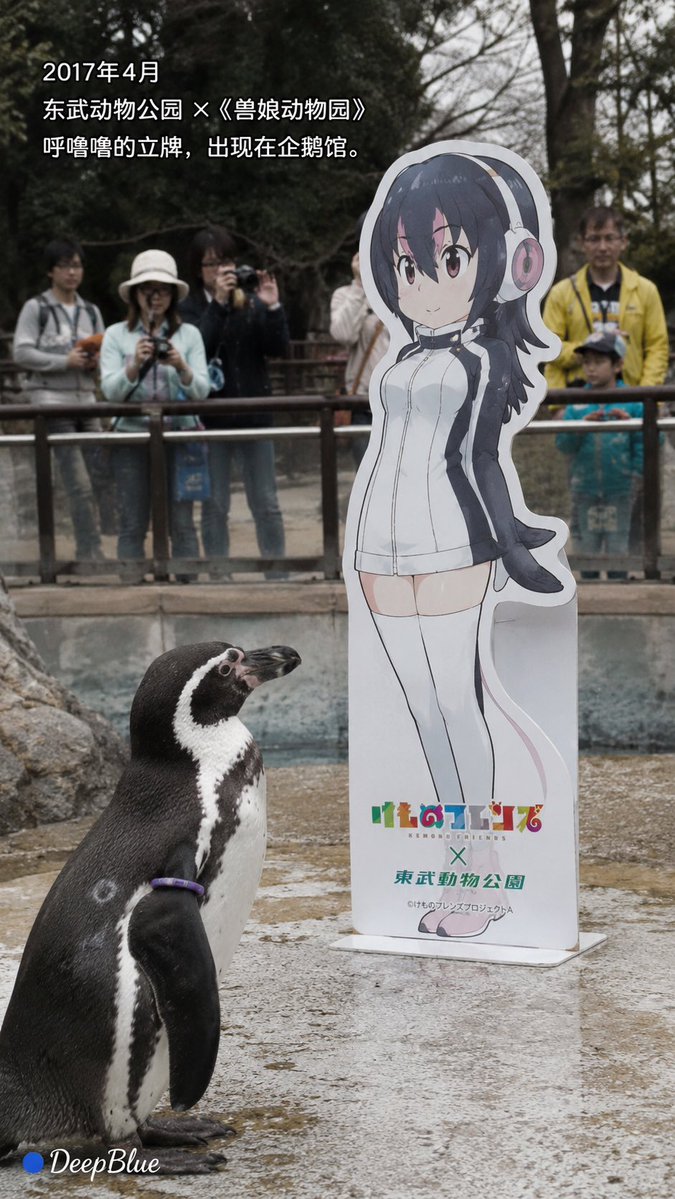
Documentary Photo Sequence of Penguin Story
A documentary-style photo sequence based on the real story of Grape-kun, a penguin who bonded with an anime character cutout.
Ini adalah contoh kasus GPT Image 2 untuk Pemandangan & Alam . Gunakan contoh siap salin di bawah ini untuk menghasilkan visual serupa, dan tinjau atribusi Awesome GPT Image 2 Prompts serta hak penggunaan komersial sebelum digunakan kembali.
Butuh seluruh rangkaian prompt? Gunakan Pemandangan & Alam Untuk contoh terkait lainnya, kunjungi pusat topik, atau buka GPT Image 2 katalog cepat untuk indeks contoh lengkap, struktur yang dapat digunakan kembali, dan atribusi sumber.
Free 1K preview
Generate one preview image instantly, no sign-up required.
2571/4000
Mengingatkan
Prompt siap salin
Realistic news documentary photography, {argument name="location" default="Real Humboldt penguin Grape-kun"}; realistic {argument name="penguin name" default="Humboldt penguin Grape-kun"}, adult male, black and white feathers, purple individual identification ring naturally visible; realistic penguin habitat, pool, rocks, metal fence, trees, visitors; {argument name="character" default="Kemono Friends character Hululu"} cardboard standee, realistic cardboard material and base; natural environmental light, candid shot, realistic feather texture, slight natural grain, low saturation, natural atmosphere, restrained and gentle.

[Image 1 | April 2017]
During the collaboration between Kemono Friends and Tobu Zoo, Hululu's standee appeared in the penguin area; Grape-kun naturally appeared near the standee; visitors watched and took pictures through the fence; a realistic zoo scene.
Text:
“April 2017”
“Tobu Zoo x Kemono Friends”
“Hululu's standee appeared in the penguin habitat.”

[Image 2 | Observation]
Grape-kun stood quietly next to Hululu's standee, his body naturally facing the standee and continuously observing it; showing the behavior noticed by visitors and the zoo at the time; no anthropomorphism, no human-like emotional expression; natural background blur, like a casually captured news photo.
Text:
“Grape-kun seemed particularly interested in this standee.”
“‘Love’ is people's interpretation of his behavior.”

[Image 3 | Retention]
After the collaboration ended, the standees of other characters were removed, but Hululu's standee remained in the penguin area; natural voids were left in other locations; Grape-kun still appeared near the standee; quiet penguin habitat, natural soft light.
Text:
“The collaboration has ended.”
“Other standees were removed, and Hululu was left behind.”

[Image 4 | Farewell]
Time point after Grape-kun passed away on October 12, 2017; the penguin habitat is quiet and empty, Grape-kun is no longer there, but Hululu's standee still exists; pool, rocks, fence, and empty activity space; soft natural light, expressing absence through space, not showing death scenes.
Text:
“October 12, 2017”
“Grape-kun passed away at the age of 21.”
“We do not know what he considered that standee to be.”

Strictly based on real events, no fictionalization of Grape-kun's psychology, dialogue, memories, or motivations; “falling in love with 2D” or “liking Hululu” are human interpretations of his behavior.

Each corner has a “● DeepBlue” logo; the circle is #0B3D91 dark blue, and DeepBlue is white natural handwritten font.
Variabel perintah
Placeholder argumen yang dapat diedit ditemukan dalam prompt, beserta nilai defaultnya.
Variabel
location
Bawaan
Real Humboldt penguin Grape-kun
Variabel
penguin name
Bawaan
Humboldt penguin Grape-kun
Variabel
character
Bawaan
Kemono Friends character Hululu
Best for
- - Pemandangan & Alam visual exploration
- - Image generation and reference-image edits
- - Reusable briefs that keep source attribution visible
Change these parts
- - Subject, product, character, or scene
- - Aspect ratio, camera, lighting, and background
- - Brand, text, color, and output constraints
Recommended model and settings
- - Model: gpt-image-2
- - Input mode: Teks ke Gambar
- - Aspect ratio: source
- - Commercial status: review original source
How to use this prompt
- 1. Copy the prompt and preserve its structure for the first test.
- 2. Replace the subject, context, and publishing channel.
- 3. Change one camera, lighting, or style variable per iteration.
- 4. Inspect the output, source, text, and rights before reuse.
Limitations, source, and reuse cautions
- - Generated output is an editable draft, not factual, legal, or rights evidence.
- - Review the linked source, people, brands, logos, text, and third-party media before commercial use.
Diimpor dari Awesome GPT Image 2 Prompts . Atribusi diperlukan. Status penggunaan komersial adalah allowed ; tinjau hak sumber sebelum penggunaan berbayar.
Lebih banyak kasus dalam kategori ini
Diprioritaskan berdasarkan kategori, kompatibilitas mode input, kualitas, dan risiko yang lebih rendah.






Catatan penggunaan kembali dan sumber
Gunakan perintah ini dengan aman setelah melihat pratinjau kasus.
- 1.Salin perintah tersebut atau buka langsung di Dovoo dengan tombol pembuatan.
- 2.Sesuaikan variabel, rasio aspek, dan gambar referensi untuk kebutuhan Anda sendiri.
- 3.Sebelum mempublikasikan atau menggunakan untuk tujuan berbayar, verifikasi hak sumber, persyaratan atribusi, dan risiko merek atau citra.