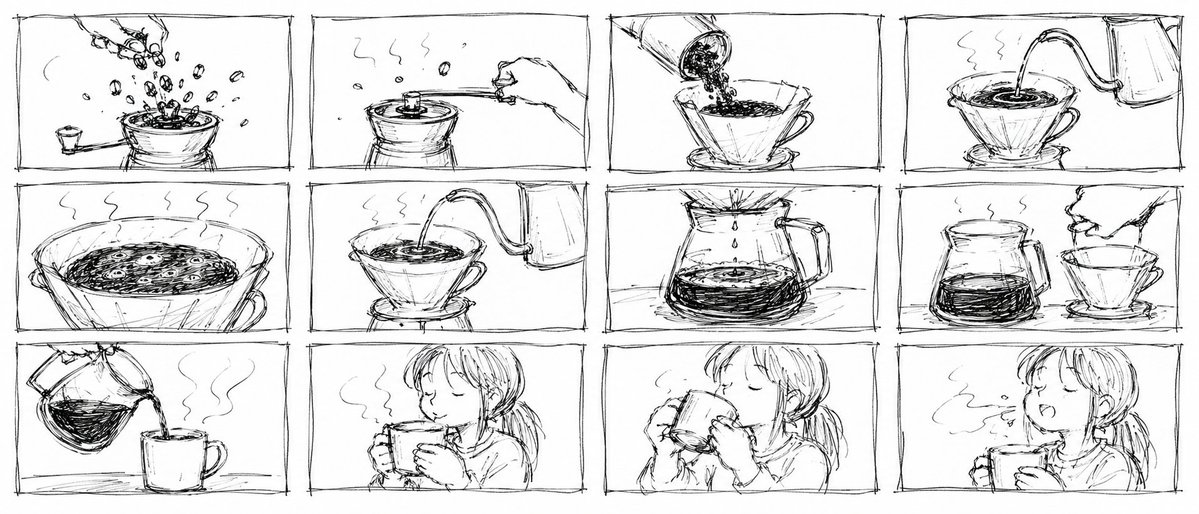
Pencil Sketch Coffee Storyboard
A prompt for generating a rough, 12-panel pencil storyboard grid depicting a coffee brewing sequence.
Ini adalah contoh kasus GPT Image 2 untuk Ilustrasi & Seni . Gunakan contoh siap salin di bawah ini untuk menghasilkan visual serupa, dan tinjau atribusi Awesome GPT Image 2 Prompts serta hak penggunaan komersial sebelum digunakan kembali.
Butuh seluruh rangkaian prompt? Gunakan Ilustrasi & Seni Untuk contoh terkait lainnya, kunjungi pusat topik, atau buka GPT Image 2 katalog cepat untuk indeks contoh lengkap, struktur yang dapat digunakan kembali, dan atribusi sumber.
Free 1K preview
Generate one preview image instantly, no sign-up required.
2677/4000
Mengingatkan
Prompt siap salin
An extremely rough, messy, dirty pencil storyboard sheet. Scribbled thumbnail sketches that look like they were drawn in 10 seconds, rough gesture sketches, loose scratchy lines, barely readable shapes. Complete doodle-level roughness, even messier and rougher than a clean sketch. Aspect ratio: 21:9. Black and white only. Absolutely do not make it look like a finished drawing. Do not make clean line art. Arrange exactly 12 panels in a 4×3 grid, 4 columns by 3 rows. Each panel should have a messy, uneven rectangular frame that looks quickly drawn. No text, numbers, logos, or captions at all. A scene of a {argument name="subject" default="woman making and drinking pour over coffee"}. Consistency rules: keep everything physically correct across all panels. The pour over dripper must always be the same cone-shaped dripper sitting on top of the same glass server. Always draw it from the same diagonal front angle. Do not flip the orientation. The kettle must always be the same long-spouted gooseneck kettle. The spout must always point in the same direction. Keep the hands simple. Draw a maximum of two fingers. Do not draw extra fingers or broken joints. The coffee grounds must always appear as a dark rough layer inside the filter. Do not make it look like liquid until water is added. Panel 1 (hook): Whole coffee beans poured into a hand grinder from above. Beans scatter and bounce dramatically. Panel 2: The grinder handle being turned. Coffee dust and aroma lines rising. Panel 3: The ground coffee poured from the grinder into a paper filter inside the cone dripper. Grounds settle into a flat bed. Panel 4: The gooseneck kettle lifted. A thin precise stream of hot water poured in a slow spiral over the grounds. Bloom forming grounds puff up. Panel 5: Close-up of the blooming coffee grounds. CO2 bubbles rising from the wet surface. Steam rising. Panel 6: A second steady pour begins. Water spiraling outward from center. Coffee beginning to drip into the glass server below. Panel 7: The glass server filling slowly with dark coffee. Crema layer visible at the top of the liquid. Panel 8: The dripper lifted off and set aside. The finished coffee in the glass server, steam rising. Panel 9: Coffee poured from the server into a simple ceramic mug. A smooth stream. Steam curling upward. Panel 10: Both hands wrapped around the warm mug. Steam rising from the surface. Panel 11: The mug lifted to the lips. Eyes close slightly. Panel 12 (finish): First sip taken. A slow exhale of breath visible as steam. Soft satisfied expression. The whole image should be a pure rough scribbled thumbnail sheet. Messy, crude, no details, no shading, no color, no text.Variabel perintah
Placeholder argumen yang dapat diedit ditemukan dalam prompt, beserta nilai defaultnya.
Variabel
subject
Bawaan
woman making and drinking pour over coffee
Best for
- - Ilustrasi & Seni visual exploration
- - Image generation and reference-image edits
- - Reusable briefs that keep source attribution visible
Change these parts
- - Subject, product, character, or scene
- - Aspect ratio, camera, lighting, and background
- - Brand, text, color, and output constraints
Recommended model and settings
- - Model: gpt-image-2
- - Input mode: Teks ke Gambar
- - Aspect ratio: source
- - Commercial status: review original source
How to use this prompt
- 1. Copy the prompt and preserve its structure for the first test.
- 2. Replace the subject, context, and publishing channel.
- 3. Change one camera, lighting, or style variable per iteration.
- 4. Inspect the output, source, text, and rights before reuse.
Limitations, source, and reuse cautions
- - Generated output is an editable draft, not factual, legal, or rights evidence.
- - Review the linked source, people, brands, logos, text, and third-party media before commercial use.
Diimpor dari Awesome GPT Image 2 Prompts . Atribusi diperlukan. Status penggunaan komersial adalah allowed ; tinjau hak sumber sebelum penggunaan berbayar.
Lebih banyak kasus dalam kategori ini
Diprioritaskan berdasarkan kategori, kompatibilitas mode input, kualitas, dan risiko yang lebih rendah.






Catatan penggunaan kembali dan sumber
Gunakan perintah ini dengan aman setelah melihat pratinjau kasus.
- 1.Salin perintah tersebut atau buka langsung di Dovoo dengan tombol pembuatan.
- 2.Sesuaikan variabel, rasio aspek, dan gambar referensi untuk kebutuhan Anda sendiri.
- 3.Sebelum mempublikasikan atau menggunakan untuk tujuan berbayar, verifikasi hak sumber, persyaratan atribusi, dan risiko merek atau citra.