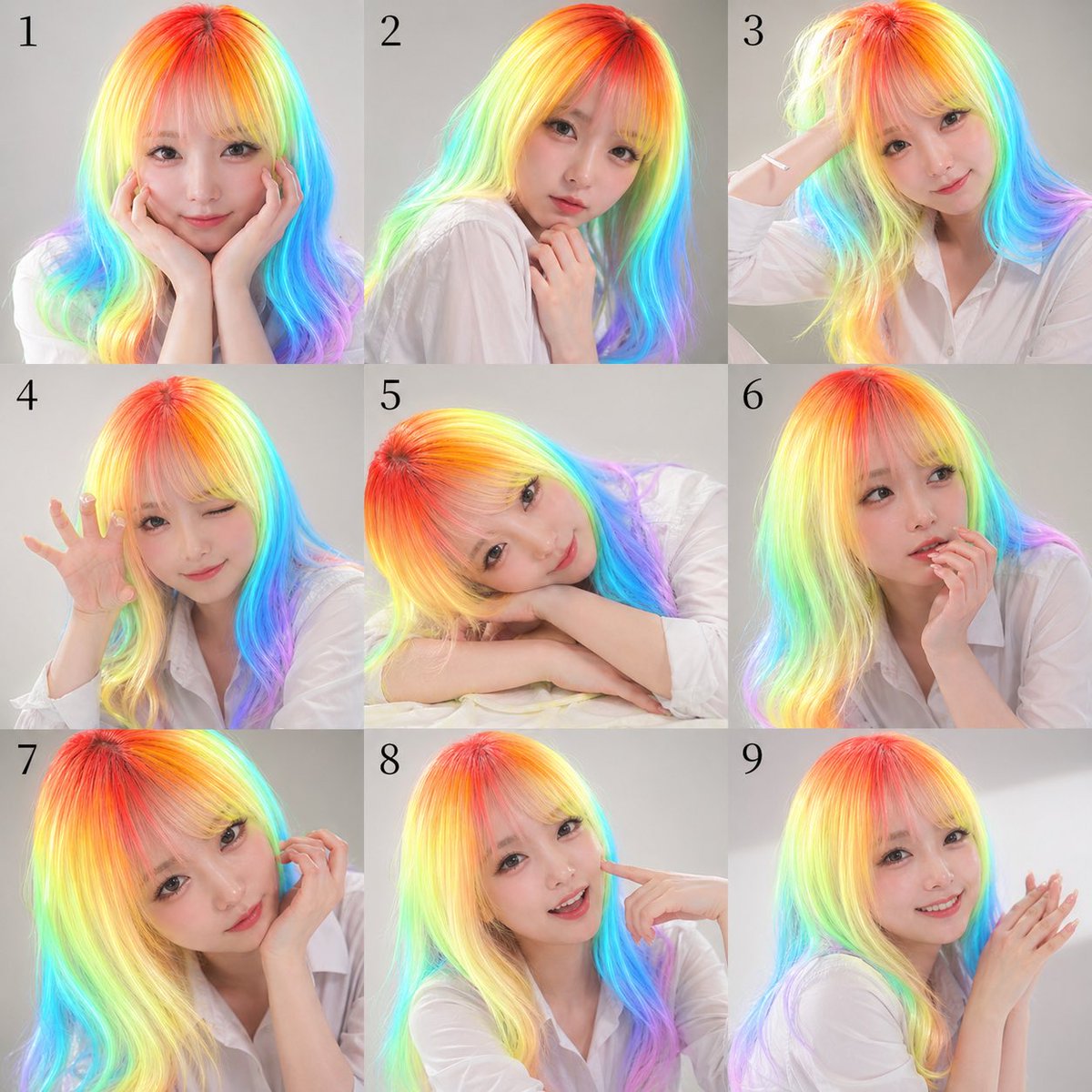
Lembar Potret Rambut Pelangi Sembilan Panel
Perintah ini menghasilkan lembar kontak potret studio berisi 9 gambar dari satu subjek dalam berbagai pose, berguna untuk visual promosi, papan ekspresi, atau set potret peringatan bergaya.
Ini adalah contoh kasus GPT Image 2 untuk Potret & Karakter . Gunakan contoh siap salin di bawah ini untuk menghasilkan visual serupa, dan tinjau atribusi Awesome GPT Image 2 Prompts serta hak penggunaan komersial sebelum digunakan kembali.
Butuh seluruh rangkaian prompt? Gunakan Potret & Karakter Untuk contoh terkait lainnya, kunjungi pusat topik, atau buka GPT Image 2 katalog cepat untuk indeks contoh lengkap, struktur yang dapat digunakan kembali, dan atribusi sumber.
Free 1K preview
Generate one preview image instantly, no sign-up required.
2304/4000
Mengingatkan
Prompt siap salin
A 3x3 contact-sheet style studio portrait collage with exactly 9 square panels arranged in a clean grid, each panel numbered in black serif numerals from 1 to 9 near the upper left corner. The same woman appears in every panel against a soft light gray seamless studio background, wearing a loose white button-up shirt with natural folds and a casual editorial look. She has long, smooth, slightly wavy hair rendered in vivid neon rainbow gradients, with hot red and orange at the crown transitioning through yellow, lime, cyan, blue, and violet toward the lengths and ends, creating a luminous iridescent effect. The face in every panel is obscured by a centered square mosaic blur block in skin-tone colors, covering the full face area while leaving hair, neck, hands, and clothing visible. Use soft, even beauty lighting, polished commercial photography, high detail, realistic skin and fabric, and a modern promotional headshot aesthetic. The 9 poses are: panel 1, facing front with both hands cupping the cheeks; panel 2, turned slightly left in three-quarter view with one hand lightly touching the neck/collarbone; panel 3, angled right with one arm raised and hand touching the back of the head; panel 4, leaning forward slightly with one hand lifted beside the face, fingers spread in a playful claw-like gesture; panel 5, resting head sideways on folded arms on a white surface, relaxed and dreamy; panel 6, front-facing with one hand supporting the chin or cheek in a thoughtful pose; panel 7, close crop from the left side with one hand lifted near the ear or hair; panel 8, front-facing with one index finger pointing to the cheek; panel 9, right three-quarter view with both hands together near the face as if softly clapping or posing delicately. Keep framing varied but consistent, mostly bust or half-body crops, with the rainbow hair as the central visual feature. Make it look like a nine-variation publicity photo sheet for {argument name="subject type" default="a young woman"}, wearing a {argument name="outfit" default="white button-up shirt"}, with {argument name="hair color" default="neon rainbow gradient hair"}, on a {argument name="background color" default="light gray studio background"}, in a {argument name="photo style" default="clean commercial beauty portrait"} style.Variabel perintah
Placeholder argumen yang dapat diedit ditemukan dalam prompt, beserta nilai defaultnya.
Variabel
subject type
Bawaan
a young woman
Variabel
outfit
Bawaan
white button-up shirt
Variabel
hair color
Bawaan
neon rainbow gradient hair
Variabel
background color
Bawaan
light gray studio background
Variabel
photo style
Bawaan
clean commercial beauty portrait
Best for
- - Potret & Karakter visual exploration
- - Image generation and reference-image edits
- - Reusable briefs that keep source attribution visible
Change these parts
- - Subject, product, character, or scene
- - Aspect ratio, camera, lighting, and background
- - Brand, text, color, and output constraints
Recommended model and settings
- - Model: gpt-image-2
- - Input mode: Teks ke Gambar
- - Aspect ratio: source
- - Commercial status: review original source
How to use this prompt
- 1. Copy the prompt and preserve its structure for the first test.
- 2. Replace the subject, context, and publishing channel.
- 3. Change one camera, lighting, or style variable per iteration.
- 4. Inspect the output, source, text, and rights before reuse.
Limitations, source, and reuse cautions
- - Generated output is an editable draft, not factual, legal, or rights evidence.
- - Review the linked source, people, brands, logos, text, and third-party media before commercial use.
Diimpor dari Awesome GPT Image 2 Prompts . Atribusi diperlukan. Status penggunaan komersial adalah allowed ; tinjau hak sumber sebelum penggunaan berbayar.
Lebih banyak kasus dalam kategori ini
Diprioritaskan berdasarkan kategori, kompatibilitas mode input, kualitas, dan risiko yang lebih rendah.






Catatan penggunaan kembali dan sumber
Gunakan perintah ini dengan aman setelah melihat pratinjau kasus.
- 1.Salin perintah tersebut atau buka langsung di Dovoo dengan tombol pembuatan.
- 2.Sesuaikan variabel, rasio aspek, dan gambar referensi untuk kebutuhan Anda sendiri.
- 3.Sebelum mempublikasikan atau menggunakan untuk tujuan berbayar, verifikasi hak sumber, persyaratan atribusi, dan risiko merek atau citra.